Links in e-mails (action and download pages)
Some QubeSight e-mails contain links that open a page outside the normal menu. This page describes the two kinds: the action page behind the buttons of a noise-management alert e-mail (/a/<token>), and the report download page behind the download links of a scheduled report delivery (/reports/download/<token>).
Community Enterprise
Scheduled report deliveries are an Enterprise feature. One-click ignore of Guardium activity is part of Guardium management, which is also Enterprise.
Action page
When QubeSight detects activity that suddenly writes far more records than usual to Guardium (it can fill the Guardium disk), it raises an alert and proposes to ignore that activity. The alert e-mail then contains up to three buttons:
| Button in the e-mail | Opens |
|---|---|
| Ignore this activity | The action page in ignore mode. |
| Keep monitoring | The action page in decline mode. |
| Review in QubeSight | The proposal in Pipeline → Noise management (sign-in required). |
The Ignore and Keep monitoring buttons appear only when the proposal may be decided from e-mail. A proposal that needs a security review (policy violations, failed logins, sensitive-object access, a protected user such as sys or sa, or an incomplete tuple) carries only Review in QubeSight. The buttons are also missing when the public address of QubeSight is not configured or when the feature is switched off.
How the link is protected
- Each link contains a random single-use token. Only a hash of the token is stored.
- A link is valid for 72 hours and can be used once. When a decision is made, the other links of the same proposal stop working. Three failed attempts revoke the link.
- Opening the page changes nothing. Mail security scanners often open links in advance, so the page shows only a preview. The change happens only when you press the confirmation button.
- An administrator can require sign-in for these links. Then the page asks you to sign in ("You need to sign in to QubeSight for this action") and returns to the page afterwards. The action runs as your user and needs the permission to reinstall Guardium policies.
- Every step is written to the audit trail.
In ignore mode the page asks Should we ignore this activity? and shows, from top to bottom: the tuple (DB user, client IP, source program, server and service), the activity line that triggered the proposal, the disk usage context, the targets (Guardium (ignore), QubeSight (summarize)), the Ignore level and Duration choices and the confirmation button. Nothing changes until you press that button.
Ignore mode
The page title is Should we ignore this activity? with the explanation that the activity writes far more records than usual to Guardium. It shows:
| Field | Meaning |
|---|---|
| DB user, Client (source) IP, Source program, Server / service (Server IP, Service name) | The activity tuple. any means the component is empty and matches every value. |
| Activity | "In the last N h about X records per hour; Y% of everything written to Guardium." |
| Before | "On previous days about X records per active hour (N× increase)." or "This tuple had never been seen before." |
| Disk — |
Guardium /var usage and its change in 24 hours. |
| Where should it apply? | Ignore in Guardium: the IGNORE rule in the Guardium policy skips the activity, so the records are never created. Summarize in QubeSight: QubeSight keeps the first N rows of each SQL pattern per minute in full and counts the rest in one summary row. You can choose one or both. |
| Ignore level | Shown when Guardium offers more than one ignore action: ignore the whole session, or ignore SQL per session. |
| For how long | 1, 7, 30 or 90 days. The default comes from the noise-management settings (30 days unless changed). Unlimited ignore cannot be chosen from a link; it needs a signed-in user in the product. |
What happens if you confirm? lists the exact steps:
- The tuple member is added to the Guardium tuple group.
- The ignore rule at the top of the Guardium policy skips this group.
- The policy is reinstalled.
- It is reverted automatically after the chosen number of days (you can revert it at any time in QubeSight).
The warning reads: "From now on this tuple's activity will not be recorded in Guardium and will not appear in reports." For QubeSight summarizing: "The individual detail of summarized rows is not kept (counts are). Violations, failed statements, DDL/DCL, protected users and sensitive objects are never summarized."
Buttons:
| Button | Effect |
|---|---|
| Ignore and reinstall the policy | Applies the Guardium ignore ("Applying… (this can take a few seconds)"). Result: Ignore applied with the automatic revert time. |
| Turn on summarizing | Applies QubeSight summarizing when only that target is selected. Result: QubeSight summarizing turned on. |
| Cancel | Changes nothing: "Nothing was changed. You can close this page." |
The page also states "The link is valid until
Keep monitoring mode
The title is Keep monitoring? and the text "This suggestion is declined; the activity stays monitored. Nothing is changed in Guardium." Yes, keep monitoring declines the proposal; the result Suggestion declined says the tuple will not be suggested again for a while.
Messages when the link cannot be used
| Message | Meaning |
|---|---|
| This link is not valid | The link may have been cut when copied. Act from Pipeline → Noise management. |
| This link has expired | Links are valid only for a short time. |
| This link has already been used | See the result in Pipeline → Noise management. |
| This link was revoked | A decision was made, or the link failed repeatedly. |
| This suggestion has already been decided | Shows the status (ignored, declined, closed…). |
| This feature is currently off | The administrator turned the ignore feature off. |
| This suggestion cannot be decided from mail | It needs a security review; sign in to review it. |
| Too many attempts | Try again in a minute. |
| The action could not be completed | For a temporary error the link stays valid: "Your link is still valid; you can retry with the same link in a few minutes." Use Try again. |
| "Could not reach the server." | The page could not contact QubeSight (network problem). It is treated as a temporary error: the link stays valid and Try again is offered. |
While the page checks the link, it shows "Verifying the link…".
For details of the detector, the thresholds and the safety rules, see Noise management (ignore).
Report download page
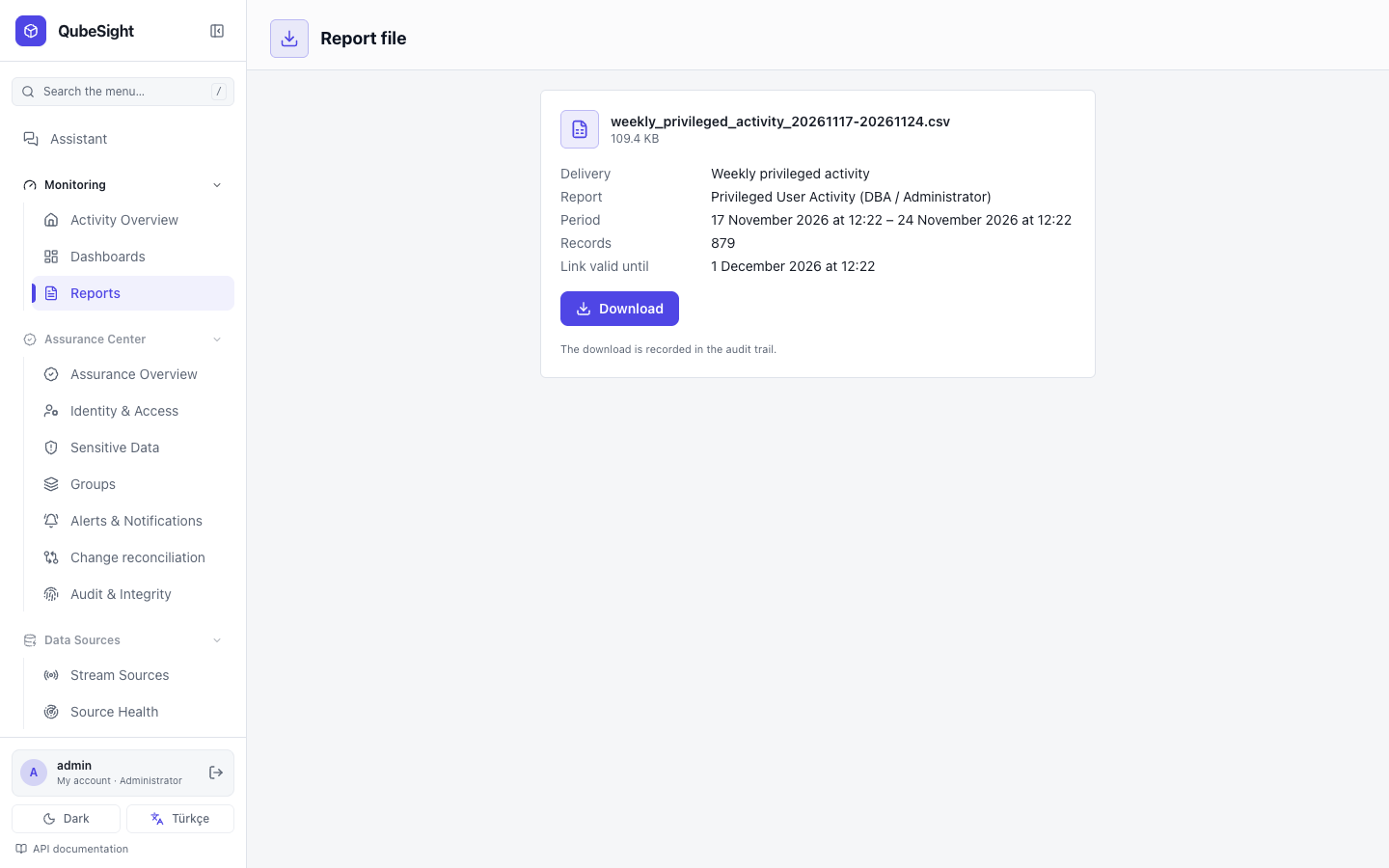
A scheduled report delivery with the Download link format, or with attachments larger than 10 MB, sends links instead of files. A link opens the Report file page.
- You must be signed in. Without a session, the sign-in page opens and returns you to the link afterwards.
- You need access to reports (any role except the access manager).
- The page shows the file information only; the download starts when you press the button.
| Field | Meaning |
|---|---|
| Delivery | Name of the scheduled delivery. |
| Report | Report name. |
| Period | The time window the file covers. |
| Records | Number of rows. |
| Size | File size. |
| Link valid until | Expiry chosen in the delivery (1 to 90 days). |
| Download | Downloads the file. "The download is recorded in the audit trail." |
| Go to reports | Opens the Reports page. |
If the link has expired or the delivery was deleted, the page shows "The file was not found or the link has expired." and "Ask the owner of the delivery to send the report again."
Limitations
- Action links are generated only in e-mail notifications, at send time. Other channels (syslog, webhook, Slack, Teams) carry no action buttons.
- A one-click ignore cannot be unlimited in time and cannot be used for proposals that need a review.
- Deleting a scheduled delivery deletes its download links; recipients of earlier e-mails can no longer download those files.
- Download links require a QubeSight account; recipients without one cannot open them. Use CSV or PDF attachments for them.