MCP server
This guide shows you how to connect an AI assistant that speaks the Model Context Protocol (MCP), such as Claude Desktop, Claude Code, ChatGPT, GitHub Copilot, Cursor or VS Code, to QubeSight. The assistant can then ask about database activity, security detections, alerts and sensitive data with your own permissions, and, with a write-enabled key, propose alert rules and reports for you to confirm.
Enterprise
QubeSight acts only as an MCP server. In Community, the panel shows "The MCP server requires the Enterprise edition. Existing keys are listed and can be revoked; new ones cannot be created." New key is hidden, and the MCP address answers that the Enterprise edition is required.
How it works
- Transport. MCP "Streamable HTTP" on a single address:
POST https://<qubesight-address>/api/v1/mcp. Responses are JSON; the server does not stream. Supported protocol versions are2025-11-25,2025-06-18,2025-03-26and2024-11-05. - Authentication. A personal API key sent as
Authorization: Bearer <key>. Keys start withqsk_and are accepted only on the MCP address. - Same permissions as the screen. Every tool runs a documented QubeSight API call internally, as your account, with the same role, capability and separation-of-duties checks. A role cannot see through MCP what it cannot see on screen. If your account is disabled, locked or changes role, the key follows.
- Audit. Every tool call is recorded as
mcp_tool_calledwith the names of the arguments (not the result data).
flowchart LR
    A[AI assistant] -->|Bearer qsk_ key| M[/api/v1/mcp/]
    M -->|internal call as your account| API[QubeSight API]
    API --> D[(Events, alerts, findings)]
M -->|data policy| ATools
| Tool | Purpose |
|---|---|
ask_activity |
Ask about database activity in natural language (same as Ask). |
list_reports |
List report templates. |
run_report |
Run a report with filters and paging. |
security_overview |
Security dashboard overview. |
security_events |
Events behind a security detection. |
investigate_activity |
Investigate one activity: timeline of the same session, related sensitive objects, change tickets and signals. |
threat_signals |
Threat analytics signals. |
list_alerts |
List alerts. |
sensitive_data |
Sensitive-data findings. |
list_alert_rules |
List alert rules. |
list_notification_channels |
List notification channels. |
preview_alert_rule |
Preview an alert rule on past events. |
test_alert_rule |
Test an existing alert rule on past events. |
With a write-enabled key, these tools are added:
| Tool | Purpose |
|---|---|
create_alert_rule |
Propose a new alert rule. |
update_alert_rule |
Propose a change to an alert rule (the rule kind cannot change). |
create_saved_report |
Propose a saved report (never overwrites an existing one). |
create_report_delivery |
Propose a scheduled report delivery (created disabled unless enabled explicitly). |
cancel_change |
Drop one of the key's own proposals (by proposal_id). |
Write tools never change anything directly. Each proposal waits in Platform → Settings → Assistant → MCP access → Pending changes for 15 minutes, where the key's owner approves or rejects it in the console; no MCP tool can apply a proposal. Nothing can be deleted through MCP. "Rules" here are QubeSight alert rules only, never Guardium policies or storage rules.
- Revoking a key cancels its pending proposals. The list shows only proposals of keys that are still valid, and approval checks again at that moment that the proposing key is neither revoked nor expired. Rejecting is always possible. The audit row of the revocation (
mcp_key_revoked) records how many pending changes were dropped. - The Pending changes card refreshes every 15 seconds, so new proposals appear and expired ones disappear without reloading the page.
- Every MCP call is audited: a read-only key's attempt to call a write tool is recorded as a failure (
read_only_key), MCP calls are recorded with the authentication methodapi_key, and an approval or rejection in the console records the proposing key. - When a write-enabled key connects, the server's instructions explain this propose-then-approve flow to the assistant.
Prerequisites
- An Enterprise licence.
- A role that can read data: Administrator, Analyst, DBA or Auditor. The Access manager role cannot create MCP keys. Auditors get read-only access, and
ask_activityis not available to them (as on screen). - HTTPS access from the machine that runs the assistant to the QubeSight web address.
- If the QubeSight certificate is signed by your internal root CA, that machine must trust the CA. Download the root certificate from Platform → Settings → Web certificate (HTTPS); for Node.js-based clients, set
NODE_EXTRA_CA_CERTSto the file. See Web certificate (HTTPS).
Create a key
- Go to Platform → Settings → Assistant and find MCP access. The panel shows the full MCP address: of this installation; Copy copies it.
- Click New key.
- Enter a Name, for example "Claude Desktop – laptop" (up to 80 characters).
- Set Valid for (days): 1–365, default 90.
- Choose Data sent to the model (default Smart masking; Open is available only to administrators). See LLM providers.
- Leave Create/update permission (write) off for a read-only key, or switch it on to allow proposals.
- Click Create. The key is shown only once: copy it and store it securely, then click Copied, close.
The dialog that shows the new key also has Copy buttons for the key, the Claude Code command and the MCP configuration file, all with the new key filled in, and the expiry time.
You can have at most 10 active keys.
Manage keys
| Column | Content |
|---|---|
| Name | The name you gave the key. |
| User | The key's owner. Shown only when an administrator switches on All users' keys. |
| Key | The key prefix (qsk_<prefix>_…) with a read-only or write pill. |
| Data | For an active key, a drop-down that changes the key's data policy at once (Smart masking, Strict, Open; Open only for administrators). The change is audited as mcp_key_data_policy_changed. Revoked and expired keys show the policy as text. |
| Expires | The expiry time of an active key, or a Revoked or Expired pill. Revoked and expired keys are shown dimmed. |
| Last used | " |
| Revoke | Shown on active keys. Asks Revoke key " |
Administrators can switch on All users' keys to see, change and revoke everyone's keys. "No keys yet." is shown when there are none.
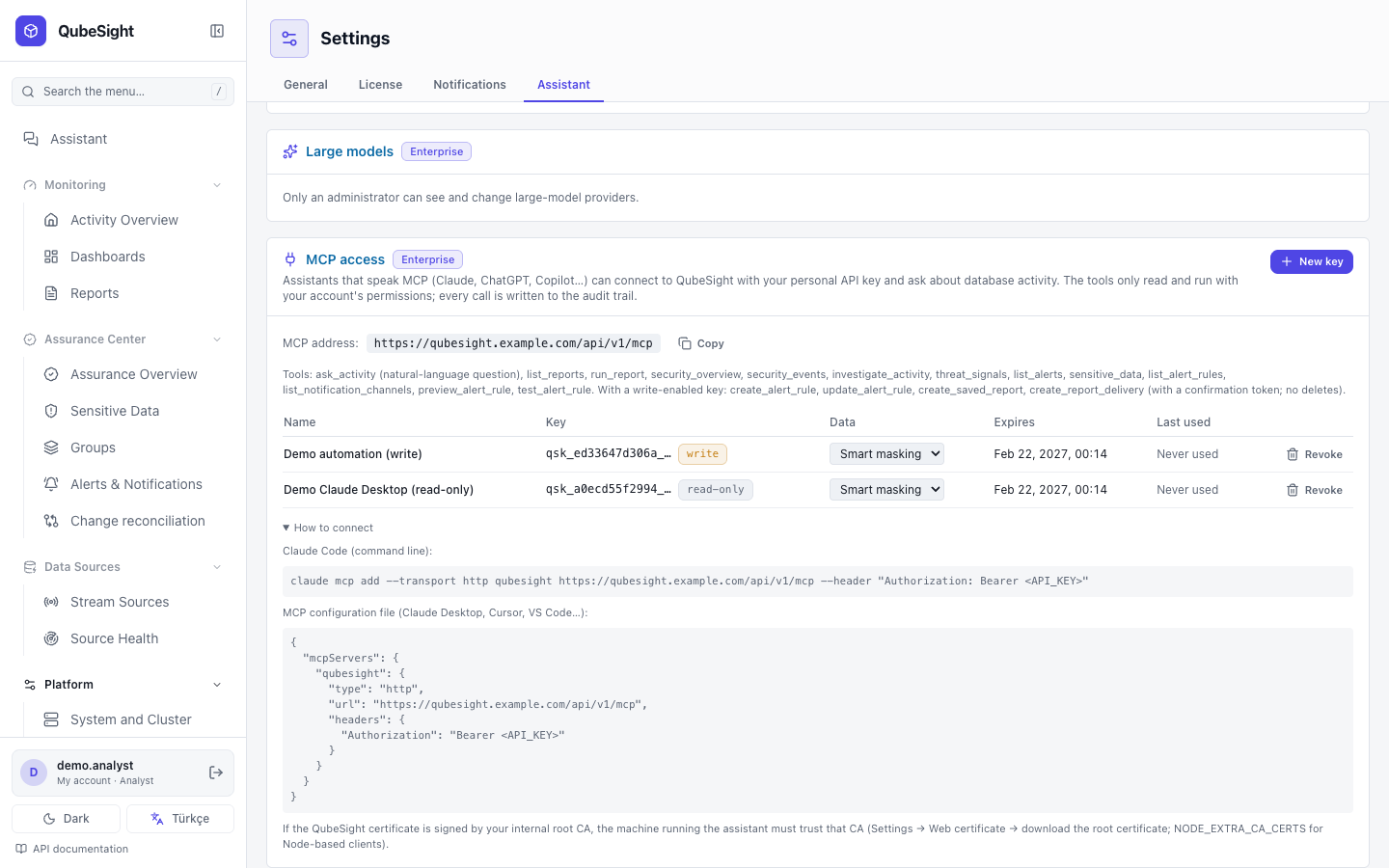
Connect an assistant
The How to connect section shows both forms with your address and key filled in.
Dates and time windows
Read tools that cover a time range accept:
from/to: RFC 3339 (2026-11-12T10:00:00Z) orYYYY-MM-DD[THH:MM[:SS]]. A value without a time zone is read in the display time zone from Platform → Settings → General. A date-onlytoincludes that whole day.hours: a window back from now (or fromto), at most one year; larger values are reduced to one year.- Neither: the tool's default window. There is no "all time" window.
Every answer reports the window it used, so the assistant can tell you what period it looked at.
Limits
| Limit | Value |
|---|---|
| Concurrent tool calls per user | 2 (further calls are refused until one finishes) |
| Request body | 1 MB |
| Result size | About 200 KB; longer lists are shortened and the answer says so |
| Rows per call | Default 50, at most 200 (list_alerts: default 25, at most 100); use offset to page |
| Active keys per user | 10 |
| Key validity | 1–365 days |
Verify
- In the client, list the MCP servers;
qubesightshould show as connected (for Claude Code:claude mcp list). - Ask the assistant a simple question, such as "How many alerts were raised in the last 24 hours?".
- In QubeSight, the key's Last used time updates and the audit trail shows
mcp_tool_called.
Troubleshooting
| Symptom | What to check |
|---|---|
| 401 Unauthorized | The key is wrong, revoked or expired, or the header is not Authorization: Bearer <key>. |
| Enterprise required | The installation has no valid Enterprise licence. |
| Certificate errors in the client | The client machine must trust the QubeSight root CA (NODE_EXTRA_CA_CERTS for Node-based clients). |
| A tool answers "forbidden" | Your role cannot use that function on screen either (for example auditors and ask_activity). |
| "At most 2 tool calls at a time per user" | Wait for the previous call; some clients run tools in parallel. |
| Write tools are missing | The key was created without Create/update permission (write). Create a new key with write permission. |
| A confirmation token is rejected | It expired (15 minutes), was already used, or is being confirmed from a different user or key. |
Limitations
- QubeSight cannot call external MCP servers.
- Write tools can create and update only; there is no delete.
- The server returns complete JSON responses; streaming responses and server-initiated messages are not used.
- Values sent to the assistant follow the key's data policy; with Open, raw SQL values leave QubeSight and reach the assistant's model provider.