LDAP / Active Directory
This guide shows you how to let users sign in to QubeSight with their corporate directory account (Microsoft Active Directory, OpenLDAP, FreeIPA or another LDAP v3 directory), how directory groups map to QubeSight roles, how to secure the connection with LDAPS or StartTLS, and which local accounts can still sign in with a password once LDAP is on.
Community Enterprise
LDAP sign-in, including group-to-role mapping and per-user roles, is Community: it is part of the core identity capability (local users, sessions, password policy, LDAP sign-in and built-in MFA), which is always enabled. Separation-of-duties evidence (the Separation of duties tab) and the Guardium account review are Enterprise (enterprise_auth); see Users, roles and permissions.
How sign-in works
sequenceDiagram
    participant U as User
    participant Q as QubeSight
    participant D as Directory
    U->>Q: Username + password
    Q->>D: Bind with service account (or anonymous)
    Q->>D: Search user (user filter, base DN)
    Q->>D: Bind as the user (checks the password)
    Q->>D: Read groups (memberOf / group filter)
    Q->>Q: Resolve role (per-user role, group mapping, default role)
Q-->>U: Session (or MFA step)- QubeSight binds with the service account (or searches anonymously when no bind DN is set) and finds the user with the User filter under the User search base (Base DN).
- It binds as that user to verify the password. The password is never stored.
- It reads the user's groups from the Membership attribute and the Group filter.
- It resolves the role: a Per-user role wins, then Group → role mappings, then the Default role when nothing matches. If no role results, sign-in is refused.
- On first sign-in the account is created automatically (if Create directory users automatically on first sign-in is on). The role is refreshed at every sign-in. Built-in MFA applies to directory accounts; see Multi-factor authentication.
The local sign-in rule
While LDAP is on, only accounts with the Administrator or Access manager role sign in with a local password. Everyone else must sign in with a directory account.
- These two roles are the break-glass accounts: they keep working when the directory is unreachable.
- LDAP cannot be enabled unless at least one active local administrator or access manager exists.
- When you enable LDAP, the open sessions of local accounts that lose password sign-in are ended. The confirmation dialog lists them by name.
- While LDAP is on, a local account can only be created as, or changed to, Administrator or Access manager.
- A wrong password for a blocked local account returns the normal sign-in error, so account names cannot be probed.
The bootstrap access manager
On a fresh installation, QubeSight creates a local access manager account named accessmgr next to admin. Its random first password is stored in the secrets directory of the control plane (file accessmgr_password, mode 0600) and must be changed at first sign-in. The installer prints the command that shows it, for example:
The account is created only on an empty user table. If you delete it, it is not recreated. To skip it, set BOOTSTRAP_ACCESS_MANAGER_USER=none before the first installation. See Settings and environment variables.
Prerequisites
- The Administrator or Access manager role. Auditors can read the settings. When separation of duties is enforced, an administrator cannot change the directory identity (server, bind DN, TLS trust, search base, attribute fields) or add a mapping that grants Administrator or Access manager; the access manager must make these changes.
- A directory server reachable from every QubeSight node on port 636 (LDAPS) or 389 (StartTLS).
- A server certificate whose subject alternative names include the host name or IP used in the LDAP URL, and the issuing CA in PEM format if it is internal.
- Optionally, a read-only service account. Anonymous search works only if the directory allows it.
Prepare the directory
- Service account. Create a dedicated, read-only account that may search users and groups, for example
cn=qs-reader,ou=service,dc=example,dc=com. Do not use a domain administrator. - Groups. Create one group per QubeSight role you want to grant, for example
qubesight-admins,qubesight-analysts,qubesight-dbas,qubesight-auditors, and add users. Keep the full group DNs. - TLS. Enable LDAPS (636) or StartTLS (389) on the directory. In Active Directory, LDAPS requires a domain controller certificate.
Configure LDAP in QubeSight
- Go to Assurance Center → Identity & Access → Directory and SSO.
- On the LDAP card, click Configure.
-
Fill in the connection:
Field Description Default LDAP URL ldaps://dc1.example.com:636(recommended) orldap://dc1.example.com:389with StartTLS.— Use StartTLS Upgrades an ldap://connection to TLS. If the server refuses StartTLS, the connection is closed; it never falls back to cleartext. Ignored forldaps://.off Allow cleartext (no TLS) connections (not recommended) Required to save an ldap://URL without StartTLS. User and service passwords then travel in clear text.off Skip server certificate verification (not recommended) Disables certificate checks. off CA certificate (PEM) Internal CA that signed the directory certificate. Empty uses the system roots. empty Service account (Bind DN) DN of the service account. Empty means anonymous search. empty Service account password Stored encrypted and never shown again. If you change the server, the bind DN or the TLS setting, you must enter it again. — Timeout (s) Connection and operation timeout. 8 -
Fill in user resolution:
Field Description Default User search base (Base DN) Required, for example ou=users,dc=example,dc=com.— User filter Must contain {username}.(&(objectClass=person)(|(uid={username})(sAMAccountName={username})(userPrincipalName={username})(mail={username})))Username attribute Attribute that becomes the QubeSight username. For Active Directory use sAMAccountName. If the attribute is empty on the entry, the typed username is used.uidEmail attribute mailDisplay-name attribute cnPerson-reference attribute Links accounts of the same person, for example employeeID; used in separation-of-duties evidence.empty -
Fill in group resolution:
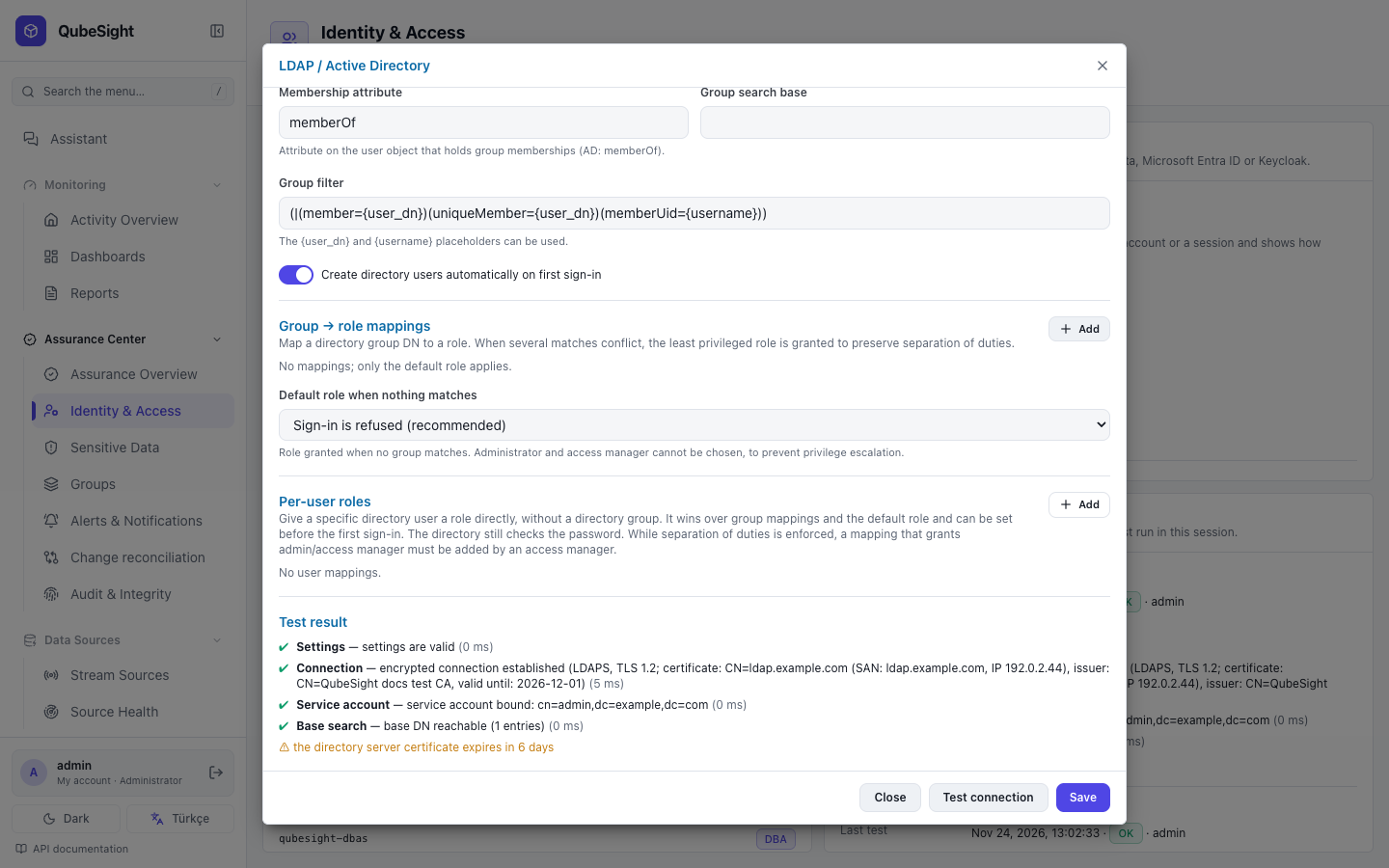
Field Description Default Group search base Where to search for groups. empty Group filter May use {user_dn}and{username}.(|(member={user_dn})(uniqueMember={user_dn})(memberUid={username}))Membership attribute Attribute on the user that lists groups (Active Directory: memberOf).memberOf -
Add role mappings:
- Group → role mappings: map a Directory group (DN or name) to a role (Administrator, Analyst, DBA, Auditor, Access manager). When several mappings match and the roles conflict under separation of duties, the least privileged role is granted.
- Per-user roles: give a Directory username a role directly, without a group. It wins over group mappings and the default role, can be set before the user's first sign-in, and the directory still checks the password.
- Default role when nothing matches: Analyst, DBA or Auditor, or Sign-in is refused (recommended). Administrator and Access manager cannot be the default.
- Leave Create directory users automatically on first sign-in on, unless you create directory accounts in advance.
- Click Test connection. The test runs four steps: Settings, Connection, Service account and Base search, and shows warnings such as an unencrypted connection.
- Switch on Enable LDAP authentication and click Save. QubeSight runs the connection test again before enabling; if it fails, nothing is saved. Confirm the dialog that lists the local accounts that will lose password sign-in.
Verify
- Under Trial sign-in, enter a directory user's name and password. QubeSight runs the whole sign-in flow without creating a session and shows Sign-in succeeded; resolved role: … (or the error), the user's Distinguished name (DN), Email, Directory groups and Matched roles, and Role source when a per-user role decided the result. A warning appears when the user maps to conflicting roles and the least privileged role was granted. The password is not stored.
- Sign in with that user in a private browser window.
- On Assurance Center → Identity & Access → Accounts, the user appears as a directory account. Its role and credentials come from LDAP and cannot be changed there.
- Check Assurance Center → Audit & Integrity for
ldap_config_changed,ldap_testedand the sign-in events.
Troubleshooting
| Symptom | What to check |
|---|---|
| Save refused: "plain-text LDAP sends passwords in the clear" | Use ldaps:// or turn on Use StartTLS. Cleartext needs the explicit Allow cleartext option. |
| Connection step fails with a certificate error | Paste the CA in CA certificate (PEM). The certificate must contain the host name or IP of the URL as a SAN. |
| Service account step fails | Check the bind DN and re-enter the password; it must be entered again after changing the server, bind DN or TLS. |
| Base search finds nothing | Check User search base (Base DN) and whether the service account may read it. |
| Trial sign-in shows no groups | Check Membership attribute, Group search base and Group filter. Nested groups are only found if your filter or attribute returns them. |
| User gets "no role" | Add a group mapping or a per-user role, or set a default role. |
| Enabling fails: no local break-glass account | Create or re-enable a local Administrator or Access manager account first. |
| An administrator's save is refused with a separation-of-duties message | Separation of duties is enforced: the access manager must change the directory identity or privileged mappings. |
| Local users can no longer sign in | Expected while LDAP is on, unless they are Administrator or Access manager. Give them directory accounts. |
Limitations
- Only one directory configuration can be active.
- QubeSight does not write to the directory (no password changes or account creation there).
- Disabling a user in the directory takes effect at their next sign-in; an open session lasts until it expires or is ended on the Accounts tab.
- The legacy local fallback option no longer has an effect: the local sign-in rule above is fixed.
- Directory (LDAP) and SSO accounts have no local QubeSight password, so they cannot run cluster operations or apply masks, which ask for the local password again. Keep a local administrator account for these tasks; see Users, roles and permissions.
- Group-to-role mapping has been verified against an in-process test directory and an OpenLDAP server; real Active Directory forests with nested groups have not been tested by the vendor.