AWS Kinesis and Database Activity Streams
This guide shows how to read Amazon RDS and Aurora database activity from Amazon Kinesis Data Streams: encrypted Database Activity Streams for Aurora, RDS for Oracle and RDS for SQL Server, and audit logs that CloudWatch Logs forwards to Kinesis for the other RDS engines.
Enterprise
Which shape to use
| Database | Path | What arrives |
|---|---|---|
| Aurora PostgreSQL, Aurora MySQL | Database Activity Streams → Kinesis | Every statement, connect, disconnect and failed login with user, client IP and port, database, SQL, object, row count and error. Encrypted with your KMS key. |
| RDS for Oracle, RDS for SQL Server | Database Activity Streams → Kinesis | The same, from the engine's unified audit or SQL Server Audit. |
| RDS for MySQL, MariaDB, PostgreSQL | Audit log → CloudWatch Logs → subscription filter → Kinesis | MariaDB audit plugin or pgaudit lines. Activity streams are not available for these engines. |
For the RDS audit logs you can also skip Kinesis and read CloudWatch Logs directly: AWS CloudWatch Logs. QubeSight recognises the record type in a stream automatically.
For an end-to-end AWS console walkthrough of Aurora PostgreSQL with Database Activity Streams (KMS key, start the stream, stack update, verification) next to the CloudWatch Logs path, see Monitor Amazon RDS for PostgreSQL and Aurora PostgreSQL.
Database Activity Streams
Requirements on AWS
- A DB instance class that supports activity streams (memory-optimised or general-purpose classes, for example
db.r6g.large). Burstabledb.t*classes, Aurora Serverless and Babelfish are not supported. - A supported engine version (see the AWS page "Supported Regions and Aurora DB engines for database activity streams").
- A customer-managed symmetric KMS key in the same region.
Step 1: create the audit rules (Oracle and SQL Server only)
Activity streams deliver only what the engine audits, and while a stream runs RDS refuses changes to the audit configuration. Create the rules before the first start (or stop the stream first):
- Oracle: for example
CREATE AUDIT POLICY app_all ACTIONS ALL; AUDIT POLICY app_all BY app_user;. Failed logons are audited by the defaultORA_LOGON_FAILURESpolicy. -
SQL Server: RDS creates the server audit
RDS_DAS_AUDIT. Add a database audit specification whose name starts withRDS_DAS_DB_, for example:
Step 2: start the activity stream
Asynchronous mode is recommended, so the database never waits for the stream:
aws rds start-activity-stream \
  --resource-arn arn:aws:rds:<region>:<account-id>:cluster:<cluster-name> \
  --mode async --kms-key-id <kms-key-arn> --apply-immediately
For RDS for Oracle and SQL Server use the instance ARN (...:db:<name>). After 10 to 20 minutes the status is started and AWS has created the stream aws-rds-das-<resource-id>. Do not rename or copy it: QubeSight derives the KMS encryption context from the name.
The stream keeps records for 24 hours by default. If QubeSight could be unable to read for longer, increase the retention with aws kinesis increase-stream-retention-period.
Step 3: grant read and decrypt permissions
QubeSight on EC2 uses its instance role; no access keys are needed. The identity needs:
| Action | Resource |
|---|---|
kinesis:DescribeStreamSummary, kinesis:ListShards, kinesis:GetShardIterator, kinesis:GetRecords |
The aws-rds-das-... stream |
kms:Decrypt |
The activity stream KMS key, only with an RDS encryption context |
QubeSight does not call kinesis:DescribeStream; you do not need to grant it.
With the QubeSight CloudFormation template, set KinesisStreamArn and ActivityStreamKmsKeyArn; the template adds these statements. Otherwise attach a policy such as:
{
  "Version": "2012-10-17",
  "Statement": [
    {"Effect": "Allow",
     "Action": ["kinesis:DescribeStreamSummary", "kinesis:ListShards",
                "kinesis:GetShardIterator", "kinesis:GetRecords"],
     "Resource": "arn:aws:kinesis:<region>:<account-id>:stream/aws-rds-das-<resource-id>"},
    {"Effect": "Allow", "Action": "kms:Decrypt",
     "Resource": "<kms-key-arn>",
     "Condition": {"ForAllValues:StringEquals": {"kms:EncryptionContextKeys": ["aws:rds:dbc-id", "aws:rds:db-id"]},
                   "Null": {"kms:EncryptionContextKeys": "false"}}}
  ]
}
The condition limits the identity to activity-stream data keys. If your key policy does not delegate to IAM, add the identity to the key policy as well.
Step 4: add the stream in QubeSight
- Open Data Sources → Stream Sources → AWS Kinesis and press New integration.
- Fill in Integration Name (events are tagged
kinesis:<name>), AWS Region and Stream Name (aws-rds-das-<resource-id>). - Leave Access Key ID and Secret Access Key empty on EC2 to use the instance role (or IRSA). Keys you enter are stored encrypted.
- Press Save, then Test. The test calls
DescribeStreamSummary; for an activity stream it then lists the shards and reads from the oldest record (up to 5 pages of 25 records per shard) until it decrypts one activity-stream record, so it tells you whetherkms:Decryptis granted. If the stream is still empty, the result says thatkms:Decryptis checked on the first record.
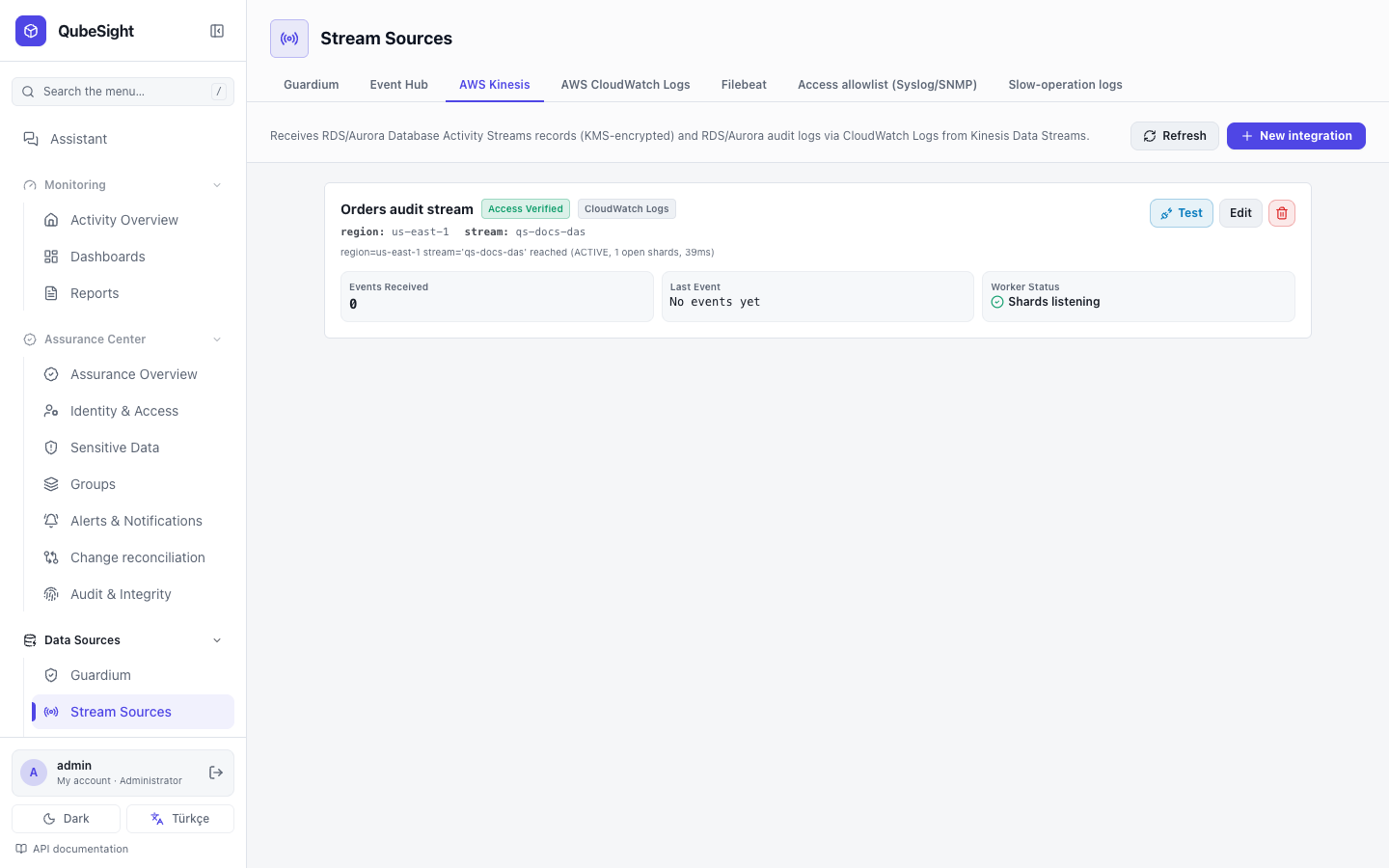
The card shows the Database Activity Streams badge and, once the worker runs, a status line (clamped to two lines) such as DAS stream decrypting (resource …): {n} records, {n} events written; {n} heartbeats and {n} AUX events not stored; {n} records quarantined; {n} KMS calls.
What QubeSight stores
| QubeSight field | Activity stream field |
|---|---|
| Time | startTime, else logTime |
| DB user, database | dbUserName, databaseName |
| Client IP, port, host name | remoteHost, remotePort |
| SQL text, operation | commandText, command |
| Session events | CONNECT, DISCONNECT, FAILED_CONNECT, Oracle LOGON / LOGOFF, SQL Server LOGIN SUCCEEDED / LOGIN FAILED |
| Success, error | Engine-specific error fields, for example PostgreSQL SQLSTATE or Oracle ORA-nnnnn |
| Objects, rows | objectName, objectType, rowCount |
| Everything else | Additional info (additional_info) |
Heartbeat events are counted, not stored. Aurora MySQL writes each statement as a main event plus detail events; only the main event is stored, and the details are added to its additional info when they arrive in the same record.
CloudWatch Logs through Kinesis
For RDS for MySQL, MariaDB and PostgreSQL:
- Turn on the audit log: the
MARIADB_AUDIT_PLUGINoption (SERVER_AUDIT_EVENTS = CONNECT,QUERY) for MySQL and MariaDB, orpgauditwith the default RDSlog_line_prefixfor PostgreSQL. - Export the log to CloudWatch Logs (
auditorpostgresql). - Create a Kinesis data stream (on-demand is fine) and an IAM role that CloudWatch Logs can assume with
kinesis:PutRecordon it. -
Subscribe the log group:
-
Add the stream in QubeSight as in step 4 above. No KMS permission is needed.
Records arrive gzip-compressed in the CloudWatch Logs envelope. PostgreSQL's own lines in the same log group become session and failed-login events or parameter-change events; housekeeping lines (checkpoints, start-up, shutdown) are counted, not stored. Lines nothing recognises go to the unrecognised-logs queue.
AWS-managed users
QubeSight stores the activity of AWS's own management users by default, because some audits require every session. Built-in rules under Platform → Pipeline → Storage rules → Built-in rules, off by default, ignore them when you turn them on:
| Rule | Ignores only |
|---|---|
| AWS rdsadmin (RDS / Aurora) | Successful, local events of the user exactly rdsadmin parsed by QubeSight's RDS parser. |
| AWS RDSSEC (RDS for Oracle) | Successful events of RDSSEC from the program "RDS Activity Streams" at 127.0.0.1 (audit-trail housekeeping, about 360 rows an hour). |
| AWS management service (RDS for SQL Server) | Successful local events of NT AUTHORITY\SYSTEM from RdsAdminService. Changes to the audit configuration are always stored. |
Ignored events are counted under the rule name. Failed logins and failing statements of these users are always stored.
Licence pause
Kinesis readers run only while Enterprise is active (licence, AWS Marketplace entitlement or the marketplace trial). When it ends, the Enterprise capability turns off and reading pauses without loss: records already read are written, the shard positions are committed and then do not advance. The AWS Kinesis tab is hidden while the licence is missing; the integrations are kept. A banner on every page reads Enterprise license required: {n} ingest sources paused (one entry per shard). When a licence is applied, the tab returns and reading resumes from the stored positions within about 15 seconds. Records are kept by Kinesis only for the stream's retention period.
Verification
- Test reports access and, for activity streams, the decryption result.
- The card shows Access Verified, Events Received, Last Event and Shards listening.
- Run a scripted session (login, DDL, insert, select, a failing statement) and find each statement once in Reports.
Troubleshooting
| Symptom | Cause and action |
|---|---|
| Access Error with a KMS message | kms:Decrypt denied, key disabled or pending deletion, or KMS unreachable. The worker keeps its position and retries (5 seconds growing to 60 seconds); after the fix it continues from the same record, as long as the records are still in the stream. |
| Access problem — reading on hold | Kinesis permissions missing or the stream name is wrong. |
| A record in the unrecognised-logs queue | A single record that could not be decrypted or parsed. It is kept with the reason and the original record; the stream continues. |
| No activity stream records | Status not yet started, unsupported instance class, or (Oracle, SQL Server) no audit rules. |
Limitations
- An Aurora PostgreSQL failed login arrives as two events, usually in different records; QubeSight stores the login failure from the
ERRORevent. A marker without itsERRORevent would not be stored (not observed). - Aurora MySQL detail events are attached to the statement only when both are in the same record.
- With several shards, noise summarising keeps up to N full rows per minute per shard.
- KMS data keys are cached for up to 6 hours, so KMS is called rarely.
- Statement duration is filled for Aurora MySQL; the other activity streams and the audit logs carry none.