REST API
This reference describes the QubeSight control-plane HTTP API: where its documentation is, how to authenticate, how authorisation and errors work, and how to call it from scripts.
Community Enterprise
The API is available in both editions. Each endpoint follows the same edition and role rules as the matching screen.
API documentation in the product
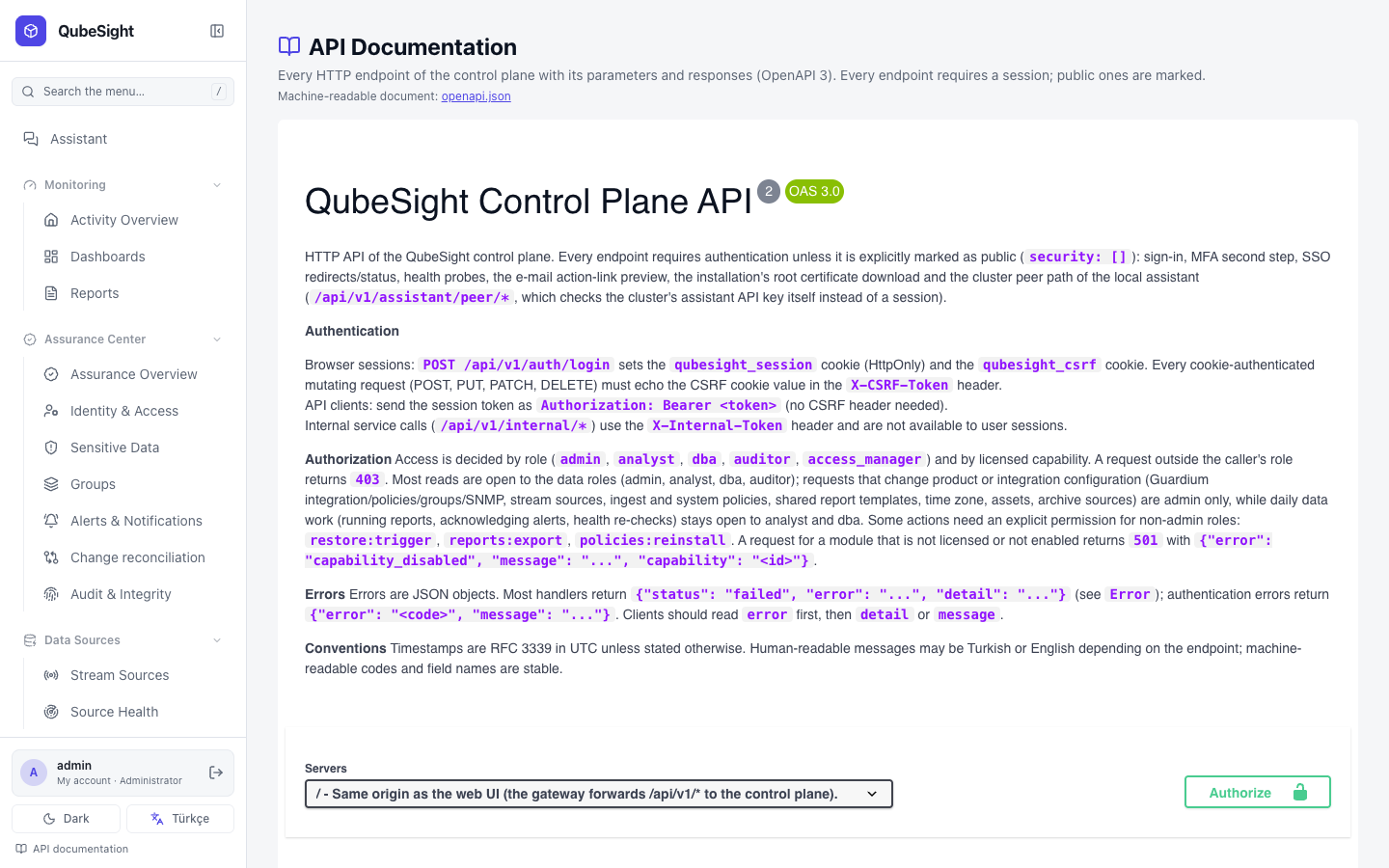
Every HTTP endpoint of the control plane is documented in OpenAPI 3.0 and shipped with the product, so the documentation always matches the installed version.
| What | Where |
|---|---|
| Interactive documentation (Swagger UI) | API documentation link at the bottom of the menu, or https://qubesight.example.com:3000/apidocs |
| Machine-readable document (JSON) | GET /api/v1/docs/openapi.json |
Both require a signed-in session, and every role can read them, including access_manager (the server allows that role to read openapi.json, and the /apidocs page has no role gate). The API documentation link in the menu is hidden for access_manager, but the page opens when the address is entered directly. Endpoints that work without a session are marked public in the document.
If the document cannot be loaded, the page shows "Could not load the API documentation: HTTP 401 when the session has ended).
Base URL
The gateway forwards /api/v1/* to the control plane on the same origin as the web UI:
A standard installation also has an API port (8085 by default) bound to 127.0.0.1, for use on the server itself. Network clients use the UI port. On a cluster, use the virtual IP or its DNS name.
Authentication
| Client | Method |
|---|---|
| Browser | POST /api/v1/auth/login sets the qubesight_session cookie (HttpOnly) and the qubesight_csrf cookie. Every cookie-authenticated POST, PUT, PATCH and DELETE must send the CSRF value in the X-CSRF-Token header. |
| Scripts and API clients | Sign in with POST /api/v1/auth/login and send the returned token as Authorization: Bearer <token>. No CSRF header is needed. |
| MCP clients (AI assistants) | Personal API keys (Authorization: Bearer qsk_…). These keys are accepted only on the MCP endpoint, not on the REST API. See MCP server. |
There are no long-lived API keys for the REST API. A REST token is a session token: it follows the session idle timeout and maximum session length configured under Platform → Settings → General, and it ends when the account is disabled, locked or must change its password. Create a dedicated local account with the least role your script needs.
If the account uses two-step verification, the password step returns 401 with error: mfa_required and an mfa_token; complete it with POST /api/v1/auth/mfa/verify. Accounts that must use MFA are not suitable for unattended scripts. While LDAP is enabled, only admin and access_manager accounts can sign in with a local password. Single sign-on (OIDC) sessions are browser-only.
Example
HOST=https://qubesight.example.com:3000

# Sign in (use a CA file instead of -k once the installation root is trusted)
TOKEN=$(curl -s --cacert qubesight-root.crt -H 'Content-Type: application/json' \
  -d '{"username":"api-reader","password":"<password>"}' \
  "$HOST/api/v1/auth/login" | jq -r .token)

# Who am I
curl -s --cacert qubesight-root.crt -H "Authorization: Bearer $TOKEN" "$HOST/api/v1/auth/me"

# Open critical and high alerts
curl -s --cacert qubesight-root.crt -H "Authorization: Bearer $TOKEN" \
  "$HOST/api/v1/assurance/alerts?status=open&severity=critical&severity=high"

# Sign out (revokes the token)
curl -s --cacert qubesight-root.crt -X POST -H "Authorization: Bearer $TOKEN" "$HOST/api/v1/auth/logout"
Download the installation root certificate from GET /api/v1/tls/ca.crt (public) or from Platform → Settings → Web certificate (HTTPS). Every sign-in attempt is written to the self-audit trail.
Authorisation
Access is decided by role and by licensed capability:
- Roles:
admin,analyst,dba,auditor,access_manager. See Roles and capabilities. - Most reads are open to the data roles (admin, analyst, dba, auditor). Changes to product or integration configuration are admin only; daily data work (running reports, acknowledging alerts, health re-checks) is also open to analyst and dba.
- Some actions need an explicit permission for non-admin roles:
restore:trigger,reports:export,policies:reinstall. - Each endpoint's description in the OpenAPI document lists its roles and capability.
Responses and errors
| Status | Meaning |
|---|---|
200, 201, 204 |
Success |
400 |
Malformed request or a value out of range |
401 |
No valid session or token (invalid_credentials, mfa_required, …) |
403 |
Role or capability does not allow the request, or the CSRF token is missing; enterprise_required for an Enterprise option inside a Community endpoint |
404 |
Resource not found. Internal paths (/api/v1/internal/*) always return 404 through the gateway. |
409 |
Conflict with the current state (for example a job already running) |
429 |
Too many requests for a rate-limited operation (see below) |
501 |
Module not licensed or not enabled: {"error": "capability_disabled", "message": "...", "capability": "<id>"} |
Error bodies are JSON. Most handlers return {"status": "failed", "error": "...", "detail": "..."}; authentication errors return {"error": "<code>", "message": "..."}. Read error first, then detail or message. Some messages are bilingual: error, detail and message keep Turkish text for existing clients, and the English text is in error_en, detail_en and message_en when the server has one. Machine-readable codes and field names are stable.
Timestamps are RFC 3339 in UTC unless the endpoint says otherwise.
Rate limits and concurrency
There is no global per-client request quota on the REST API. Limits that apply:
- Sign-in lockout. Failed sign-ins count toward the account lockout of the password policy (Assurance Center → Identity & Access); two-step verification failures are capped at 10 regardless of the policy.
- Operation-specific limits return
429, for example assistant and investigation requests (withRetry-After), e-mail action links and some Guardium actions. The OpenAPI document lists429on those endpoints. - Gateway protection. The gateway accepts at most 1,024 concurrent connections by default (
GATEWAY_MAX_CONNS) and closes a request whose body stops sending for 60 seconds (GATEWAY_BODY_IDLE_SECONDS). - Long-running jobs (backups, restores, cluster jobs, benchmarks) run one at a time and return
409while another is running.
Good practice
- Use a dedicated account per integration and the least role it needs; disable it when no longer used.
- Do not store the session token; sign in at the start of each run and sign out at the end.
- Trust the installation root (or your own CA) instead of disabling certificate checks.
- For AI assistants and agents, use the MCP server, which has personal keys, read-only defaults and data masking.