SIEM forwarding (Splunk HEC, syslog CEF)
This guide shows you how to forward the database activity events that QubeSight stores to a SIEM, either through a Splunk HTTP Event Collector (HEC) or through syslog over TCP or TLS in CEF or RFC 5424 + JSON format. It covers the setup on both sides, the event format, verification and the delivery guarantees.
Enterprise
SIEM forwarding sends stored database events, not alerts. To send alerts to a SIEM, use a syslog or webhook notification channel instead; see Mail (SMTP) and notification channels.
How it works
flowchart LR
    A[Ingest pipeline] -->|storage rules, masking, session gate| B[(Event store)]
    B -->|read 30 s behind| C[SIEM forwarder]
    C -->|batch POST| D[Splunk HEC]
    C -->|TCP / TLS| E[Syslog receiver]
C -->|cursor| F[(Configuration DB)]- What is sent. Each destination reads events from the event store after they have been written. Storage rules, masked recording and session-conditional recording have already been applied, so the event you receive is identical to the event in QubeSight.
- Lossless cursor. Every destination keeps its own cursor (receive time and event ID) in the configuration database. The cursor moves only after the receiver has accepted the events. After a restart, a network failure or a receiver outage, forwarding resumes from the cursor.
- Safety lag. Events are read 30 seconds after they are written, so that rows still being written or replicated are not skipped.
- At-least-once delivery. In rare cases (for example a node failover) the same event can be sent twice. Deduplicate on the
log_idfield (HEC) orexternalId(CEF). QubeSight also skips event IDs it has already sent recently, which removes duplicates written by the source itself, such as a cloud stream re-delivering an event. The filter keeps two generations of IDs, each rotated after 10 minutes or 200,000 IDs, so it covers roughly the last 10 to 20 minutes. - One sender in a cluster. In a high-availability cluster only one node forwards at a time. If that node stops, another node takes over from the stored cursor within seconds.
- Back-pressure. Each destination has a rate limit in events per second. On an error, a connection problem or an HTTP 429 / 503 answer, the forwarder waits with exponential back-off (at least 15 seconds after 429 / 503, at most 5 minutes) and retries the same events.
UDP syslog is not offered for SIEM forwarding, because UDP cannot confirm delivery.
Prerequisites
- An Enterprise licence (capability
alert_delivery) to create, edit, test, enable or disable destinations. Without it, the tab shows the note SIEM forwarding is part of the Enterprise edition., New destination, Test and edit are hidden and the Enabled switch is disabled. Delete still works. - The Administrator role to create, edit, test and delete destinations. Administrators and auditors can see the tab.
When the Enterprise licence ends
Destinations that are enabled keep forwarding events after the licence ends; the forwarder does not check the licence. Because the Enabled switch is disabled without a licence, you cannot pause such a destination; you can only delete it (which also deletes its cursor).
- Network access from every QubeSight node to the receiver (HEC port, usually 8088, or the syslog port, usually 6514 for TLS).
- For TLS receivers signed by an internal CA: the CA certificate in PEM format.
Prepare the receiver
- In Splunk, open Settings → Data inputs → HTTP Event Collector and create a new token.
- Choose the index that will hold database activity (for example
db_audit) and allow it for the token. You can leave the source type to QubeSight; it sendsqubesight:db_activityby default. - Make sure HEC is enabled with SSL. QubeSight accepts an
http://HEC address only when Do not verify the certificate (tests only) is switched on, so that the token is never sent in clear text by accident. - Copy the token value.
- Open a TCP or TLS listener on the receiver (for example port 6514 for TLS).
- For TLS, install a server certificate whose name or IP matches the address QubeSight will use. If it is signed by an internal CA, keep the CA certificate (PEM) ready.
- Configure the receiver to parse RFC 5424 framing. Choose CEF parsing if you select the CEF format in QubeSight, or JSON parsing of the message part if you select RFC 5424 + JSON.
Add a destination in QubeSight
- Go to Platform → Settings → Notifications and open the SIEM forwarding sub-tab.
- Click New destination.
- Enter a Name (1–80 characters: letters, digits, spaces and
_ . : ( ) / -). - Select the Destination type: Splunk HEC or syslog (TCP/TLS). The type cannot be changed after saving.
- Fill in the connection fields for the type you chose (see the tables below).
- Under Scope, choose which events to send. Empty fields do not filter; values must match exactly.
- Set Rate limit (events/s), Events per request, Oldest event (hours) and Start.
- Leave Enabled on and click Save (notice Destination saved).
Invalid values are refused when you save, with a message from the server in the interface language. The server refuses, for example, a name with other characters, an HEC URL that is not https://server:port (plain http:// only with Do not verify the certificate (tests only)), a missing HEC token on a new destination, a changed HEC URL without a new token, a syslog transport other than TCP or TLS, a format other than CEF or JSON, a Start that is neither now nor an RFC 3339 time, an address that is not host:port, and a CA PEM without a valid certificate. The checks of the syslog address itself (a missing or malformed host:port) and of the facility come from the shared syslog sender and are not translated: they appear in Turkish in the English interface.
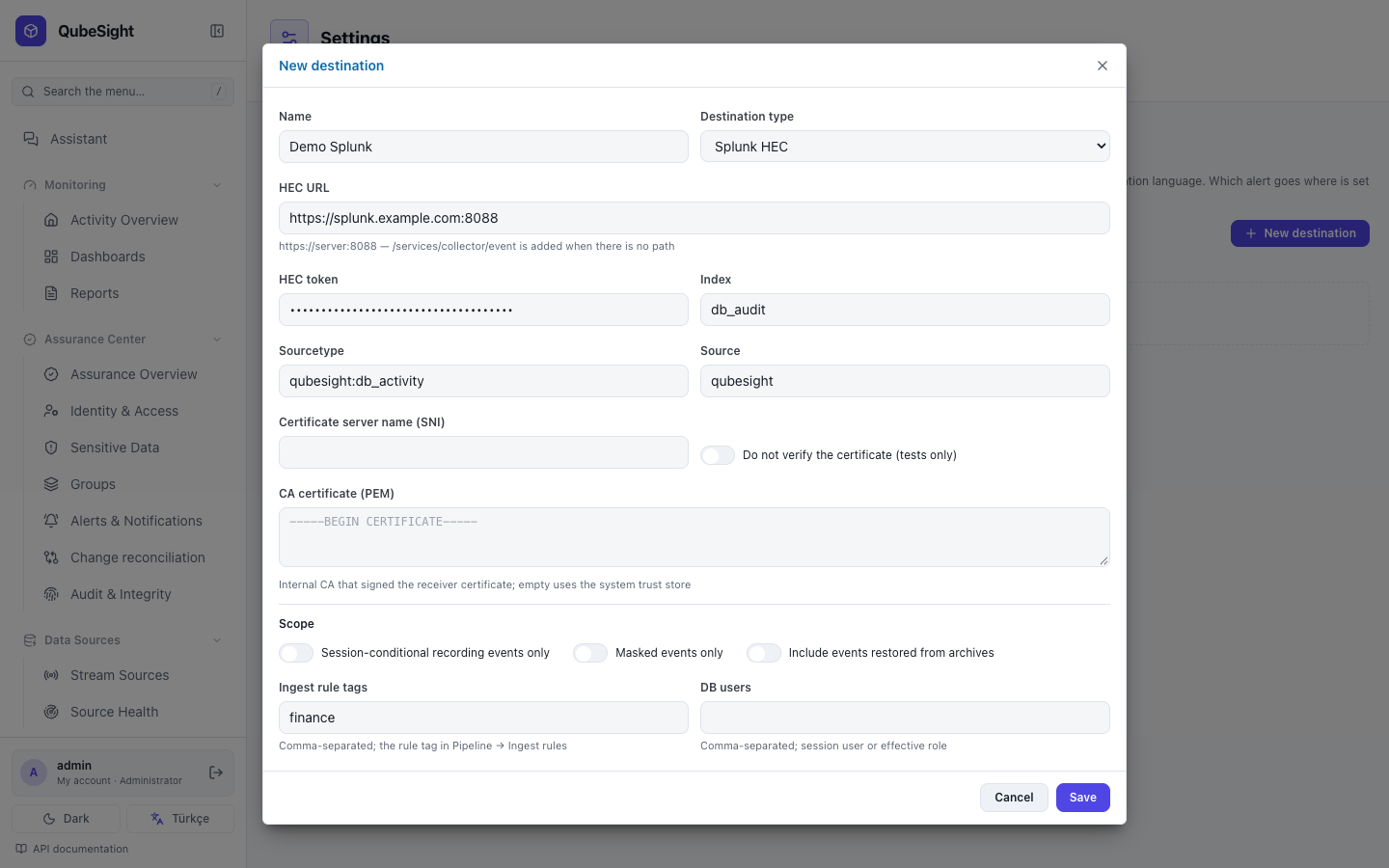
Splunk HEC fields
| Field | Description | Default |
|---|---|---|
| HEC URL | https://server:8088. When the URL has no path, /services/collector/event is added. |
— |
| HEC token | Required for a new destination. Stored encrypted and never shown again. When you edit a destination, the hint The stored token is kept (enter it again if the URL changes) is shown; if you change the URL, you must enter the token again. | — |
| Index | Splunk index. Empty uses the token's default index. | empty |
| Sourcetype | Splunk source type. | qubesight:db_activity |
| Source | Splunk source. | qubesight |
Syslog fields
| Field | Description | Default |
|---|---|---|
| Transport | TLS or TCP. | TLS |
| Address (host:port) | Receiver address, for example siem.example.com:6514. |
— |
| Format | CEF or RFC 5424 + JSON (the message part is the event as JSON, without structured data). | CEF |
| HOSTNAME | Value of the HOSTNAME field in each line. Empty uses the sending node's name (the placeholder qubesight is only an example). |
empty |
The syslog facility (local0), APP-NAME (qubesight) and the connection timeout (15 seconds) are fixed and have no field.
TLS fields (both types)
| Field | Description |
|---|---|
| Certificate server name (SNI) | Name to check in the receiver certificate when the address is an IP or differs from the certificate name. |
| Do not verify the certificate (tests only) | Disables certificate verification. Use only in a test network. |
| CA certificate (PEM) | Internal CA that signed the receiver certificate. Empty uses the system trust store. |
Scope fields
| Field | Effect |
|---|---|
| Session-conditional recording events only | Sends only events recorded by a session-conditional storage rule. |
| Masked events only | Sends only events whose SQL was masked at ingest. |
| Include events restored from archives | Off by default: events restored from Guardium archives or backfills are not forwarded. |
| Ingest rule tags | Comma-separated tags. The tag is set in the Tag field of a rule under Platform → Pipeline → Storage rules (the field hint says Pipeline → Ingest rules) and is written to the event as qs_tag. |
| DB users | Comma-separated. Matches the session user or the effective role. |
| Sources | Comma-separated source identifiers, for example eventhub:azure-db-audit. |
| Log sources | Comma-separated log source names, for example azure:postgresql. |
Delivery fields
| Field | Description | Default | Range |
|---|---|---|---|
| Rate limit (events/s) | Maximum events per second for this destination. | 2000 | 1–100,000 |
| Events per request | Events per HEC POST or syslog batch. | 500 | 1–5000 |
| Oldest event (hours) | Events whose own timestamp is older than this, relative to the cursor, are not forwarded. | 48 | 1–744 |
| Start | now or an RFC 3339 time such as 2026-11-12T10:00:00Z. When editing, leave it empty to keep the cursor; enter a value to move it. A time in the future is treated as now. |
now |
Out-of-range numbers are not refused but adjusted: a rate limit of 0 or less becomes 2000 and above 100,000 becomes 100,000; events per request 0 or less becomes 500 and above 5000 becomes 5000; oldest event 0 or less becomes 48 and above 744 becomes 744. Each scope list keeps at most 200 distinct entries; entries longer than 256 characters are dropped.
Event format
Splunk HEC
Each event is posted as one HEC JSON object. The time is the event time, host is the database server host name (or IP), and the event object carries these fields (empty fields are omitted):
log_id, event_time, received_at, source, log_source, server_type, server_hostname, server_ip, db_name, db_user, current_db_user, client_ip, client_hostname, client_port, source_program, session_id, verb, query_category, objects, sql, succeeded, error, response_time_ms, records_affected, product, request_type.
The QubeSight markers qs_effective_user, qs_identity_switch, qs_session_gate, qs_masked and qs_tag are lifted to the top level of event, so you can search them directly. Any other additional information is kept under additional_info.
Syslog CEF
The CEF header is CEF:0|QubeSight|Assurance|1.0|db_activity|<operation>|<severity>|, where the name is the SQL verb. Severity is 3 for successful statements and 6 for failed ones (syslog severity 6 and 4). The extension uses these keys:
| CEF key | QubeSight field |
|---|---|
externalId |
log_id (use it to deduplicate) |
rt |
Event time (epoch milliseconds) |
src, shost, spt |
Client IP, host name, port |
dst, dhost |
Database server IP, host name |
suser |
Database user (session user) |
sproc |
Client program |
act |
SQL verb |
cat |
Query category |
msg |
SQL text (first 4000 characters) |
reason |
Error text |
outcome |
success or failure |
cs1 / cs1Label=effectiveUser |
Effective user (current role) |
cs2 / cs2Label=database |
Database name |
cs3 / cs3Label=sessionGate |
Session-gate marker |
cs4 / cs4Label=identitySwitch |
Identity switch (for example SET ROLE) |
cs5 / cs5Label=gateEffectiveUser |
Effective user seen by the session gate |
cs6 / cs6Label=ruleTag |
Storage-rule tag (qs_tag) |
flexString1 / flexString1Label=masked |
Masking marker |
cn1 / cn1Label=responseTimeMs |
Response time in milliseconds |
The RFC 5424 MSGID is DB_ACTIVITY in both syslog formats. SIEM field keys do not depend on the notification language.
Verify the destination
- On the destination card, click Test. QubeSight sends one test event. The message Test event sent confirms that the receiver accepted it; Test failed: {error} shows why not. The test does not move the cursor or change the counters.
- Search the receiver for the test event. Its fields:
log_idis the all-zero UUID,sourceisqubesight:test,log_sourceisqubesight, the verb (actin CEF) isTEST,request_typeisQUBESIGHT_TEST, and the SQL text (msgin CEF) is a fixed Turkish sentence meaning "QubeSight SIEM forwarding test event".- Splunk HEC: search
index=<your index> sourcetype=qubesight:db_activity source=qubesight:test; the event also carriesqs_test=1underadditional_info. - Syslog CEF: search for
act=TESTorexternalId=00000000-0000-0000-0000-000000000000. CEF lines carry no additional information, so there is noqs_testkey. - Syslog RFC 5424 + JSON: the JSON message part contains
"verb":"TEST"andqs_test=1.
- Splunk HEC: search
- Check that real events arrive: run a statement on a monitored database that is in the destination's Scope, wait at least the 30-second safety lag plus the ingest delay of its source, and search the receiver for it (for CEF, by
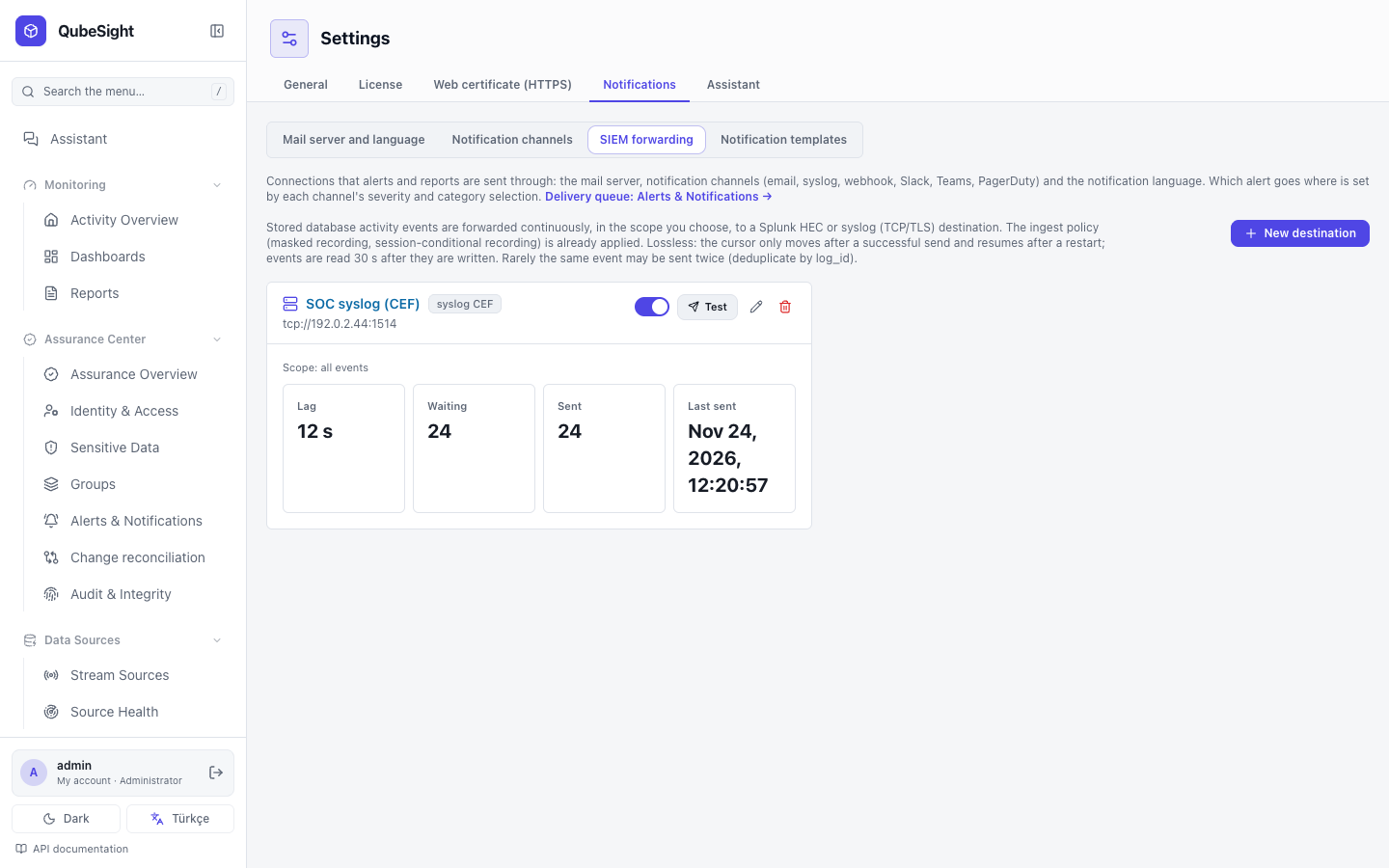
suser,srcorexternalId; theexternalIdequals the event'slog_idin Reports). - Watch the card for a few minutes. The card header shows the type (Splunk HEC, syslog CEF or syslog JSON) and the subtitle shows the HEC URL or
tcp|tls://address. The line Scope: lists the filters (all events, or for example session-conditional only · masked only · tag: … · user: … · source: … · log source: …). The counters:
| Counter | Meaning |
|---|---|
| Lag | Age of the oldest event still waiting for this destination; 0 when nothing is waiting. Shown in seconds below 90 s, in minutes below 90 minutes, otherwise in hours, and — when unknown; warning colour above 600 seconds (10 minutes). If the event store cannot be queried, the age of the cursor is shown instead. |
| Waiting | Number of events not yet sent (counted up to 1,000,000; warning colour above 10,000; — when unknown). |
| Sent | Total events sent since the destination was created. |
| Last sent | Time of the last successful send. |
| Last error | The most recent send error and its time, in red, below the counters. Any save, including switching Enabled, clears it. |
With no destination, the tab reads No forwarding destination yet. While loading it shows Loading…; if the list cannot be loaded, an error box with Retry appears. Deleting a destination (trash icon) asks Delete the destination? (The destination "{name}" and its cursor are deleted; waiting events are not sent to it.).
Every create, update, delete and test is written to the product audit trail (siem_forwarder_created, siem_forwarder_updated, siem_forwarder_deleted, siem_forwarder_tested).
Troubleshooting
| Symptom | What to check |
|---|---|
| Save fails with "the HEC address must be https…" or "the HEC address must look like https://server:8088" | The HEC URL must start with https://. Plain http:// is accepted only with Do not verify the certificate (tests only). |
| Last error shows "connection refused" and Waiting grows | The receiver is down or the port is blocked. Nothing is lost: the cursor waits, and the backlog is sent when the receiver returns. |
| Last error shows a certificate error | Add the CA in CA certificate (PEM) or set Certificate server name (SNI) to the name in the certificate. |
| Splunk answers 403 or "invalid token" | Re-enter the HEC token. After a URL change the token must always be entered again; saving without it is refused. |
| No events arrive although the test works | Check Scope: a tag, user or source filter that matches nothing sends nothing. Also check Oldest event (hours) and Start. |
| Duplicate events in the SIEM | Deduplicate on log_id / externalId. Duplicates can follow a node failover. |
| Old events from an archive restore are missing | Restored events are excluded by default; switch on Include events restored from archives. |
Limitations
- Delivery is at least once. The duplicate filter is held in memory per node, so after a failover up to about 10 to 20 minutes of events can be sent again.
- The validation messages for a syslog destination's address and facility are shown in Turkish in the English interface; all other destination messages are in English.
- Without an Enterprise licence, existing enabled destinations keep forwarding and cannot be disabled, only deleted.
- Only Splunk HEC and syslog over TCP/TLS are supported. UDP syslog, Kafka output and other SIEM APIs are not available for event forwarding.
- In the HEC JSON, numeric values such as
response_time_msandrecords_affectedare sent as strings. - The number of skipped duplicates is not shown in the interface.
- Events older than Oldest event (hours) (maximum 31 days) relative to the cursor are never forwarded. To send older history, export it from Reports and investigation.
- A deleted destination loses its cursor; events waiting for it are not sent.
Related pages
- Mail (SMTP) and notification channels: send alerts (not events) to syslog, webhook, Slack, Teams and PagerDuty.
- Pipeline: storage rules, masked recording and rule tags.
- Editions