Assurance Overview
Assurance Overview (/assurance) answers the questions auditors and customers most often ask about a data activity monitoring system, live and with evidence. Every answer is computed from the running system; when a feature is off or incomplete, the answer says so and lists the gap. This page explains the score, the question cards and the evidence pack.
Community Enterprise
The scorecard is in both editions. The signed Evidence pack download is Enterprise.
Who can open it: administrator, analyst, DBA and auditor.
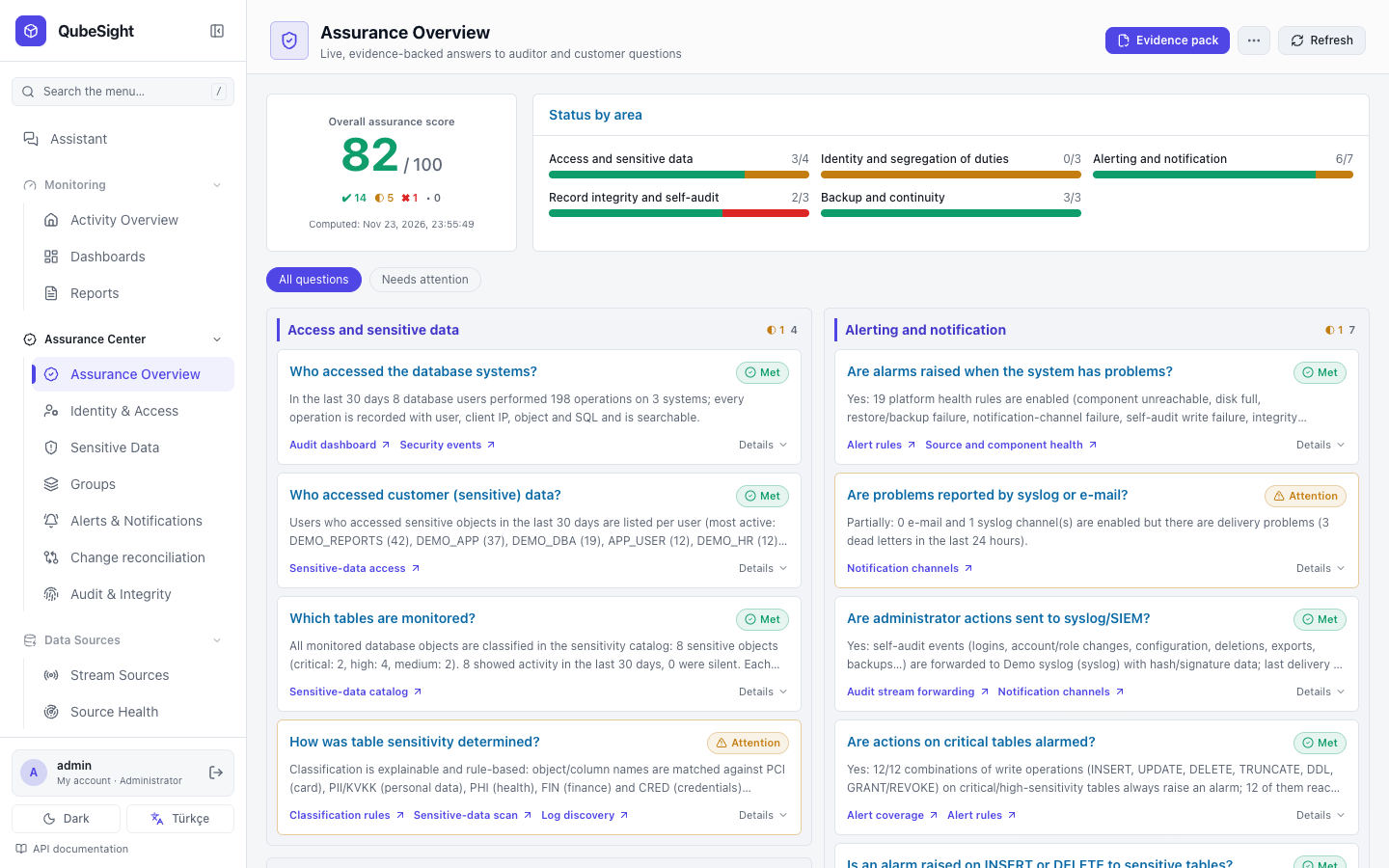
Header
| Element | What it does |
|---|---|
| Evidence pack | Downloads the printable HTML evidence pack in the interface language. Enterprise. |
| Other evidence formats (⋯) | Evidence pack (EN) or Evidence pack (TR) (the other language) and Signed JSON. |
| Refresh | Recomputes the scorecard. |
Score
| Element | Meaning |
|---|---|
| Overall assurance score | 0–100. Each answered question counts: Met = 1 point, Attention = 0.5, Gap = 0. Info items are not counted. Green from 80, amber from 50, red below 50. |
| ✔ / ◐ / ✖ / • | Number of questions that are Met, Attention, Gap and Info. |
| Computed: | When the scorecard was calculated. The result is cached for a short time and recomputed in the background. |
| "Data could not be collected for N question(s); the result is partial." | Some data sources could not be read; those questions show "Data for this question could not be read." |
Status by area shows the counts per area. The filter All questions / Needs attention limits the cards to Attention and Gap items; "Nothing needs attention." when none.
The same score appears on the home page as the Assurance Center strip.
Question cards
Each card shows the question, a status pill and the answer. Details expands it with:
- facts (label and value, for example the number of monitored databases),
- gaps (⚠ lines that explain what is missing),
- the related regulation references (for example PCI DSS, ISO 27001, SOX ITGC, GDPR, KVKK),
- links to the screens where the evidence lives.
Gap cards are expanded by default. Less collapses a card.
Questions by area
| Area | Question | Evidence screen |
|---|---|---|
| Access and sensitive data | Who accessed the database systems? | Dashboards, Reports |
| Who accessed customer (sensitive) data? | Sensitive Data | |
| Which tables are monitored? | Sensitive Data → Catalog | |
| How was table sensitivity determined? | Sensitive Data → Catalog, Discovery, Classification rules | |
| Identity and segregation of duties | What is the password policy and is it enforced? | Identity & Access → Password and session |
| Is there a directory (LDAP/AD) integration? | Identity & Access → Directory and SSO | |
| Are the account manager and the administrator separate? Where is the evidence? | Identity & Access → Separation of duties | |
| Alerting and notification | Are alarms raised when the system has problems? | Alerts → Rules, Source Health |
| Are problems reported by syslog or e-mail? | Settings → Notifications | |
| Are administrator actions sent to syslog/SIEM? | Audit & Integrity, Settings → Notifications | |
| Are actions on critical tables alarmed? | Alerts → Coverage, Rules | |
| Is an alarm raised on INSERT or DELETE to sensitive tables? | Alerts → Coverage, rule simulation | |
| If auditing/logging is turned off on a database (e.g. MongoDB), is an alarm raised? | Alerts → Rules | |
| Is the last audit (log) received from each server tracked? Is an alarm raised if the log flow stops? | Source Health | |
| Record integrity and self-audit | How is it proven that data has not been altered? | Audit & Integrity → Immutable archive |
| Where are the logs of actions performed in this system (self-audit)? | Audit & Integrity → Events | |
| Who can write events to the log intake endpoints (syslog, SNMP trap)? Is writing forged events prevented? | Stream Sources → Access allowlist, Source Health | |
| Backup and continuity | When are backups taken and are they verified? | Data and Backup |
| Is there a disaster-recovery (DR) setup? | Data and Backup → DR | |
| If one zone fails, does the system continue in another zone? | Data and Backup → DR (zone-loss simulation) |
An answer is never fixed text: if, for example, no notification channel is enabled, "Are problems reported by syslog or e-mail?" answers "No: there is no enabled e-mail or syslog channel; alerts are visible only in the UI."
Evidence pack
The evidence pack is a document you can give to an auditor. It contains the scorecard with all answers, facts and gaps at the moment of generation, plus sections such as sensitive-data scanning.
| Format | Content |
|---|---|
| Evidence pack (HTML) | Printable document in the chosen language. Print it to PDF from the browser if needed. |
| Signed JSON | The same content as JSON, with a SHA-256 digest and an Ed25519 signature made with the installation's audit signing key. |
Each pack carries a verification link and its digest (pack_sha256). The auditor (or anyone with an account) can open the link to confirm the pack was produced by this installation and has not changed. See Evidence Pack Verification.
Generating a pack is recorded in the audit trail.
Limitations
- The score is a weighted count of questions, not a compliance certification. It shows what the running system can prove at this moment.
- Questions whose data cannot be read count as Info and do not affect the score; check the "partial" warning.
- DR and zone answers depend on the topology you declare in Data and Backup → DR; without a declaration, components are assumed to be in one zone.
- The evidence pack download requires the Enterprise edition; the on-screen scorecard does not.