Identity & Access
Identity & Access (/assurance/identity) is where QubeSight accounts, sign-in rules, two-step verification, directory and single sign-on, and separation of duties are managed and evidenced. This page describes its six tabs: Overview, Accounts, Password and session, MFA, Directory and SSO and Separation of duties.
Community Enterprise
Local accounts, the password policy, MFA and LDAP are in both editions. SSO (OIDC) and the Separation of duties tab are Enterprise.
Who can open it: administrator, auditor and access manager. What each role can change:
| Action | Who |
|---|---|
| Create, edit, disable, unlock and delete accounts; reset passwords and MFA; revoke sessions | Access manager. Administrator only while separation of duties is not enforced. |
| Change the password and session policy, the MFA policy | Administrator (the access manager reads them). |
| Change LDAP and SSO settings | Administrator and access manager. While separation of duties is enforced, only the access manager can add role mappings that grant administrator or access manager, or change the directory/provider identity. |
| Trial sign-in (LDAP, SSO) | Administrator |
| Turn separation-of-duties enforcement on or off | Access manager; administrator only while it is not enforced. |
| Read everything | Auditor |
When you cannot change a screen, it says why, for example "Separation of duties is enforced: account management belongs to the access manager role only. This screen is read-only for you."
Overview tab
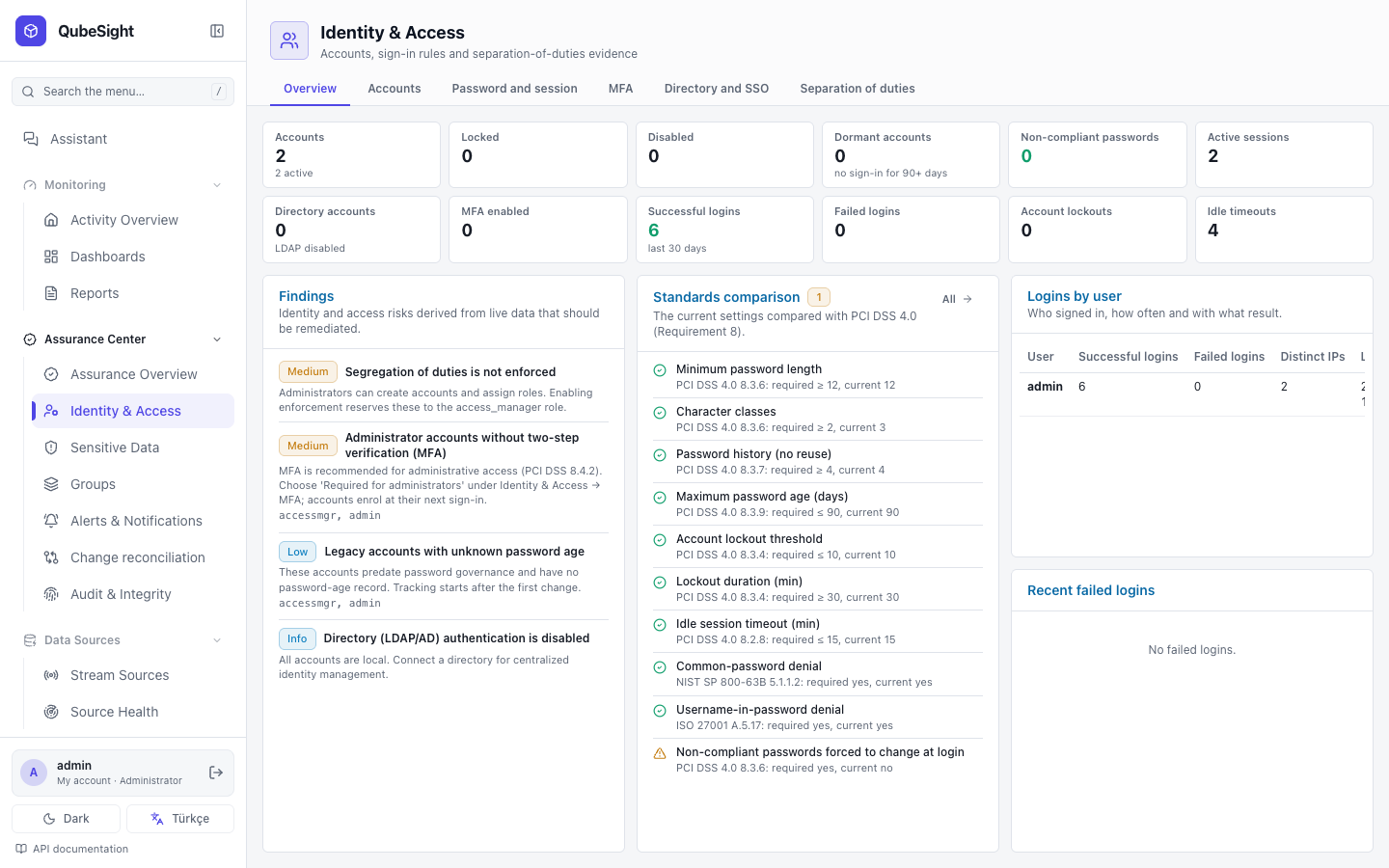
| Section | Content |
|---|---|
| Statistics | Accounts, Disabled, Locked, MFA enabled, Non-compliant passwords, Active sessions, Dormant accounts (no sign-in for 90+ days), Directory accounts, and LDAP status (LDAP enabled / LDAP disabled). |
| Findings | "Identity and access risks derived from live data that should be remediated", for example "Two-step verification (MFA) is turned off by an administrator", "Administrator accounts without two-step verification (MFA)", "MFA is required; some accounts have not enrolled yet". "No open findings." when none. |
| Standards comparison | The current policy compared with PCI DSS 4.0 Requirement 8, as " |
| Sign-in evidence (last 30 days) | Successful logins, Failed logins, Distinct IPs, Account lockouts, Idle timeouts; Logins by user (User, Successful logins, Failed logins, Distinct IPs, Last successful); Recent failed logins with the Reason (for example "Wrong username or password", "Account locked", "Local sign-in disabled (LDAP required)", "Wrong verification code"). |
Accounts tab
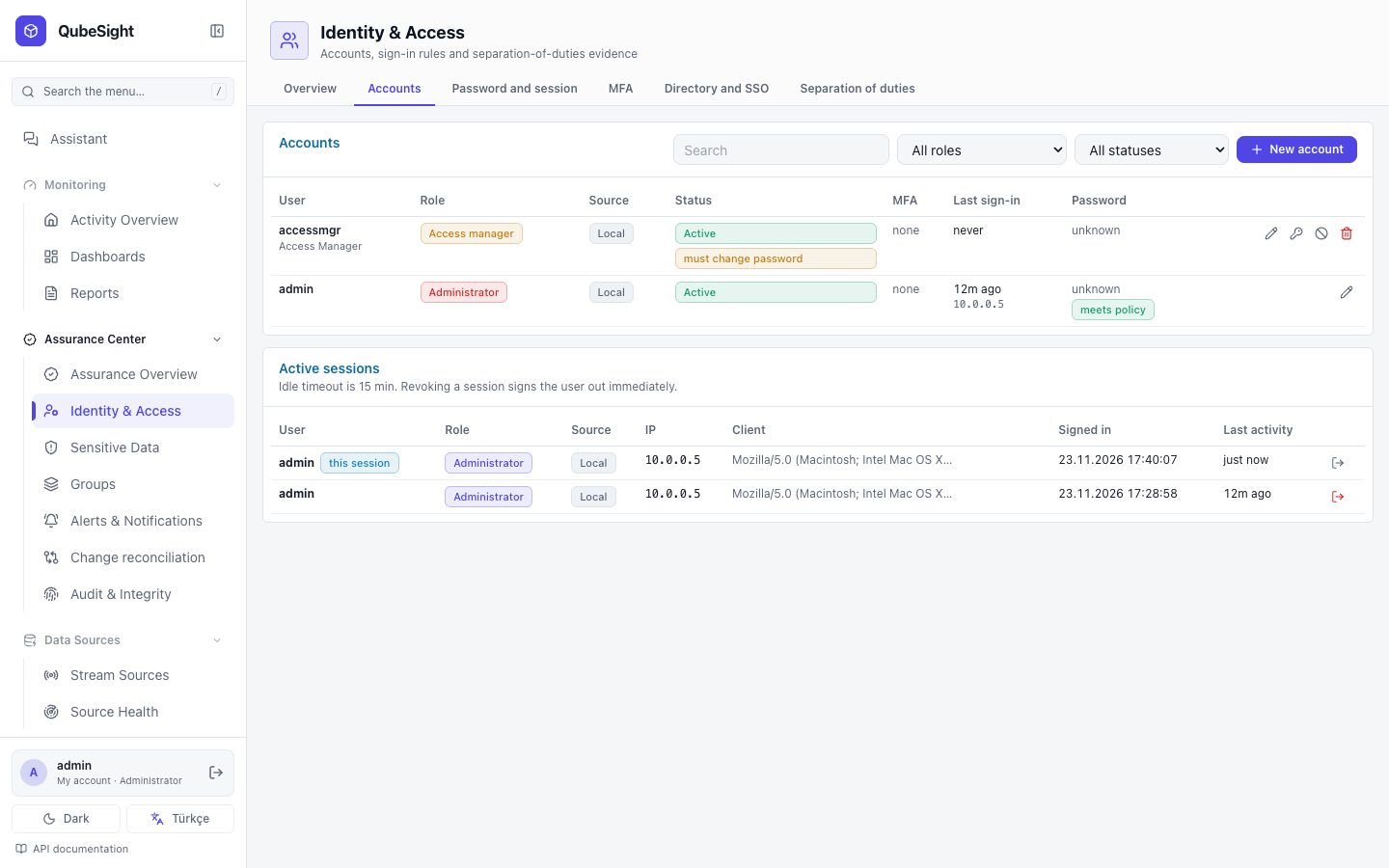
Account list
Filters: search, All roles, All statuses.
| Column | Meaning |
|---|---|
| User | User name and display name. |
| Role | Administrator, Analyst, DBA, Auditor, Access manager. |
| Source | Local, LDAP or SSO (OIDC). |
| Status | Active, Disabled, Locked; "must change password"; "Local sign-in off (LDAP)" for local accounts that lost password sign-in when LDAP was enabled. |
| MFA | on, none, required, none, or SSO. |
| Last sign-in | Or "never". |
| Password | Age ("N days old") and whether it meets policy, violates policy or is unknown. |
Account actions
| Action | Effect |
|---|---|
| New account | Opens the account form. |
| Edit | Edits the account. Directory accounts show "This account is managed in the directory: role and credentials come from LDAP and cannot be changed here." |
| Disable / Enable | " |
| Unlock | Clears a lockout. |
| Reset password | Leave the field blank to generate a secure temporary password. The user must change it at first sign-in, and open sessions end. A generated password is shown once ("This password is shown only once; pass it to the user over a secure channel."). |
| Reset MFA | Deletes the user's two-step verification and ends their sessions; they set it up again if required. |
| Delete | "Permanently delete the account " |
Account form
| Field | Meaning |
|---|---|
| Username | Sign-in name. |
| Display name, Email | The e-mail is used, for example, for test sends of scheduled reports. |
| Role | One of the five fixed roles. While LDAP is enabled, a local account can only be an administrator or an access manager. |
| Initial password | "If left blank, a secure temporary password is generated." |
| Extra permissions | Comma-separated, for example restore:trigger, reports:export. |
| Person reference | Links several accounts of the same person (for example an employee ID). Separation-of-duties conflicts are detected through this link. |
Active sessions
Below the list, Active sessions shows User, Role, Source, Client, Signed in and Last activity. "Idle timeout is N min. Revoking a session signs the user out immediately." Revoke session ends a session. Your own session is marked "this session"; ending it signs you out after a confirmation.
Password and session tab
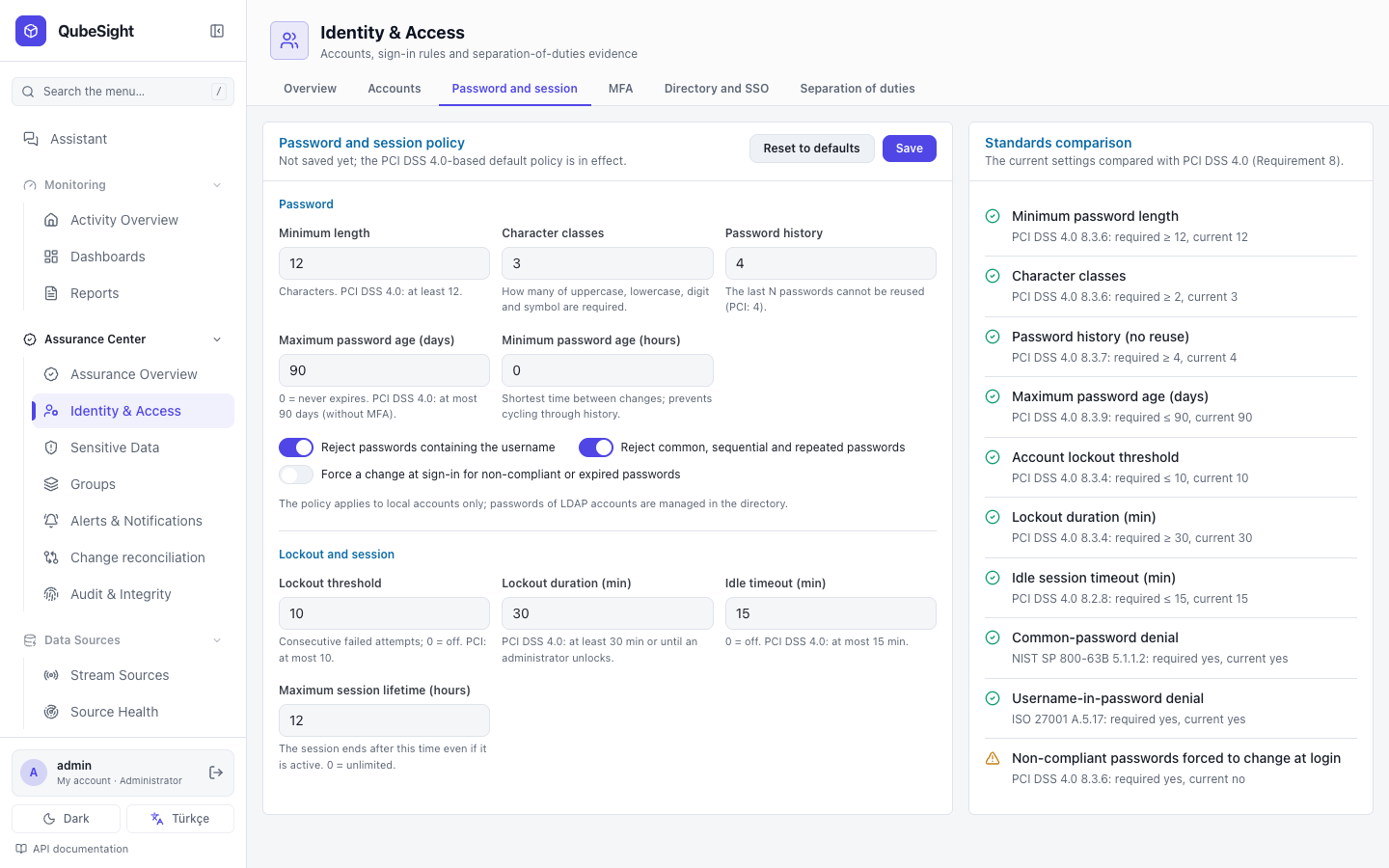
Shows Password and session policy. "The saved policy is in effect." or "Not saved yet; the PCI DSS 4.0-based default policy is in effect." Only an administrator can change it.
| Field | Default | Allowed range | Notes |
|---|---|---|---|
| Minimum length | 12 | 8–128 | PCI DSS 4.0: at least 12. |
| Character classes | 3 | 1–4 | Of uppercase, lowercase, digit and symbol. |
| Password history | 4 | 0–24 | Last N passwords cannot be reused. |
| Maximum password age (days) | 90 | 0–730 | 0 = never expires. |
| Minimum password age (hours) | 0 | 0–720 | Prevents cycling through history. |
| Lockout threshold | 10 | 0 (off) or 3–50 | Consecutive failed attempts. |
| Lockout duration (min) | 30 | 1–1440 | |
| Idle timeout (min) | 15 | 0 (off) or 1–480 | Signs out inactive users. |
| Maximum session lifetime (hours) | 12 | 0 (unlimited) or 1–168 | Ends the session even if active. |
| Reject passwords containing the username | On | ||
| Reject common, sequential and repeated passwords | On | ||
| Force a change at sign-in for non-compliant or expired passwords | Off | Without it, weak existing passwords are only flagged. |
The policy applies to local accounts only; LDAP passwords are managed in the directory. Reset to defaults restores the default values; Save stores them. The Standards comparison panel shows each value against PCI DSS 4.0. If someone else changed the policy while you were editing, nothing is saved and the current values are loaded.
MFA tab
Two-step verification (MFA): authenticator app plus recovery codes, for local and LDAP accounts that sign in with a password. SSO accounts are exempt.
| Field | Meaning |
|---|---|
| Two-step verification is on | Master switch. When off, everyone signs in with a password only; turning it off asks for confirmation. |
| Requirement | Not required (users opt in), Required for administrators (admin and access manager), Required for everyone (all local and LDAP accounts). Accounts without MFA are sent to setup on their next request. |
| Save | To save a requirement, MFA must first be enabled on your own account ("Open Account security"). |
The panel subtitle shows who saved the policy last and when ("Last changed:
Coverage shows Password sign-in accounts, MFA enrolled, Administrator accounts (enrolled / total) and SSO (exempt). Accounts without MFA lists Account, Role, Source and Status ("will be sent to setup on the next request" or "optional").
When the device and recovery codes are lost: reset the user's MFA from the Accounts tab. See also Multi-factor authentication and Your account and sign-in.
Directory and SSO tab
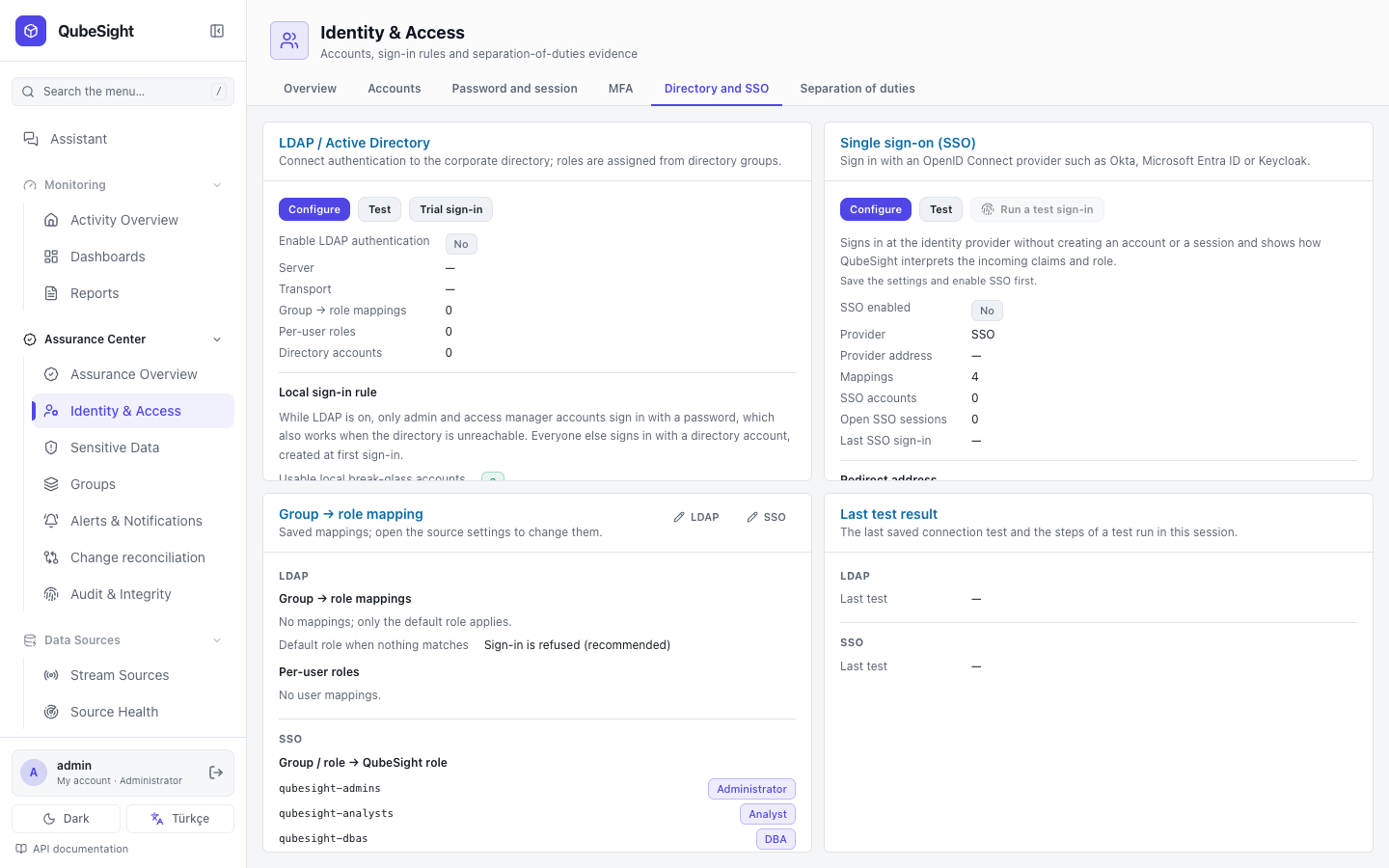
The tab shows two sources side by side, LDAP and SSO, each as a card with Configure (or Show settings when read-only), Test, the saved Group → role mapping and the Last test result. Unsaved changes are marked, and Revert changes discards them. Test connection uses the values on the screen and keeps your unsaved edits (since 2.0.109), so you can test, correct and test again before you save. The access manager opens this tab like an administrator (in 2.0.107 the tab failed to load for that role on a new installation).
LDAP
LDAP / Active Directory connects sign-in to the corporate directory; roles come from directory groups.
| Field | Meaning |
|---|---|
| Enable LDAP authentication | Switches LDAP sign-in on. |
| LDAP URL | ldaps://host:636 (recommended) or ldap://host:389 with Use StartTLS. |
| Allow cleartext (no TLS) connections (not recommended), Skip server certificate verification (not recommended) | Unsafe options with warnings. |
| CA certificate (PEM) | Internal CA that signed the directory server certificate; system roots are used when empty. |
| Service account (Bind DN), Service account password | The password is stored encrypted; re-enter it when the server, bind DN or TLS setting changes. |
| User search base (Base DN), User filter | The filter must contain {username}. |
| Username attribute, Email attribute, Display-name attribute, Person-reference attribute | Attribute names. |
| Group search base, Group filter, Membership attribute | Group lookup; {user_dn} and {username} placeholders; AD uses memberOf. |
| Group → role mappings | Directory group DN or name → role. If several mappings conflict, the least privileged role is granted. |
| Per-user roles | A role for a specific directory user, without a group. It wins over group mappings. |
| Default role when nothing matches | A role, or Sign-in is refused (recommended). Administrator and access manager cannot be the default. |
| Create directory users automatically on first sign-in | Auto-provisioning. |
| Timeout (s) | Connection timeout. |
Test connection runs the steps Settings, Connection, Service account and Base search. Trial sign-in (administrator) runs the full sign-in flow with a directory user (Username, Password) without creating a session; the password is not stored. The result shows "Sign-in succeeded; resolved role:
Local sign-in rule: while LDAP is on, only administrator and access manager accounts sign in with a local password; this also works when the directory is unreachable. Everyone else signs in with a directory account. Before you enable LDAP, the card lists Usable local break-glass accounts and Local accounts that lose password sign-in when LDAP is enabled; saving asks Turn on LDAP sign-in? and ends those accounts' sessions. LDAP cannot be enabled when there is no active local administrator or access manager.
Full configuration guide: LDAP / Active Directory.
SSO
Enterprise
Single sign-on with OpenID Connect (for example Okta, Microsoft Entra ID, Keycloak). The card contains a step-by-step setup guide, the provider settings, group/role mapping, Test connection and a trial sign-in. In the Community edition the card shows an Enterprise lock. Full guide: Single sign-on (OIDC).
Separation of duties tab
Enterprise
This tab proves that the people who manage accounts are not the people who administer the system. It has three sub-views.
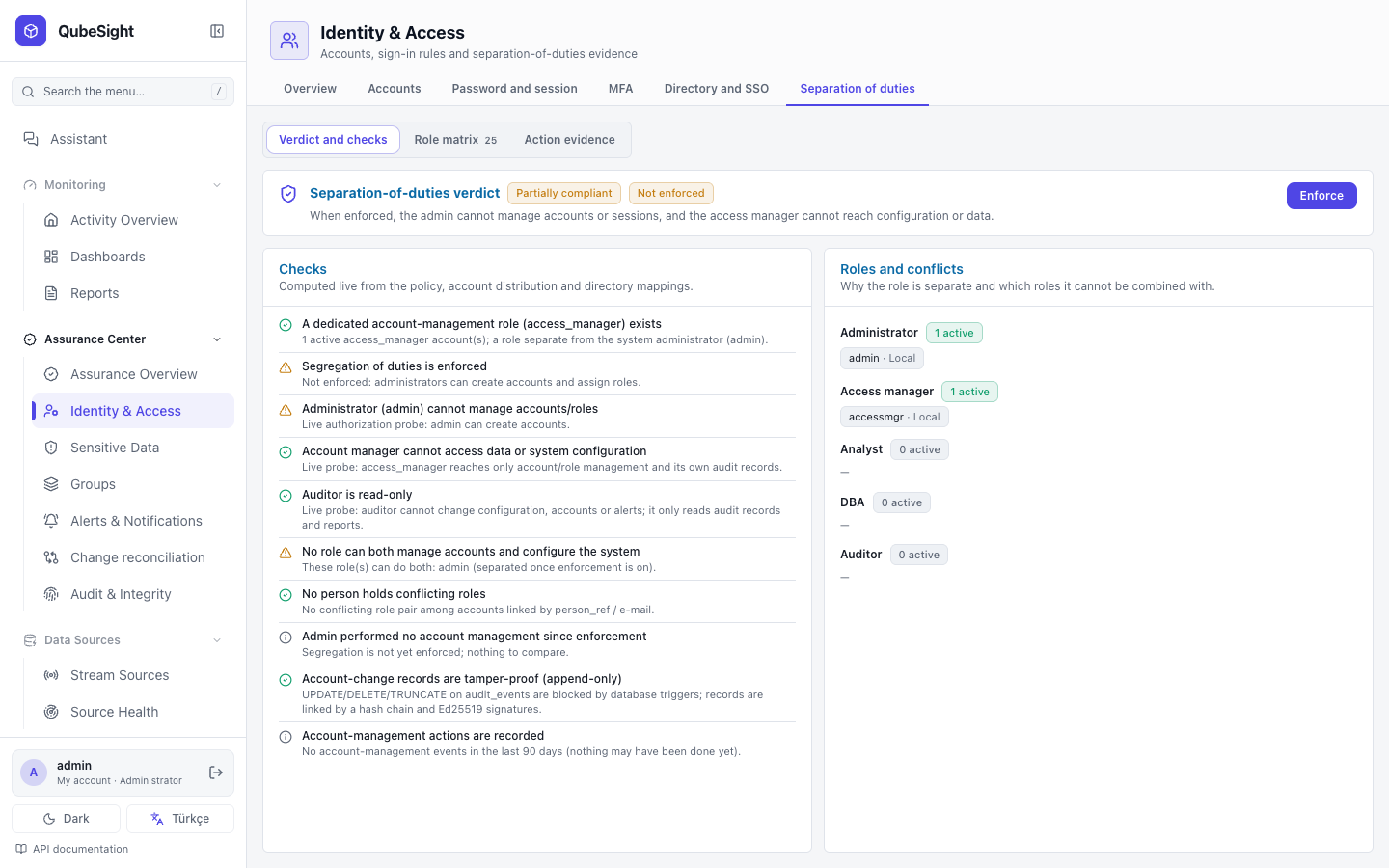
Verdict and checks
| Element | Meaning |
|---|---|
| Separation-of-duties verdict | Compliant, Partially compliant or Non-compliant. |
| Enforced / Not enforced | "When enforced, the admin cannot manage accounts or sessions, and the access manager cannot reach configuration or data." "Enforced by |
| Enforce / Stop enforcing | Takes effect immediately, after a confirmation. "Only the authorised role can switch enforcement on or off; while enforced, an administrator cannot turn it off." |
| Checks | Computed live from the policy, account distribution and directory mappings. |
| Roles and conflicts | Why each role is separate and which roles it cannot be combined with. |
| People holding conflicting roles | Accounts linked by Person reference that hold conflicting roles. |
Role matrix
Role matrix (live proof): for each Area, which roles are allowed. It is computed with the same decision function the server uses for every request, so it reflects actual enforcement.
Action evidence
| Section | Content |
|---|---|
| Account-management actions | Who made account and role changes, and when. |
| Denied attempts | Records where an unauthorised role attempted a segregated action and was denied ("No denied attempts recorded." when none). |
| Policy change history | Who changed the separation-of-duties policy and when, from the self-audit chain. |
Guardium accounts
Guardium's own accounts, role changes and LDAP configuration (from restored Guardium records) are on Guardium → Guardium accounts. Old links to this tab are redirected there. See Guardium.
Limitations
- There are five fixed roles; custom roles cannot be defined. Extra permissions are added per account.
- There is no per-database scope: a role sees activity of all monitored databases to the extent the role allows.
- Anyone with account-management rights can reset another account's password and MFA, including an administrator's, without a second approval.
- The password policy does not apply to LDAP or SSO accounts.
- While LDAP is enabled, analysts, DBAs and auditors cannot sign in with a local password, even if it is correct.