Hot and cold storage tiers
This page explains how QubeSight stores activity data in two tiers, why the cold tier is locked, how reports read both tiers and how QubeSight proves that archived data was not altered. To change the settings, see Data lifecycle and retention; to view the verification results, see Audit & Integrity.
Community Enterprise
Why two tiers
Activity data has two different jobs:
- Recent data is queried constantly by dashboards, alert rules and investigations. It must be fast.
- Old data is rarely queried but must be kept for years and must be provably unaltered for auditors.
QubeSight therefore keeps recent data in ClickHouse (the hot tier) and every record, from the first minute, in an S3-compatible bucket with Object Lock (the cold tier or locked store). The cold tier is also the backup of the activity data: in a disaster, recent days are reloaded from it into a new ClickHouse.
flowchart LR
  W[Worker] -->|on arrival| H[(Hot tier: ClickHouse)]
  H -->|every 10 min, ~12 min after arrival| B[10-minute block files, locked 30 days]
  B -->|day final, 1.5-2 days later| D[Daily file, locked for the cold period]
  H -->|oldest exported months leave hot| X[Dropped from hot only]
  R[Reports] --> H
  R --> D
  R --> B
The hot tier
The hot tier is the ClickHouse event table plus the summary tables that dashboards use. You choose how much activity stays hot:
| Hot data limit | Behaviour | Default |
|---|---|---|
| Number of days | The last N days stay hot (7–3650). If the disk fills first, the oldest exported months still leave the hot tier. | Runtime default: days mode, 365 days |
| Disk usage | As much data as fits stays hot until the ClickHouse disk reaches the set usage (50–95 %). Beyond it, the oldest months that are already exported to and verified in the locked store leave the hot tier. | When selected, the field starts at 85 % |
Hot-data default
The installer's hot-data choice (--hot-mode, --hot-days, --hot-disk-percent, or the web installer's hot-data step) is stored by the control plane on its first start, while no retention setting has been saved yet; after that you change it in Platform → Data and Backup → Retention. Without an installer value the control plane uses days mode, 365 days. An existing installation keeps its saved setting when it is upgraded; see Upgrading from 2.0.106.
Data leaves the hot tier one calendar month at a time, and only when every row of that month has been exported to the locked store and verified. Unexported data is never dropped to free space. The current month is never dropped.
Separately from the hot limit, the disk guard protects the server when the disk fills for other reasons. Its default action, Hold incoming events (default, lossless), loses nothing: the worker stops writing and stops advancing its offsets, and events wait in Redpanda or at the cloud source until space is available. See Data lifecycle and retention.
The cold tier
What is written
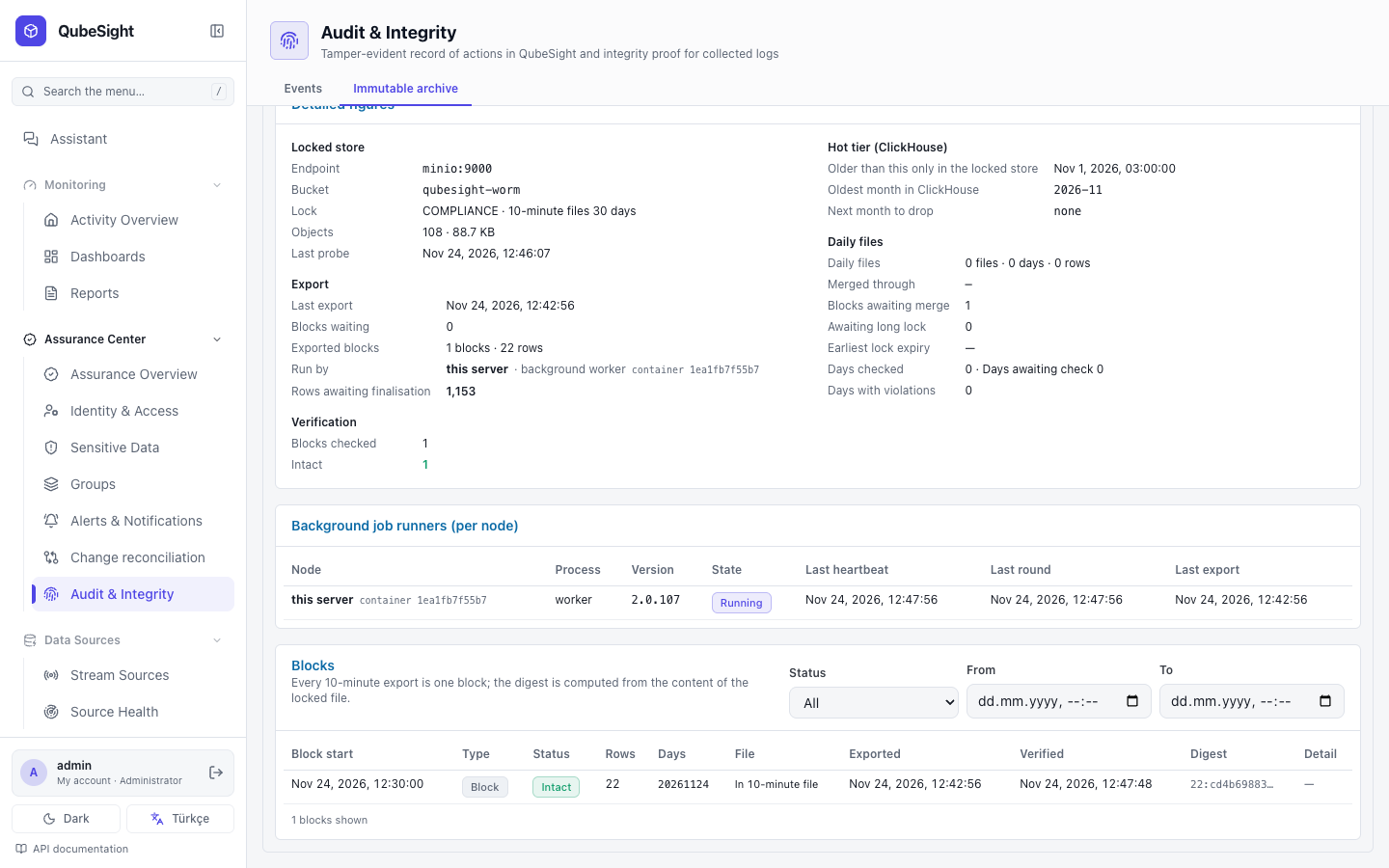
Every 10 minutes the worker exports the events that arrived in the previous 10-minute block. ClickHouse writes them as a Parquet file into the bucket (default qubesight-worm), partitioned by event day, together with a locked manifest. Each block file is locked for 30 days as soon as it is written.
Daily consolidation
Thousands of small files make queries slow, so QubeSight merges them. When an event day is final (the day has ended, the Guardium live window has closed and the last block is at least an hour old; about 1.5–2 days after the day ends), the day's block files are merged into one daily file. QubeSight compares the merged content with the source blocks, records the daily file, writes its manifest and extends its lock to the full cold period. After their own 30-day lock expires, the 10-minute files are deleted. No block file is deleted before its daily file has been verified and locked for the long period.
Object Lock in COMPLIANCE mode
Every file is locked with S3 Object Lock in COMPLIANCE mode for the lock period (default 5 years, 1–30 years):
- Nobody can delete or overwrite a locked file before its lock expires, not even the storage administrator or the root account of the store.
- The bucket cannot be deleted and its space cannot be reclaimed while it holds locked files.
- A lock can be extended but never shortened.
Plan storage capacity for the full lock period. Parquet compresses well; in measurements the cold copy was smaller than the same data in ClickHouse.
Where the store runs matters
A MinIO on the QubeSight server itself protects against application and database administrators. It does not protect against someone with root access to that server, who can wipe the disk. For full protection, run the locked store on a separate server or use an external S3 Object Lock store (both Enterprise, immutable_vault). See Deployment architectures.
Tamper handling
Object Lock prevents deletion, but an S3 client can still hide a file (a versionless delete creates a "delete marker") or upload a new version over it. QubeSight records the exact version of every file it wrote. Every 10 minutes a maintenance pass checks the store: if a file is hidden or overwritten, QubeSight restores the original locked version, extends its lock, records the intervention and raises a critical Locked store alert.
How reports read both tiers
When a report's time range reaches beyond the oldest month still in the hot tier, QubeSight reads the older part directly from the locked Parquet files and combines it with the hot part. You use the same report and the same filters; the only difference is speed.
| Query over one year | Hot tier | Cold tier |
|---|---|---|
| Aggregation | about 2.5 s | about 4.5 s |
| Filter on a user | about 12.5 s | about 21.6 s |
| Free-text search in SQL | about 11.8 s | about 35.5 s |
These figures come from an internal test environment (about 38 million rows) and depend on your hardware and data. Cold queries are typically 1.7 to 3 times slower than hot queries.
Dashboards and Activity Overview read only the hot summaries; use Reports for older periods. Activity Overview allows a custom range of at most one year.
Verification
Verification proves that the hot data and the locked copy agree:
- Every exported row is fingerprinted from all its columns except the arrival time, so that a harmless repeated delivery does not raise a false alarm.
- Verification joins the locked file with ClickHouse by event ID and reports rows that are missing, modified (with the original and current values) or extra.
- Each daily file's digest must equal the digest of its source blocks.
- Days are re-verified on a rotating schedule.
- Any difference raises a critical alert; the details are in Assurance Center → Audit & Integrity → Immutable archive.
Because verification compares against a copy that nobody can change, a successful check is evidence for auditors that the activity history is complete and unaltered.
Guardium live rows
Rows that arrive live from Guardium (syslog and SNMP) are not exported block by block. The next-day Guardium archive delivers the same activity with about thirty additional fields; those archive rows replace the live rows and are exported and locked. Live rows that never receive an archive counterpart are finalised and exported after 36 hours. Daily consolidation waits for this window, which is why a day becomes final only 1.5–2 days after it ends.
ClickHouse's own storage tier
The ClickHouse S3 tier (MinIO, advanced) option in the installer is unrelated to the locked store. It lets ClickHouse move its own older data parts to MinIO instead of a local directory. It is off by default; the locked store is configured separately in the installer's Retention step.
Limitations
- If the locked store is unreachable, blocks wait and are exported when it returns. Months that are not exported stay hot, so a long outage of the store increases disk usage on the QubeSight server.
- Rows written to the locked store keep the values they had at export time. Later reclassification (for example a new command class) is applied when reports read the data, not by rewriting locked files.
- Reloading cold data into the hot tier (rehydration) is available through the API for administrators but has no button in the interface.
- The 10-minute block files and the daily file coexist for up to 30 days, so the store temporarily holds about twice the data of recent days.
- Plain syslog lines received in the last 10 minutes before a total loss of the server are not yet in the locked store.