Notification templates
This page explains how to customise the alert email (subject, HTML body and plain-text body) and the message part of outgoing syslog lines with templates, and lists every variable and function you can use. Use it when your mail layout, ticketing parser or SIEM expects a specific format.
Community Enterprise
Templates are available in both editions. Syslog channels themselves are an Enterprise feature, so the syslog template only has an effect on installations that can send to syslog.
Where templates apply
Templates are edited in Platform → Settings → Notifications → Notification templates and apply to the whole installation.
| Delivery | Template used |
|---|---|
| Email channels (Email (SMTP)) | Email subject, HTML body, plain-text body |
| Email to recipients set inside alert rules | Email subject, HTML body, plain-text body |
| Send test email on the outgoing mail server card | Email subject, HTML body, plain-text body |
| Syslog channels (alerts, channel tests, the self-audit stream) | Syslog message (MSG) |
| Slack, Microsoft Teams, PagerDuty, webhook | Not used: these always use the built-in format |
| SIEM forwarding of database activity events | Not used |
An empty template part means the built-in format for that part. You can customise one part only, for example just the subject, and leave the others built-in.
The language of the values (titles, field names, severity labels, status words) follows the Notification language setting on the same tab (Turkish or English). See Settings.
How templates work
Templates use the Go template syntax: {{.Title}} inserts a value, {{if .SQL}}…{{end}} adds text only when a value is present, and {{range .Fields}}…{{end}} repeats text for every field.
- HTML body: values are escaped automatically for their HTML context, so SQL text, user names and other field values cannot inject HTML. Use
{{.DefaultHTML}}to embed the built-in body as is. - Subject and Plain-text body: plain text. The subject is reduced to one line and cut at 400 characters.
- Syslog message (MSG): the template produces only the message part of the line. The header (PRI, time, host name, app name, MSGID) stays standard. The output is reduced to one line. For a CEF channel, the template replaces the whole CEF body.
- A template sees only the notification data and the functions listed below. It has no access to files, the network or environment variables.
Safety rules
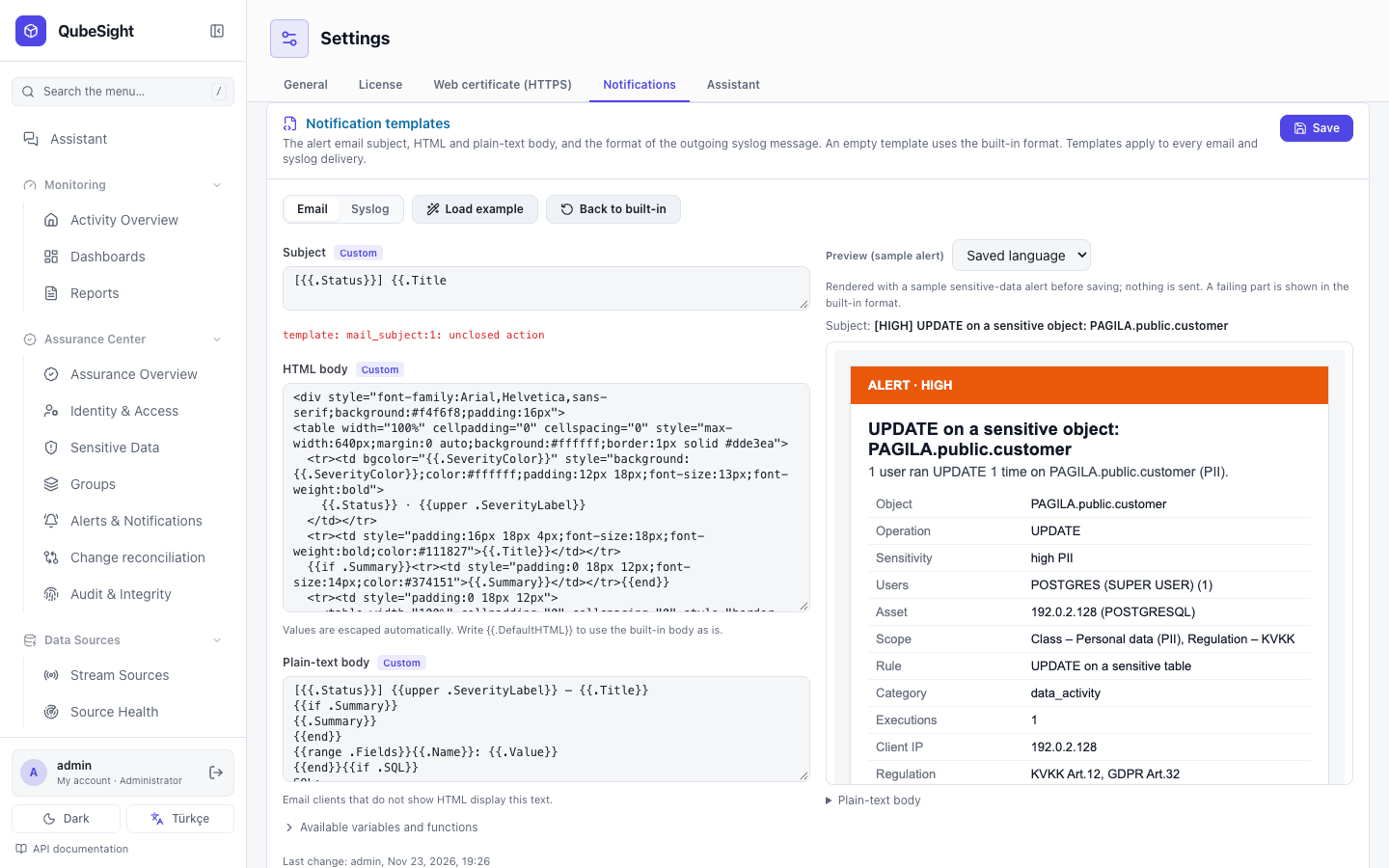
- Validation on save. When you save, every template is tried against sample notifications (an alert, a resolved alert, a test notification and an audit event), in Turkish and English, and in RFC 5424 and CEF syslog format. If any part fails to parse or run, produces empty output, exceeds the size limit or takes longer than 2 seconds, nothing is saved, the previous templates stay in effect, and the failing part is named under its field.
- No lost alerts. If a template part fails at send time, that part is sent in the built-in format and the error is logged. A template error never stops a notification.
- Audit. Every save is written to the audit trail (event
notification_templates_changed) with the length and SHA-256 digest of each part and the list of changed parts. The template text itself is not stored in the audit trail. - Size limits.
| Limit | Value |
|---|---|
| Source text per template | 64 KB |
| Subject output | 400 characters |
| Plain-text body output | 256 KB |
| HTML body output | 512 KB |
| Syslog message output | 16 KB |
| Time to render all samples on save | 2 seconds |
Saved templates take effect within about 15 seconds on every node.
The Notification templates card
| Element | Description |
|---|---|
| Email / Syslog | Switch between the email parts and the syslog part. |
| Load example | Fills the current tab's fields with a starter template that uses most variables. Nothing is saved until you click Save. Shown to administrators only. |
| Back to built-in | Empties the current tab's fields (and, on the syslog tab, turns off Do not send structured data (SD)). Nothing is saved until you click Save. Shown to administrators only. |
| Subject, HTML body, Plain-text body | Email parts. Each label shows Custom or Built-in. Placeholder: "Empty: the built-in format is used". HTML body notes that values are escaped automatically and that {{.DefaultHTML}} inserts the built-in body; Plain-text body notes that it is shown by email clients that do not display HTML. |
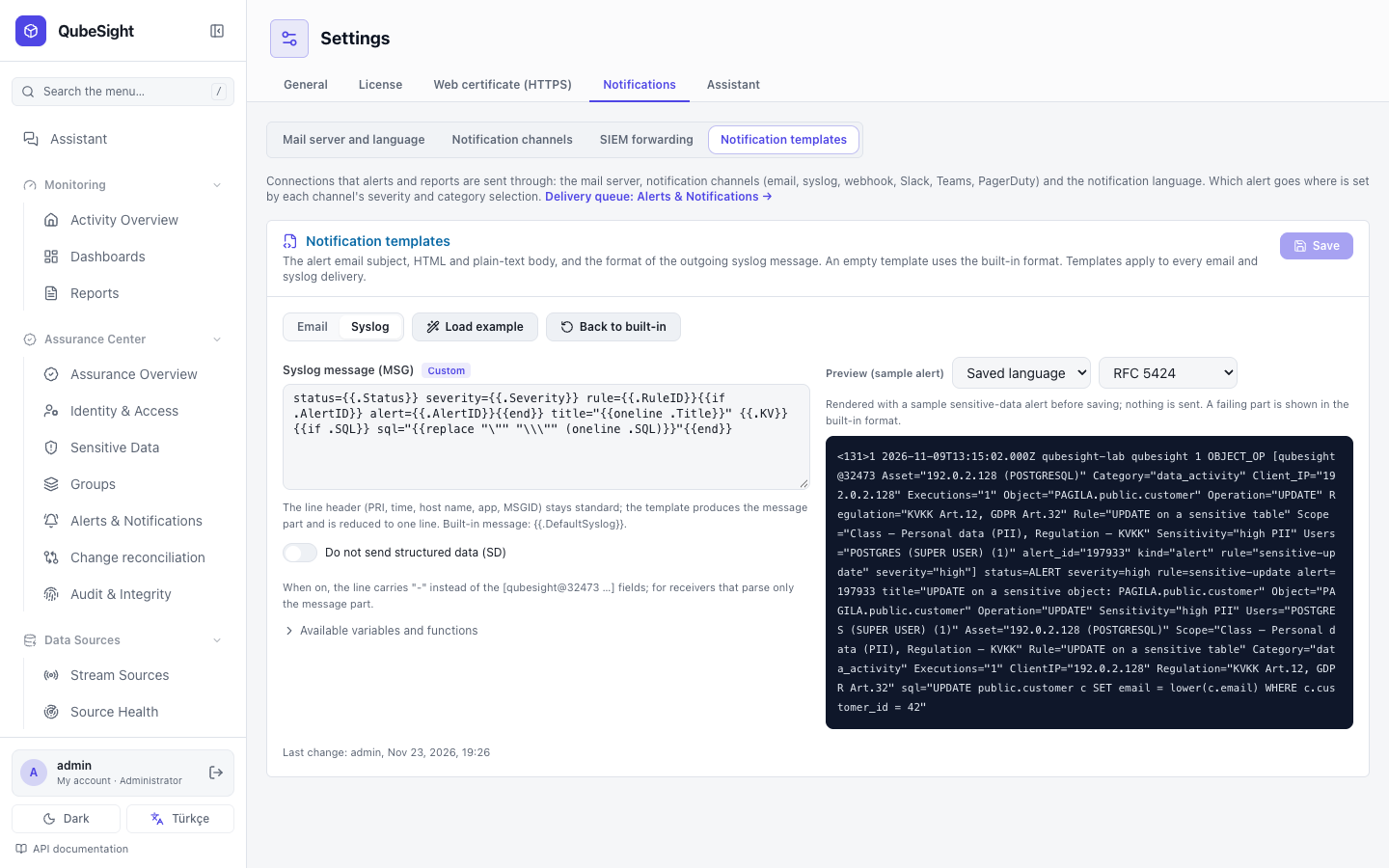
| Syslog message (MSG) | Syslog part, with the same Custom / Built-in label and a note that the header stays standard and the output is reduced to one line. |
| Do not send structured data (SD) | When on, the syslog line carries - instead of the [qubesight@32473 …] structured-data fields. Use it for receivers that parse only the message part. Default: off. |
| Error lines | A red line under a field gives the error of that part, from the live preview while you type and from the server after Save. An error that concerns all parts is shown below the fields. |
| Available variables and functions | Expandable list of everything in the tables below, with descriptions in the interface language. |
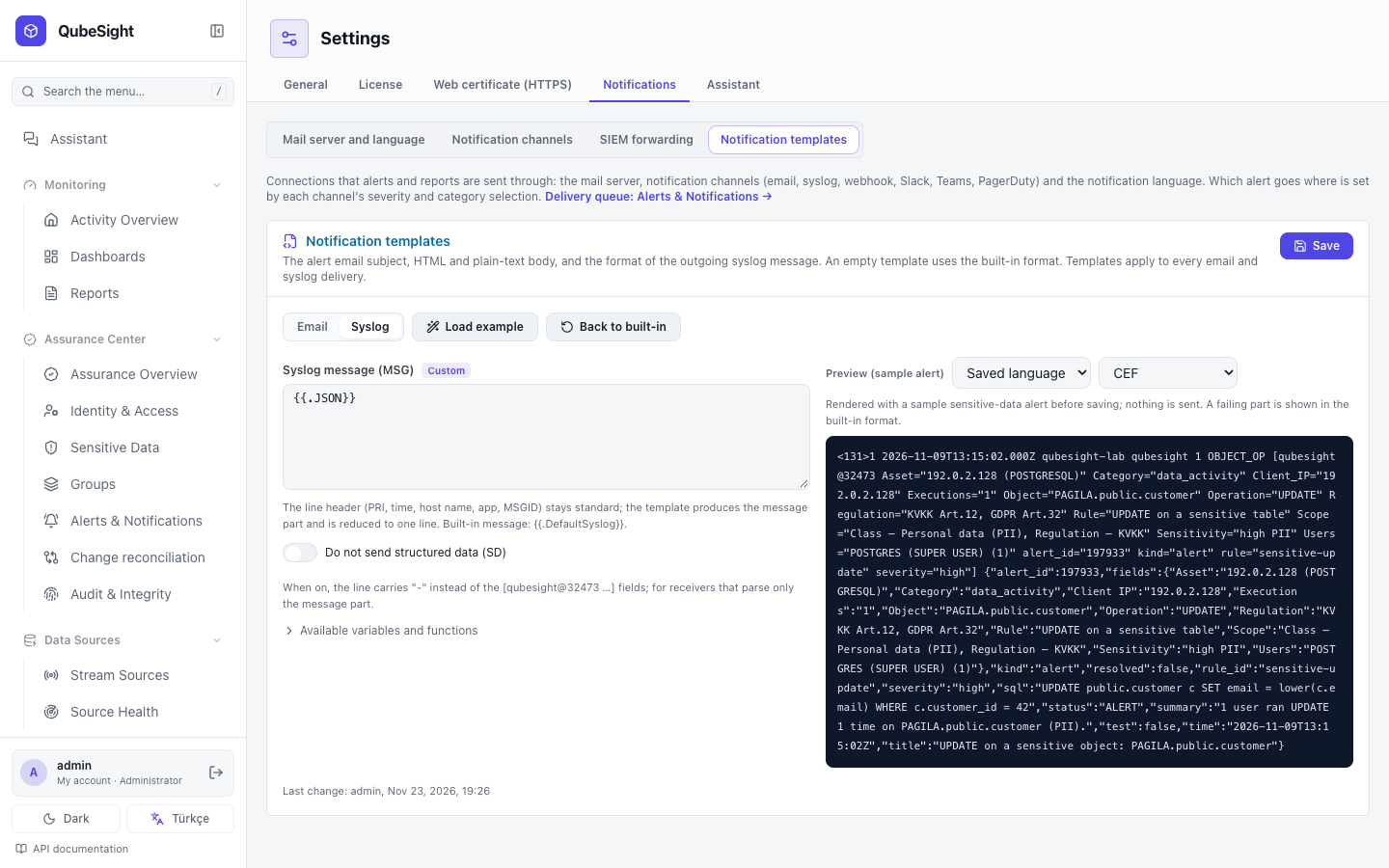
| Preview (sample alert) | Live preview, rendered with a sample sensitive-data alert about 0.5 seconds after you stop typing. Nothing is sent or saved; a failing part is shown in the built-in format. A language selector (Saved language, Türkçe (Turkish), English) and, on the syslog tab, a format selector (RFC 5424, CEF) change the preview. The email preview shows the subject line, the HTML body in an isolated frame (scripts do not run) and a collapsible plain-text body; the syslog preview shows the full line. If the preview request fails, "The preview failed." or the server's reason is shown. |
| Save | Validates and saves all parts. Enabled when something changed. Shown to administrators only; other roles see an "admin only" note instead. |
| Last change | "Last change: {user}, {time}", shown once templates have been saved. |
| Result line | "Notification templates saved; notifications from now on use this format." after a successful save; otherwise the server's reason or "The notification templates could not be saved.". If the templates cannot be loaded, "The notification templates could not be read." is shown and the fields stay read-only. |
Roles that see the Notifications tab (admin, analyst, dba, auditor) can read the templates and use the preview; for other roles the fields are read-only. Only an administrator can change and save them.
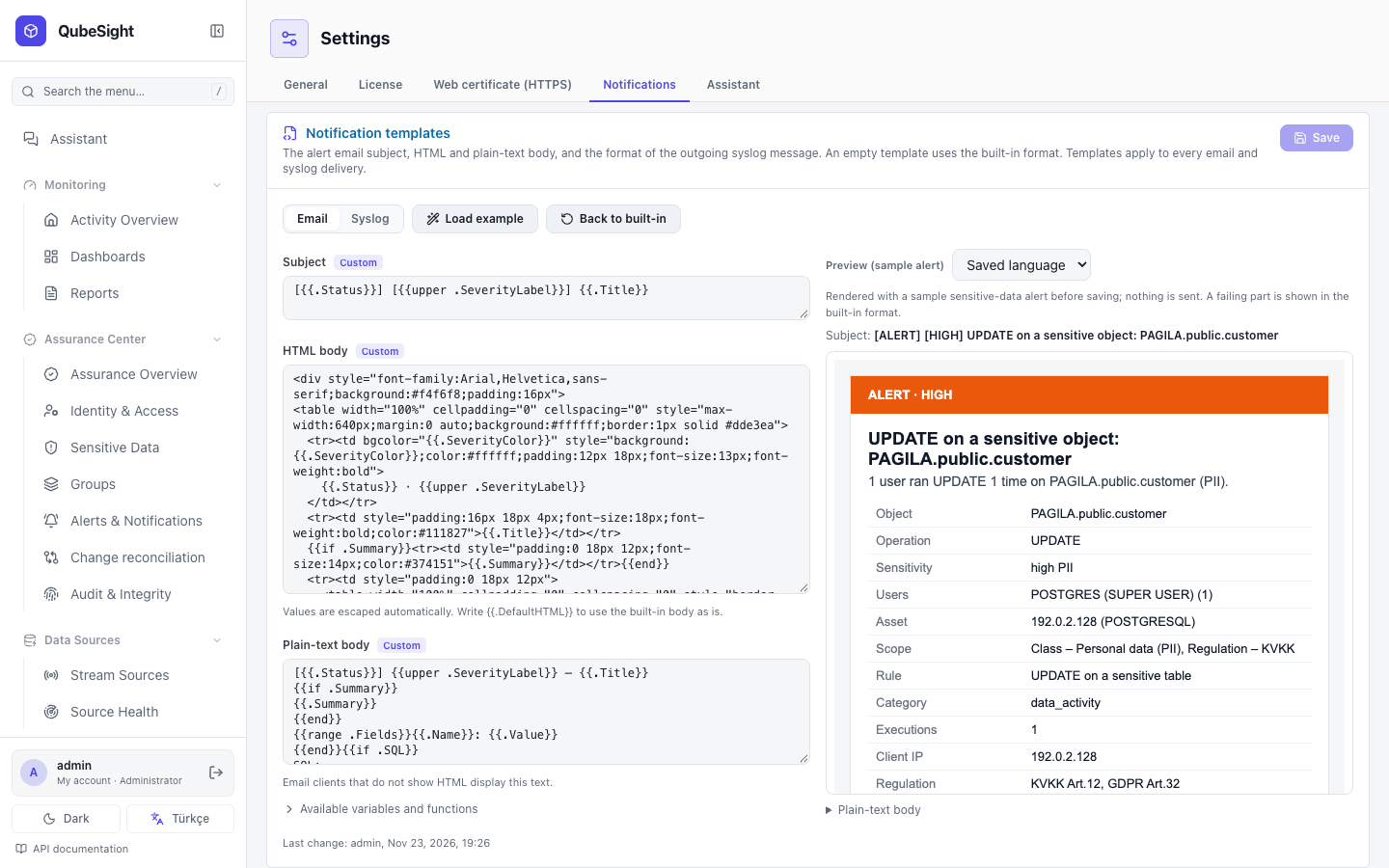
Customise the alert email
Prerequisites: you are signed in as admin, and an outgoing mail server or an email channel is configured.
- Open Platform → Settings → Notifications → Notification templates.
- Select Email.
-
Click Load example to start from the example, or type your own templates. To keep the built-in body and change only the subject, fill Subject only, for example:
-
Check the preview on the right. Switch the preview language to see both languages.
- Click Save. A message confirms "Notification templates saved; notifications from now on use this format."
- Open the Mail server and language sub-tab, enter a Recipient address under Test email and click Send test email. The test mail uses the new templates.
If Save is refused, the failing part shows the error under its field in red. Fix it and save again; the previous templates remain in effect meanwhile.
Customise the syslog message
- Open Notification templates and select Syslog.
- Enter the template in Syslog message (MSG). To wrap the built-in message, use
{{.DefaultSyslog}}. - Optionally turn on Do not send structured data (SD).
- Use the format selector in the preview to check the line for RFC 5424 and CEF channels.
- Click Save, then use Test on a syslog channel under Notification channels to send a test line.
Variables
All variables are written with a leading dot, for example {{.Title}}.
| Variable | Type | Description |
|---|---|---|
.Title |
text | Title in the notification language. For a simulated alert the [TEST] prefix is removed, because .Status already says TEST. |
.Summary |
text | Summary sentence. May be empty. |
.Severity |
text | critical, high, medium, low or info. |
.SeverityLabel |
text | Display name of the severity: Critical, High, Medium, Low, Info (Kritik, Yüksek, Orta, Düşük, Bilgi in Turkish). |
.Status |
text | ALERT, RESOLVED, TEST, AUDIT or REPORT in English; ALARM, ÇÖZÜLDÜ, TEST, DENETİM or RAPOR in Turkish. |
.Kind |
text | Notification kind, for example alert, test or audit. |
.Fields |
list | All fields. Each item has .Key (the language-independent field name), .Name (the name in the notification language) and .Value. |
.SQL |
text | The executed SQL, only when the channel or the rule includes SQL; otherwise empty. |
.SQLHTML |
HTML | The SQL formatted for an email body (escaped, line breaks and indentation kept). |
.RuleID |
text | Identifier of the alert rule. |
.AlertID |
number | Alert number; 0 when there is none. |
.MsgID |
text | Event type, for example OBJECT_OP or AUTH_LOGIN. |
.Time |
time | Event time in UTC; use with the date function. |
.TimeUTC |
text | Event time as 2006-01-02 15:04:05 UTC. |
.Link |
text | Link to the item in QubeSight, when available. |
.Actions |
list | Action buttons, when the notification has any (for example the one-click links in alert emails). Each item has .Label and .URL. |
.Lang |
text | Language of this notification: tr or en. |
.English |
yes/no | True when the notification language is English. |
.Test |
yes/no | True for a test notification. |
.Resolved |
yes/no | True when the alert was resolved. |
.Hostname |
text | Host name carried by the notification, when set. Often empty. |
.Reference |
text | Reference carried by the notification, when set. Often empty. |
.SyslogSeverity |
number | Syslog severity: critical 2, high 3, medium 4, low 5, info 6. |
.CEFSeverity |
number | CEF severity: critical 10, high 8, medium 5, low 3, info 1. |
.DefaultSyslog |
text | The built-in syslog message for the channel's format (the "title — summary" text for RFC 5424, the CEF body for CEF). Filled only in the syslog template. |
Methods
These are called like variables and return a value built from the notification.
| Method | Returns |
|---|---|
.Field "name" |
Value of one field. The name can be the Turkish key or the name in the notification language, case-insensitive: for example {{.Field "Object"}} or {{.Field "Nesne"}}. Empty when the field does not exist. |
.HasField "name" |
True when the field exists and is not empty. |
.KV |
All fields as key="value" pairs. Keys are the field key reduced to ASCII letters and digits (for example IstemciIP); " and \ are escaped. |
.CEFExt |
All fields as a CEF extension (key=value, CEF-escaped, sorted by key). |
.JSON |
The essentials as one-line JSON: status, severity, title, summary, rule_id, alert_id, time, fields, kind, test, resolved, and sql when present. |
.DefaultSubject |
The built-in email subject. |
.DefaultText |
The built-in plain-text body. |
.DefaultHTML |
The built-in HTML body, safe to embed. |
.SeverityColor |
Severity colour for HTML styles: critical #b91c1c, high #ea580c, medium #d97706, low #2563eb, otherwise #64748b. |
.SeverityTint |
Light background tint for the severity: critical #fef2f2, high #fff7ed, medium #fffbeb, low #eff6ff, otherwise #f8fafc. |
Common field names in alert notifications (English / Turkish key): Object / Nesne, Operation / İşlem, Sensitivity / Hassasiyet, Users / Kullanıcılar, Asset / Varlık, Scope / Kapsam, Rule / Kural, Category / Kategori, Executions / Yürütme, Client IP / İstemci IP, Regulation / Düzenleme. Which fields a notification carries depends on the alert type.
Functions
| Function | Usage | Description |
|---|---|---|
upper |
{{upper .SeverityLabel}} |
Upper case. In Turkish, Turkish letter rules apply (i → İ). |
lower |
{{lower .Title}} |
Lower case, Turkish-aware in Turkish. |
trim |
{{trim .Summary}} |
Removes leading and trailing spaces. |
trunc |
{{trunc 80 .Title}} |
Cuts to N characters and adds … when longer. |
default |
{{default "-" (.Field "Group")}} |
Returns the first argument when the value is empty. |
replace |
{{replace "\"" "'" .Title}} |
Replaces every occurrence of the first argument with the second. |
contains |
{{if contains .Title "UPDATE"}}…{{end}} |
True when the second text occurs in the first. |
join |
{{join ", " .SomeList}} |
Joins a list of texts with a separator. |
oneline |
{{oneline .SQL}} |
Replaces line breaks with spaces. |
cef |
{{cef .Title}} |
Escapes for a CEF extension value (\, =, line breaks). |
cefh |
{{cefh .Title}} |
Escapes for a CEF header field (\, |, line breaks). |
sd |
{{sd .Title}} |
Escapes for an RFC 5424 structured-data value (\, ", ]). |
leef |
{{leef .Title}} |
Replaces tabs, line breaks and | for LEEF. |
json |
{{json .Title}} |
JSON-encodes a value (including the quotes). |
date |
{{date "2006-01-02 15:04" .Time}} |
Formats a time in UTC with a Go layout. |
Go's built-in template functions such as if, else, range, with, eq, ne, and, or, not, len and printf are also available.
Examples
Email subject
The example loaded by Load example:
Result for the sample alert in English: [ALERT] [HIGH] UPDATE on a sensitive object: PAGILA.public.customer.
Plain-text body
The example loaded by Load example:
[{{.Status}}] {{upper .SeverityLabel}} — {{.Title}}
{{if .Summary}}
{{.Summary}}
{{end}}
{{range .Fields}}{{.Name}}: {{.Value}}
{{end}}{{if .SQL}}
SQL:
{{.SQL}}
{{end}}{{range .Actions}}
{{.Label}}: {{.URL}}{{end}}{{if .Link}}
{{.Link}}{{end}}

{{if .AlertID}}#{{.AlertID}} · {{end}}{{.RuleID}} · {{.TimeUTC}}
HTML body wrapping the built-in body
<p style="font-family:Arial,sans-serif;color:#6b7280">ACME Data Security Office — internal</p>
{{.DefaultHTML}}
Load example on the email tab also loads a complete table-based HTML layout that uses .SeverityColor, .Fields, .SQLHTML, .Actions and .Link.
Syslog message
The example loaded by Load example:
status={{.Status}} severity={{.Severity}} rule={{.RuleID}}{{if .AlertID}} alert={{.AlertID}}{{end}} title="{{oneline .Title}}" {{.KV}}{{if .SQL}} sql="{{replace "\"" "\\\"" (oneline .SQL)}}"{{end}}
A JSON message for a SIEM that expects JSON:
A message with a fixed prefix and the built-in content:
Troubleshooting
| Symptom | Cause and action |
|---|---|
| Save fails and a red error appears under a field | The template does not parse, produces empty output in one of the samples, or is too large or too slow. Read the error (it names the line and column), fix it and save again. |
| A field is empty in the output | The field does not exist in that notification type, or its name is misspelled. Use {{default "-" (.Field "…")}} and check the names in Available variables and functions. |
.SQL is always empty |
SQL is included only when the channel has Include SQL text in notifications turned on or the rule includes SQL. |
| Mail arrives in the built-in format although a template is saved | That part failed at send time and fell back to the built-in format. Check the control-plane log for "template" errors and test the template with the preview in both languages. |
| The SIEM parser stopped matching | The syslog template changed the message part. Use Back to built-in, or adjust the parser. Field keys in .KV and .CEFExt use ASCII letters only. |
Limitations
- One set of templates applies to the whole installation. Templates cannot be set per channel, per rule or per recipient.
- Slack, Microsoft Teams, PagerDuty and webhook notifications, SIEM forwarding and scheduled report emails do not use these templates.
- The syslog header (PRI, time, host name, app name, MSGID) cannot be changed by a template; the host name and app name are set per channel.
- The preview always uses the same sample sensitive-data alert; other notification types (audit events, resolved alerts) are checked only when you save.
- Template output is reduced to one line for the subject and the syslog message.