Cluster operations and the cluster map
This page is for administrators who run a QubeSight high-availability cluster. It explains how to read the cluster screens, what happens when a node fails, how the virtual IP moves, how to update, remove and bring back nodes, and the role of the witness. To build a cluster, see Add cluster nodes and a witness; for the concepts, see High availability and disaster recovery.
Enterprise
The Cluster tab requires the high-availability cluster and disaster-recovery capabilities and is visible to administrators and auditors. Only administrators can change it.
Cluster building blocks
| Component | In a cluster |
|---|---|
| ClickHouse (logs) | Every table is replicated: written on every full node, parts copied between them. |
| ClickHouse Keeper | Raft coordination for ClickHouse replication; one vote per member. |
| PostgreSQL (settings) | Patroni: one writer and a synchronous replica, automatic promotion. Coordination in the product's own etcd. |
| Redpanda (queue) | One broker per member; log topics replicated 3 times once 3 brokers run. |
| Worker | One consumer group; partitions are shared and taken over when a worker fails. |
| Control plane | On every full node; scheduled jobs run on one node at a time under a lock. |
| Log intake | A virtual IP (keepalived, VRRP unicast) on a healthy node. |
Why at least three votes
Automatic failover is a majority decision. With two votes, a failure leaves no majority: Keeper, etcd and Redpanda stop accepting writes and logs cannot be stored. A cluster is therefore always formed with at least three votes: two full nodes and a witness, or three full nodes. The witness is a small server that runs only a Keeper vote, an etcd member and a Redpanda broker; it runs no application. Five votes tolerate two simultaneous failures. The number of votes should be odd.
The add-node wizard enforces this: while the cluster has fewer than three members, Join cluster asks you to select the other servers that join together.
The Cluster tab
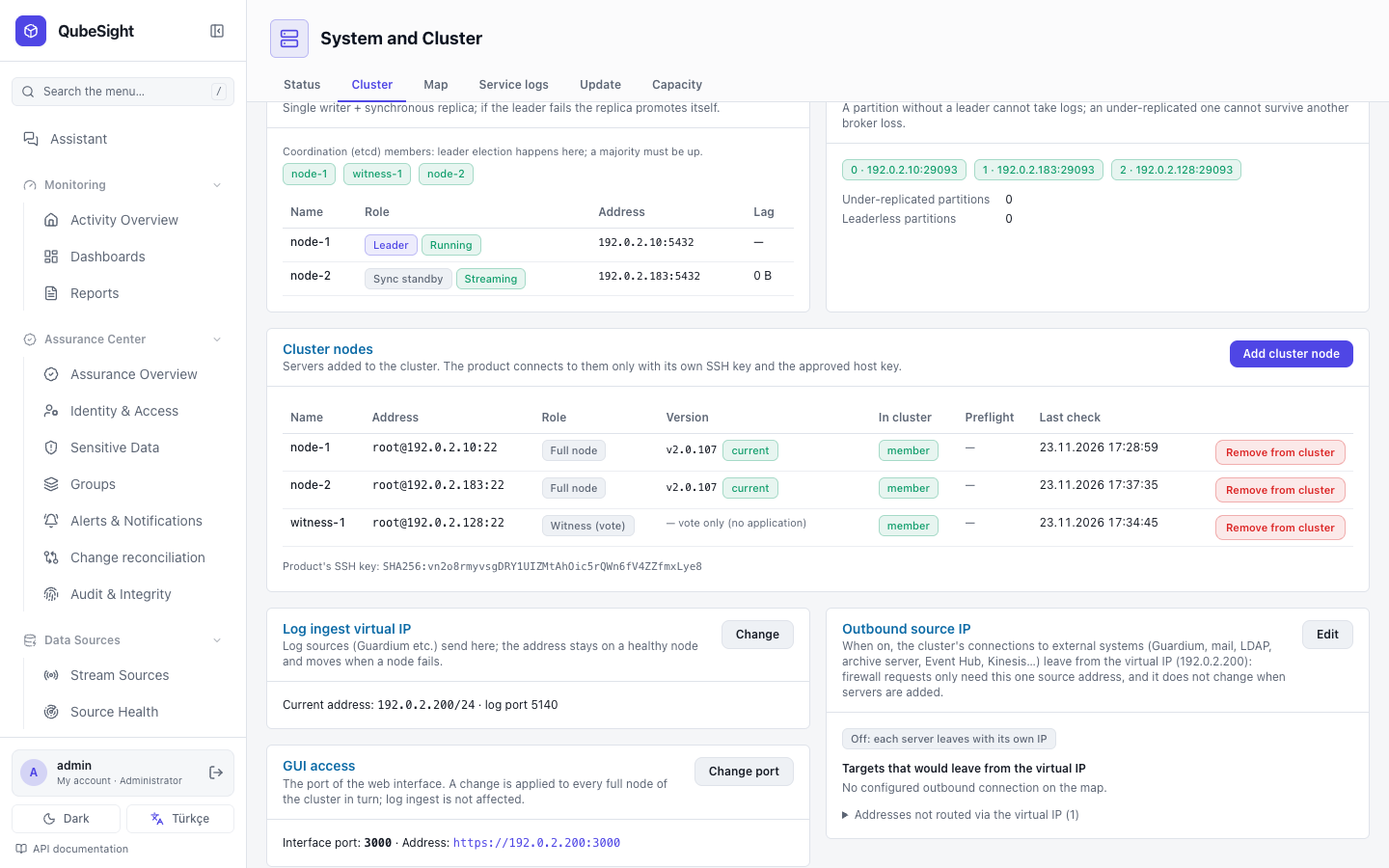
Platform → System and Cluster → Cluster shows the live state, refreshed every 15 seconds and never stored:
- ClickHouse replica summary, Keeper leader and followers, etcd members, Patroni leader, replicas and lag, Redpanda brokers with leaderless or under-replicated partitions, and the virtual IP probe.
- Cluster nodes: each node with role (Full node or Witness (vote)), Version, In cluster (member, detached, connected only, lost — unreachable; for a member also unreachable with last seen, or partial), Preflight and Last check. Click a row for the current or last job, Earlier jobs ({n}), the pinned host key and the preflight checks.
- Log ingest virtual IP: the only place where the virtual IP is changed.
- GUI access: the port of the web interface on every full node.
- Outbound source IP: whether connections to external systems leave from the virtual IP; the panel lists the targets that leave (or would leave) from it before you turn it on.
See System and Cluster for every field.
Node actions (administrators only; all are disabled while a cluster job runs):
| Action | Effect |
|---|---|
| Add cluster node | Enrols a server: name, address, SSH port, user, role; the SSH host key is confirmed by fingerprint; the product's SSH key is installed once with a password that is never stored; a read-only preflight checks OS, CPU, memory, disk, container engine, ports, clock and reachability. |
| Make this server the first node | Turns the server running the UI into the first cluster node. Writers pause for a few minutes while PostgreSQL moves to Patroni and ClickHouse tables become replicated; incoming logs wait in Redpanda. |
| Join cluster | Installs Keeper vote, ClickHouse replica, PostgreSQL replica, Redpanda broker, applications and the virtual IP on the node. A failed join is rolled back. Without a cluster, the server running the UI first becomes the first node and the node then joins by itself. |
| Update | Shown only on a full member node (not the source node) that runs a different version than the cluster definition. Updates its application services. |
| Remove from cluster | Shown on member nodes when the cluster has more than one member. Moves the virtual IP and PostgreSQL leadership away if held, drops the ClickHouse replica record, decommissions the broker and frees the Keeper vote. Services are stopped; data directories stay on the server. A node cannot remove itself; run it from another node's interface. |
| Remove | Shown on nodes that are not members. Removes the node from the list only; services on the server are not stopped. Optionally withdraws the product's SSH key from the server (selected by default). |
| Re-check | Shown on nodes that are not members. Runs the preflight again. |
Join, update, remove from cluster and first node, as well as changes to the virtual IP, the GUI port and the outbound source IP, are confirmed with Your administrator password, the signed-in account's own local password. After five wrong passwords in 15 minutes the cluster operation is refused for that account; sign-in is not blocked by this limit. Each wrong password also counts toward the account's sign-in lockout under the password policy, and a locked account cannot confirm a cluster operation.
SSO and LDAP accounts cannot run cluster operations
The confirmation needs a local password. An administrator signed in through SSO or LDAP cannot run these operations; use a local administrator account.
The cluster map
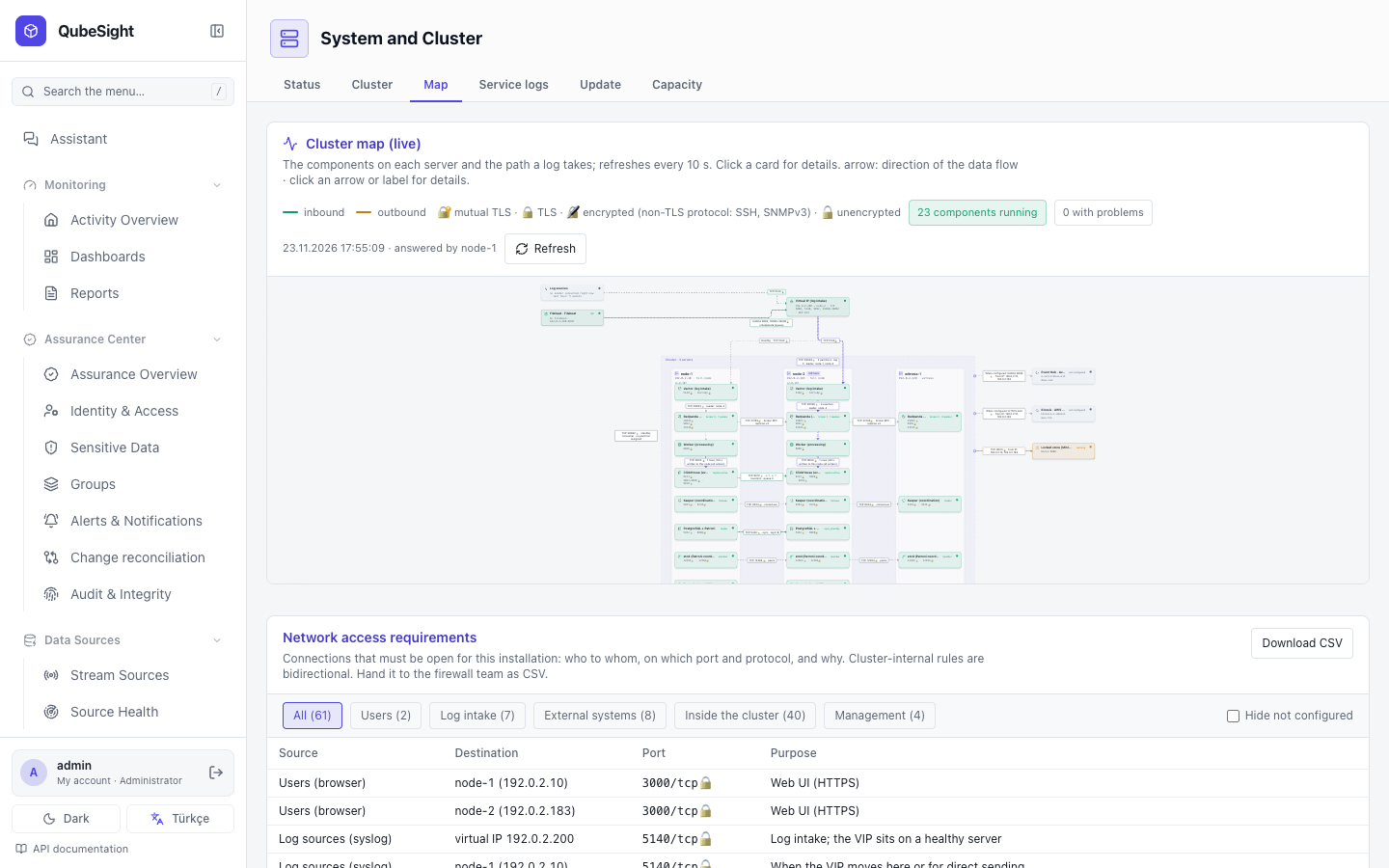
Platform → System and Cluster → Map draws the live cluster: per server, the product containers with state and published ports, whether it holds the virtual IP, the log senders connected to Vector, rows written locally and fetched from replicas in the last 60 seconds, and the replication queue. Cluster-wide it shows Redpanda events per second, the worker consumer group, and Keeper, etcd and Patroni state. It refreshes every 10 seconds.
The server holding the virtual IP is marked VIP here; a server with a service on a different version is marked update pending. Click a server box for its role, installation method, SSH state, Reachability (when unreachable or partial), Egress IP, service versions and Product containers without a row on the map.
Edges are drawn in the direction of the data flow, with the port and the protection of each path (mutual TLS, TLS, encrypted non-TLS such as SSH or SNMPv3, or unencrypted). Click an edge for details: who opens the connection, port and purpose. The top row shows external paths (Guardium SNMP trap and REST, Event Hub, Kinesis, Filebeat, Guardium archive) and warns, for example, when the Guardium trap target is not the virtual IP or when a log sender connects directly to a node instead of the virtual IP.
Ports come from the cluster definition and are the same on every node. In this release only the virtual IP can be changed from the interface.
A red component shows why it is red: on the card, in the server's component list and as Reason in its detail panel. Typical reasons are a stopped container with its exit code (and out of memory (OOM) when the engine killed it), a failing or timed-out health check with the check's last output, a container that does not exist on the server, or the result of the cluster's own probe (Keeper, Redpanda broker metadata, etcd, Patroni, ClickHouse replica). The full list is in System and Cluster → Why a component is red.
The virtual IP
Log sources and users should always use the virtual IP (or a DNS name that points to it):
- Log intake. keepalived checks the local Vector syslog port (5140) every 3 seconds; after two failures the node gives up the address and another healthy node takes it, typically within seconds. If the UI port is also monitored, a node whose UI does not answer gives up the address only if a peer has both ports healthy, so logs are never left without a node.
- No preemption. When the former holder comes back, it does not take the address back, avoiding a second interruption.
- Web UI.
https://<virtual IP>:3000opens the UI on whichever node holds the address. Sessions are in PostgreSQL, so a failover does not sign users out. The web certificate is shared by all nodes. - Change the address. Edit it under Log ingest virtual IP. Applying restarts keepalived on every node with the new address; log ingest may pause for a few seconds. Repoint log sources to the new address.
- Outbound connections. Optionally, outbound connections to external systems (Guardium, mail, LDAP, archive server, cloud sources) can leave from the virtual IP, so firewall rules need only one source address.
On AWS high-availability deployments an internal Network Load Balancer replaces the VRRP virtual IP.
Warning
Logs sent directly to a node's own address are lost while that node is down. Point every source at the virtual IP.
What happens when a node fails
When one full node of a three-vote cluster fails without warning, the expected behaviour is:
| Layer | Behaviour |
|---|---|
| Virtual IP | Moves to a healthy node within seconds. |
| PostgreSQL | Patroni promotes the replica within about 20 seconds; applications find the new writer automatically. When the failed node returns, it rejoins as a replica. |
| Keeper, etcd | The remaining majority keeps working; the Keeper leader moves if needed. |
| ClickHouse | Writes pause briefly (tens of seconds) while coordination settles, then continue on the remaining replica. |
| Redpanda | Partition leaders move to the remaining brokers; log topics have 3 replicas, so no acknowledged event is lost. |
| Worker | The consumer group rebalances; events that the failed worker had not committed are processed again. Duplicates are merged by their deterministic event id. |
Events that reached Kafka are not lost. The exception is plain or TLS TCP syslog: there is no application-level acknowledgement between the sender and QubeSight, so a few lines in flight on the connection to the failed node can be lost. For zero-loss sources use Filebeat (Kafka) or a sender with a disk queue (for example RELP), sending to the virtual IP. See How a log line flows.
What to check after a failure:
- Cluster tab: the failed node shows unreachable with its last-seen time; Patroni shows a leader; no leaderless partitions.
- Status tab and open Platform component alerts.
- Map: the virtual IP holder and that senders are connected to it.
Bring a node back
- Same server, still installed. Start it again. Its services rejoin: PostgreSQL as a replica, ClickHouse fetches missing parts, the broker rejoins.
- Server rebuilt. Reinstall it with Restore from backup in the web installer (or
install.sh --restore-from …) using the cluster's backup location and passphrase. The restore reads the cluster definition from the backup and, because the cluster is running, rejoins the node in its own place (same name, numbers and role). Its data comes from the cluster, not from the backup. You confirm the product's SSH key fingerprint during the restore. - All nodes lost. The first server restored from backup comes back as a one-member cluster in its own place, with data from the backup. The other nodes stay in the definition as lost ("Nodes keeping their place") until they are restored and rejoin.
A failed join is rolled back. Remains of an old interrupted join can be listed and removed:
docker compose exec control-plane ./control-plane -cluster-orphans          # list
docker compose exec control-plane ./control-plane -cluster-orphans --remove # remove
Updates on a cluster
The update service runs on the source node. Apply patches there; the other nodes follow automatically, one service at a time. See Upgrades.
Limitations
- In this release, ports cannot be changed from the interface; only the virtual IP can.
- Joining updates the peer lists of existing nodes for new addresses only; it does not propagate port changes.
- Ingest TLS is configured with command-line tools on the cluster; see Syslog and Kafka TLS.
- SNMP traps (UDP) sent to a node during the seconds its listener restarts or fails over are lost; UDP has no retransmission.
- A two-vote cluster is not supported for automatic failover; with two votes, one failure stops writes.