Guardium syslog
This guide shows how to send Guardium alert messages to QubeSight over syslog, and how QubeSight parses them. Use it when your Guardium appliances already forward syslog, or when SNMP traps cannot reach QubeSight.
Community Enterprise
How it works
A Guardium policy rule with an alert action formats each matching event with a message template and writes it to the appliance's syslog. Guardium's remote logging forwards it to QubeSight's syslog endpoint. QubeSight's collector recognises the line with the built-in Guardium LEEF or Guardium JSON template parser, splits it into columns and passes it to the internal Kafka; the worker stores it in the event table.
flowchart LR
  P[Guardium policy rule] --> T[Message template]
  T --> S[Appliance syslog]
  S -- remote log, TCP 5140 --> V[QubeSight collector]
  V --> K[Internal Kafka] --> W[Worker] --> E[Event table]
No integration has to be created in QubeSight for this path. The only QubeSight-side step is allowing the sending appliances.
Prerequisites
- TCP 5140 open from every Guardium collector and aggregator that forwards syslog to the QubeSight host (in a cluster, to the virtual IP).
- In a cluster with ingest TLS enabled, TCP 6514 instead (see Syslog and Kafka TLS).
- Access to the Guardium GUI (policies, message templates) and CLI (remote logging).
Step 1: allow the appliances in QubeSight
- Open Data Sources → Stream Sources → Access allowlist (Syslog/SNMP) (administrators only).
- Under Defined Guardium devices check that every appliance that will send syslog is covered. Press Fetch suggestions to see recent senders.
- Add missing addresses, for example
198.51.100.20, and press Save.
If the allowlist is enforced and an appliance is not listed, its lines are rejected and shown under Dropped sources.
Step 2: prepare the message template in Guardium
- In Guardium, open Setup → Tools and Views → Global Profile → Message Templates.
- Edit the LEEF template, or create one, and paste a single-line template.
The easiest source for a complete template is QubeSight itself: open Guardium → Live data (SNMP), open the Guardium LEEF message template sub-tab and press Copy on Recommended: no delay (real time). The same text works for syslog.
A shorter template that follows the rules below looks like this:
LEEF:1.0|IBM|Guardium|12.0|%%ruleDescription|ruleID=%%ruleID|severity=%%severity|devTime=%%receiptTime|serverType=%%serverType|dst=%%serverIP|dstPort=%%serverPort|src=%%clientIP|srcPort=%%clientPort|violationID=%%violationID|dbUser=%%DBUser|osUser=%%OSUser|dbName=%%DBName|serviceName=%%serviceName|sourceProgram=%%SourceProgram|sql=%%SQLString
Template rules:
- Put
sql=%%SQLStringlast. The SQL text can itself contain|, so QubeSight reads it to the end of the line. Since 2.0.107 one exception is made: result and ticket fields placed aftersql=are still read as fields (see Limitations). Every other|key=aftersql=stays part of the SQL. - Put server-side facts (rule, severity, time, addresses, violation id) first and client-controlled text (DB user, OS user, database name, service name, source program, error, SQL) after them, with the DB user first among them. When a key appears twice, the first value wins, so text typed by a database client cannot override a real field.
- The text is a single line. Do not add line breaks. You may remove fields; do not reorder them.
- Key names are case- and underscore-insensitive:
clientIP,client_ipandCLIENT_IPare the same key. Guardium variable names and the short LEEF names (src,dst,srcPort,dstPort,usrName,type,start,sql,ruleDesc) are recognised. - Keys that map to no column are not lost: they are stored as JSON in the Additional info (
additional_info) column.
A JSON template is also supported (for example {"time":"%%receiptTime","client_ip":"%%clientIP",...,"sql_query":"%%SQLString"} with the SQL member last), but LEEF is recommended. A JSON line must contain at least one known column key; otherwise it is treated as unrecognised.
Delayed variables
Guardium delays messages that contain %%RecordsAffected, %%ResponseLength, %%succeeded, %%uid_chain or %%compressed_uid_chain, and according to Guardium these variables carry no value in an "alert only" syslog notification. Leave them out of the syslog template; the archive fills these fields the next day.
Step 3: add the alert action to the policy rules
- In the Guardium policy that logs the activity you want to monitor (rules with LOG FULL DETAILS), add an alert action that notifies through syslog using the template from step 2.
- Install (or reinstall) the policy on the collectors.
Guardium sends a message only when a rule with this action matches.
Step 4: forward syslog to QubeSight
On each Guardium collector and aggregator, configure remote logging of the facility that carries the alert messages to QubeSight over TCP, for example:
For TLS in a cluster (port 6514 with the installation's root certificate):
The exact syntax depends on the Guardium version; check the CLI reference of your release. Use the QubeSight virtual IP in a cluster.
Verification
- Run a statement on a monitored database that matches a rule with the syslog action.
- Open Platform → Pipeline → Parsing → Built-in parsers. The Guardium LEEF row (or Guardium JSON template) shows lines in Last 24 h and a recent Last line.
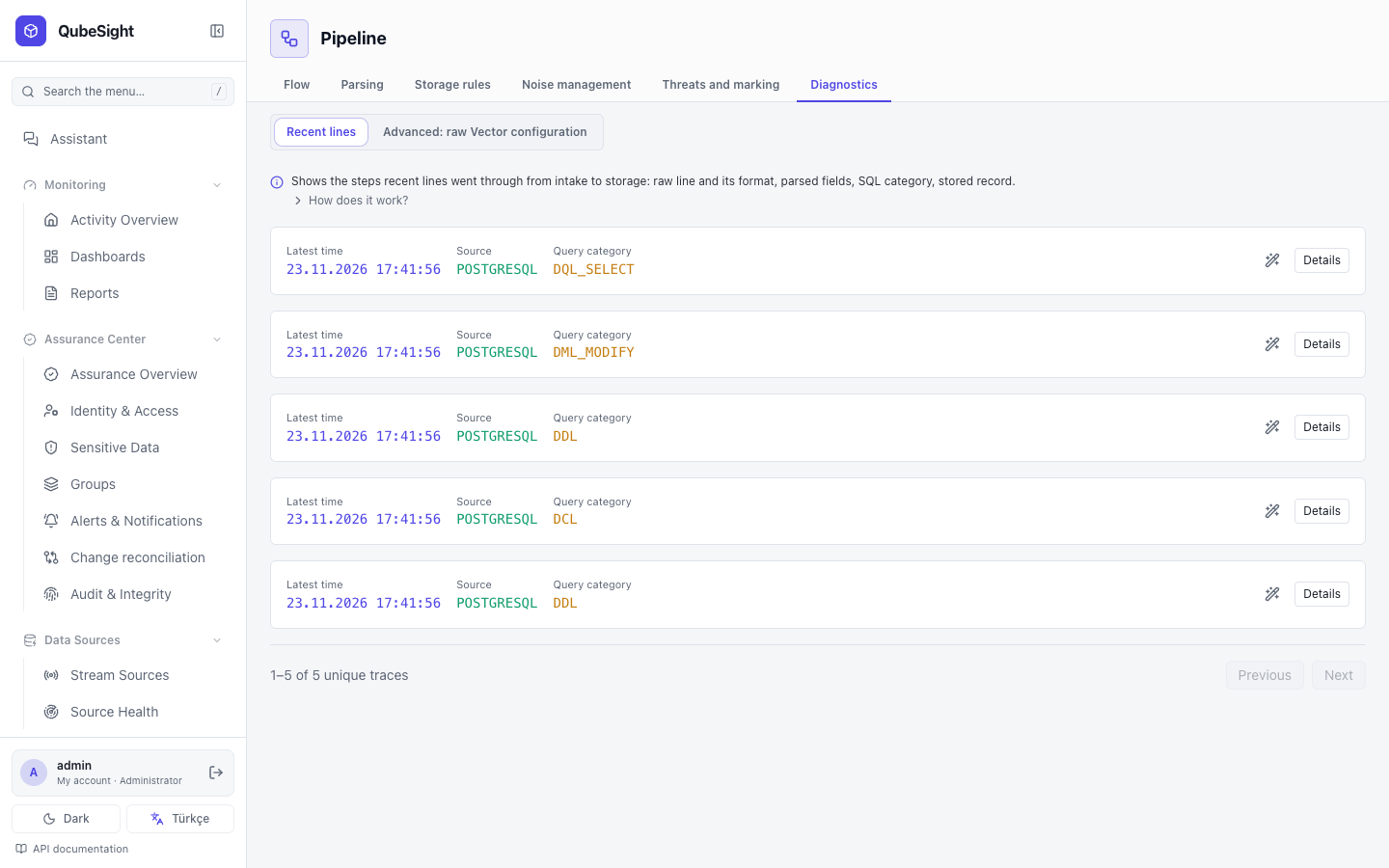
- Open Platform → Pipeline → Diagnostics → Recent lines and select the line: the format is LEEF and the fields (DB user, client IP, SQL) are filled.
- Search the event in Reports. Guardium live rows have the product Guardium; the sending appliance's address is in the sender IP column.
Troubleshooting
| Symptom | Cause and action |
|---|---|
| Appliance listed under Dropped sources | Add it to the allowlist. |
| Nothing arrives and nothing is dropped | Remote logging not configured, UDP used instead of TCP, or port 5140 blocked. QubeSight accepts syslog over TCP only. |
| Lines arrive in Unrecognized logs | The message is neither LEEF (first marker LEEF:) nor a JSON object with known keys. Check the template. |
| SQL is cut or other fields contain SQL text | sql= is not the last field of the template, and the fields after it are not only result or ticket fields (see Limitations). Move sql=%%SQLString to the end. |
| Event times are shifted by hours | See the time zone limitation below. |
Limitations
- Time zone. Guardium's
devTime/%%receiptTimeis the appliance's local time without a zone. On the SNMP live path QubeSight derives the zone from the trap's arrival time and stores UTC. On the syslog path this correction is not applied: the time in the message is stored as sent. Run the appliances in UTC, or prefer the SNMP live path, so that live rows and archive rows (UTC) line up. - Fewer fields than the archive. Verb, objects, session id and the success flag are not in a typical alert message; the archive fills them the next day.
- Reconciliation. Live Guardium rows are replaced by the matching archive rows when the archive is restored (see SNMP live path). Matching relies on the event time; rows with a shifted local time may not match and then stay as an additional row.
- Fields after
sql=(trade-off). Since 2.0.107, if the line ends with result or ticket fields after the SQL, for example…|sql=GRANT SELECT ON customers TO report_user|error=|ticketid=CHG-1042, those fields are read as fields and are not added to the SQL. This applies only to an unbroken tail at the very end of the line made of these keys:error/lastError(a value without;or|),succeeded,recordsAffected,responseLength,responseTime,returnedDataCount(a value without spaces) andticketId(an id such asCHG-1042). The trade-off:- An SQL statement that really ends with text of that form, for example a string literal ending in
|error=x, loses that tail from the SQL column; the tail is stored as a field instead. - If any identity, time, address, sender or type key (for example
dbUser,src,devTime,type) appears aftersql=, nothing is split: the whole rest of the line stays SQL and the event is marked with a[QS EMBEDDED FIELD]note. Text typed by a database client therefore cannot set the user, address or time of an event. - The original line is always stored unchanged in the [QS] Raw Payload (
raw_payload) column, so the exact text Guardium sent can be checked in reports. Withsql=%%SQLStringas the last field none of this applies, which is why it remains the recommended order.
- An SQL statement that really ends with text of that form, for example a string literal ending in
- Delivery. Plain TCP syslog has no application-level acknowledgement; lines in flight when the receiving node fails can be lost. The archive restores the complete day.