Offline (air-gapped) installation
This page explains how to install QubeSight on a server without internet access with the offline bundle: what the bundle contains, how to copy, unpack and install it with the web installer or the terminal installer, and what the installer does with it. It also describes the manual image procedure as a fallback and the offline setup wizard qubesight-setup.
Community Enterprise
How it works
The offline bundle qubesight-<version>-offline.tar.gz (for this release qubesight-2.0.110-offline.tar.gz) holds everything an installation needs: the release source tree, every container image and, optionally, the embedded language model. You unpack it on the server and run one command. No flags and no internet access are needed.
flowchart LR
  A[Copy bundle<br/>to server] --> B[Unpack]
  B --> C[./install.sh --web<br/>or ./install.sh]
  C --> D[Verify images<br/>SHA-256]
  D --> E[Load missing<br/>images]
  E --> F[No build:<br/>images present]
  F --> G[Start services]
When it runs from an unpacked bundle, the installer:
- finds the bundle by itself: the
images/andmodels/directories next toinstall.sh(or in its parent directory, or in the directory named byQUBESIGHT_BUNDLE_DIR); - uses the bundled language model from
models/as if--assistant-modelhad been given; the model is verified with SHA-256 and not downloaded; - verifies every image archive that is not yet on the server against
images/SHA256SUMS, then loads it withdocker load(orpodman load). A missing or corrupt archive stops the installation with its file name; - does not build from source, because every image of this release is now present (
--buildforces a build); - installs exactly as an online installation from then on.
The bundle is the same release as the online one; the installation that results from it is identical.
What the bundle contains
| Item | Content |
|---|---|
| Release source tree | install.sh, setup.sh, uninstall.sh, docker-compose.yml, the web installer and the rest of the release, without any secrets |
images/IMAGES.txt |
One line per image: image name, image id and archive file |
images/SHA256SUMS |
The SHA-256 checksum of every image archive; checked before an archive is loaded |
images/*.tar.gz |
The image archives (docker save, compressed): the QubeSight images built for this release, the third-party images of every optional component (Guardium archive restore, local locked store, update service, embedded language model), and the cluster images (ClickHouse Keeper, etcd, Patroni, keepalived) |
models/ |
The embedded language model gemma-3-4b-it-Q4_K_M.gguf with its SHA256SUMS. A bundle can be produced without the model; then this directory is absent. |
OFFLINE-README.md |
A short installation note (Turkish and English) |
BUNDLE-INFO.txt |
Version, source commit, architecture (linux/amd64), number of images, whether the model is included, build time |
A checksum file qubesight-<version>-offline.tar.gz.sha256 is delivered next to the bundle. The bundle is about 4 GB with the model and about 1.6 GB without it; the images are for x86_64 (amd64).
Because the cluster images are in the bundle, a high-availability cluster (Enterprise) can also be built offline: when you add a node, the product transfers these images from the first server to the new node.
Prerequisites on the server
| Item | Requirement |
|---|---|
| Operating system | Ubuntu Server 22.04 or 24.04 LTS, x86_64 (amd64). The product images are amd64 only. |
| Container engine | Docker Engine from Docker's packages (docker-ce, docker-ce-cli, containerd.io, docker-compose-plugin), or Podman with Docker CLI emulation and Compose v2. docker-buildx-plugin is not needed. |
| Node.js | 20 or newer, only for the web installer. Ubuntu's own nodejs package is too old; use the Linux x64 archive from nodejs.org or the NodeSource package. Without Node.js, use the terminal installer. |
| Tools | bash, openssl, iproute2, awk, sed, grep, df, gzip, and sha256sum (or shasum or openssl) to verify the archives. Optional: python3 (sizing recommendation), arping (virtual IP check). |
| Disk | Room for the bundle, its unpacked copy and the loaded images, in addition to the data. See System requirements and sizing. If a larger data disk is mounted, the installer offers it for the data (see Data disk). |
| Access | root, or a user in the docker group with sudo for the virtual IP. |
| Network | No internet access. Open the ports you choose (by default 3000/tcp, 5140/tcp, 9092/tcp, 162/udp) and allow the server to reach your log sources and, for a restore, the backup location. |
Install from the offline bundle
- Obtain the bundle and its
.sha256file for your release from QubeSight, and copy both to the server with whatever transfer your site allows. -
Verify the transfer and unpack the bundle where the installation should live, for example under
/opt. The installation directory is the directory the bundle unpacks to. -
Start the installation with one of the following:
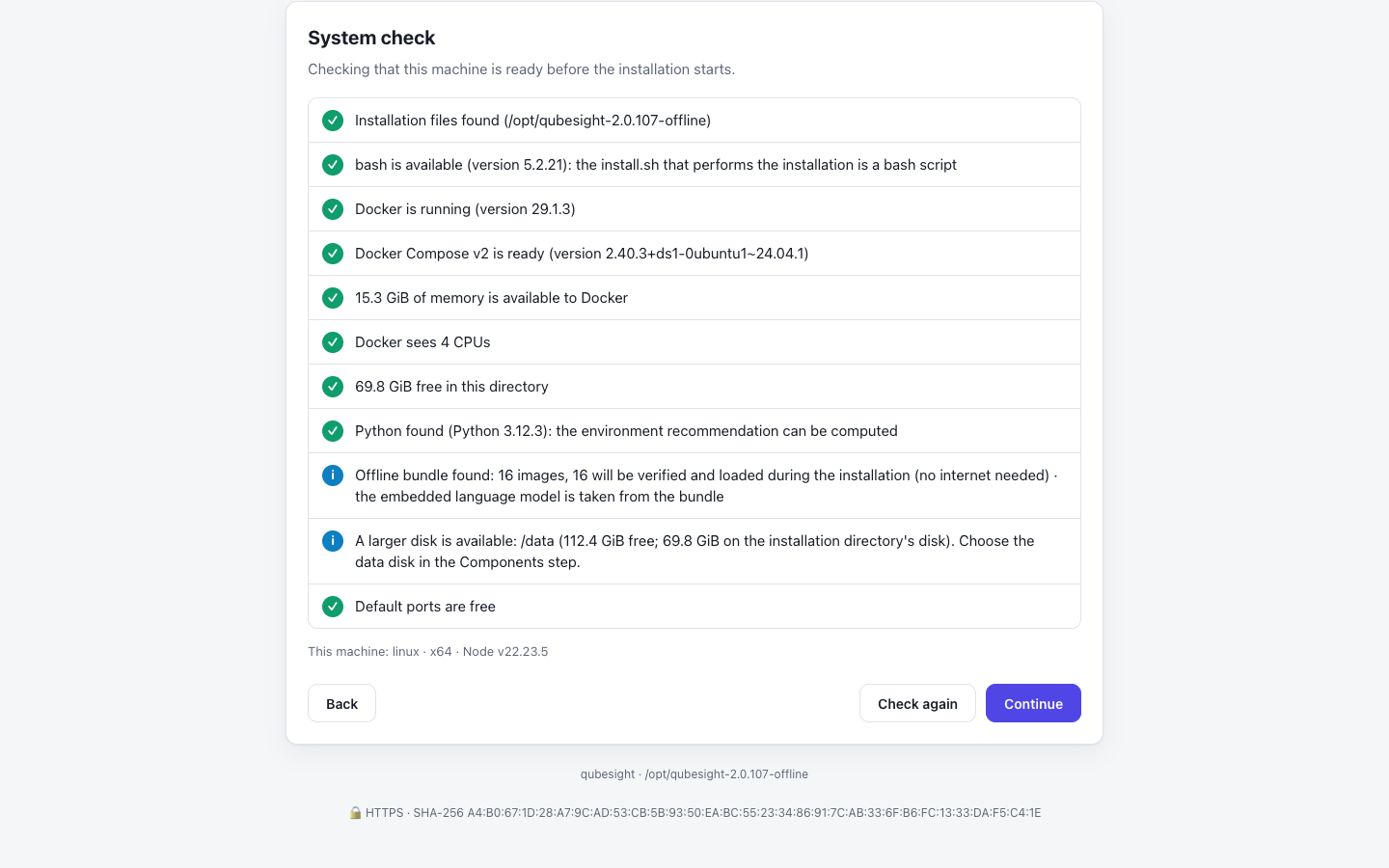
Open the printed link from a browser that can reach the server. The System step reports the offline bundle and how many images will be loaded. In Components, Build the images from source is off, with the note that no build and no internet are needed, and Data disk offers a larger disk if one is mounted. See Web installer.
The script asks its questions as on any new installation and prints that the images of the offline bundle are verified and loaded. See Terminal installer (install.sh).
export QUBESIGHT_BACKUP_PASSPHRASE="$(cat /root/qs-backup.pass)"
sudo -E ./install.sh --yes --data-dir /data/qubesight
With
--yesno question is asked; give--data-dirif the data belongs on a separate disk, otherwise the data stays in the installation directory. See Unattended installation. -
Continue with After installation.
Re-running the installer. The installer records which bundle it has loaded (.qs-bundle-images in the installation directory). A re-run with the same bundle loads only images that are missing. A newer bundle replaces images on the server that have the same name but a different image id.
After the installation you may delete images/ and models/ to free disk space. Keep the bundle if you may need to reinstall the server.
Bundle in another place. If the bundle's images/ and models/ are not next to install.sh or in its parent directory, set QUBESIGHT_BUNDLE_DIR to their directory. The installer stops if that directory contains neither.
Embedded language model offline
With a bundle that contains models/, nothing needs to be done: the installer and the web installer take the model from the bundle.
With a bundle without the model, copy the model file (gemma-3-4b-it-Q4_K_M.gguf, about 2.5 GB) from a connected machine and pass it:
The file is verified with the same SHA-256 as the in-product download. Without the file, the installer tries the download address once, briefly; on a server without internet it then warns that the server is offline and the installation completes without the model. You can provide it later with ./install.sh --assistant-model <file> or in Platform → Settings → Assistant. A site mirror can also be given with QUBESIGHT_ASSISTANT_MODEL_URL (the file is still verified with the same checksum).
Restore onto an offline server
Unpack the bundle as above and choose Restore from backup in the web installer, or use --restore-from on the terminal. The server must reach the backup location. See Restore from a backup.
When images are missing
If an image is missing and the server cannot reach Docker Hub, the installer does not attempt a build. It stops before the build, lists the missing images and says that the server cannot reach the internet: unpack the offline bundle and run the ./install.sh inside it. The web installer shows the same advice as its hint.
Manual image procedure (fallback)
Use this procedure only when you cannot use the offline bundle, for example when your site must transfer images through its own registry or review process. You save the images on a connected machine, load them on the server, and install with --no-build.
Images
Images are not installed, they are loaded into the engine's local image store. QubeSight's own images are not published on a public registry; they come from QubeSight. Take the third-party images from the same set too: several upstream tags float, and a later pull can bring a different, untested patch version.
Always required
Replace <version> with your release version, for example 2.0.110 (the VERSION file of the release).
| Image | Purpose |
|---|---|
qubesight/control-plane:<version> |
API, scheduler, alerting; also runs the embedded language model service |
qubesight/worker:<version> |
Ingestion worker; also runs the SNMP trap receiver |
qubesight/ui:<version> |
Web interface |
qubesight/gateway:<version> |
HTTPS gateway |
qubesight/updater:<version> |
Signed patch installation |
clickhouse/clickhouse-server:24.3 |
Activity log store |
postgres:16-alpine |
Configuration database |
docker.redpanda.com/redpandadata/redpanda:v23.2.28 |
Kafka-compatible buffer |
timberio/vector:0.38.0-alpine |
Syslog intake |
alpine:3.20 |
Data-directory preparation |
mysql:8.4 |
Guardium archive restore (on by default; not needed with --no-restore) |
Required for some choices
| Image | Needed when |
|---|---|
qubesight/minio:RELEASE.2025-10-15T17-29-55Z-qs1 |
Cold storage on this server (--cold-mode local, the default) or a vault on another server (--cold-mode vault; the vault image is streamed from this server) |
qubesight/keepalived:2 |
A virtual IP for log intake (--vip). Without it the installer would try to build it from the internet and stop at the virtual-IP stage. |
qubesight/patroni:4.1.5-pg16, quay.io/coreos/etcd:v3.5.35, clickhouse/clickhouse-keeper:26.8.36.3 |
High-availability cluster (Enterprise). The cluster copies them from the first node to the other nodes. |
Build-stage images (golang, node) are not needed on the server. The images in the first table are about 3.1 GB uncompressed.
Save the images on a connected machine
mkdir -p qubesight-images && cd qubesight-images
V=2.0.110
for img in \
  qubesight/control-plane:$V qubesight/worker:$V qubesight/ui:$V \
  qubesight/gateway:$V qubesight/updater:$V \
  clickhouse/clickhouse-server:24.3 postgres:16-alpine \
  docker.redpanda.com/redpandadata/redpanda:v23.2.28 \
  timberio/vector:0.38.0-alpine alpine:3.20 mysql:8.4 \
  qubesight/minio:RELEASE.2025-10-15T17-29-55Z-qs1 qubesight/keepalived:2; do
  docker save "$img" | gzip > "$(echo "$img" | tr '/:' '__').tar.gz"
done
sha256sum *.tar.gz > SHA256SUMS
Copy the qubesight-images/ directory and the QubeSight release archive to the server with whatever transfer your site allows.
Load the images on the server
cd qubesight-images
sha256sum -c SHA256SUMS                      # every line must say OK
for f in *.tar.gz; do gunzip -c "$f" | docker load; done
docker images                                 # every required image is listed with its tag
docker load keeps repository names and tags. Under Podman the names gain a docker.io/ prefix; Compose still resolves them.
Install from the loaded images
Unpack the release, for example to /opt/qubesight, then use one of the following. Because every image is present, the installer does not build; --no-build makes this explicit.
Open the printed link from a browser that can reach the server. In Components, Build the images from source is off by default because the images of this version are already on the server. See Web installer.
For the embedded language model, pass the model file with --assistant-model as described in Embedded language model offline.
Checks after installation
cd /opt/qubesight
docker compose config --images | xargs -n1 docker image inspect --format '{{.RepoTags}} {{.Architecture}}'
docker compose ps
Every image is present and amd64; every service is healthy. Then sign in (see After installation) and measure throughput in Platform → System and Cluster → Capacity.
The offline setup wizard (qubesight-setup)
qubesight-setup is a self-contained setup program with an embedded web interface. It is separate from the offline bundle described above and uses its own signed bundle format. It needs neither Node.js nor any external web resource, verifies a signed offline bundle when one is given, and deploys the same stack. It is an alternative to the web installer for sites that do not allow Node.js. Docker Engine and Compose v2 must already be installed; the wizard does not install them.
./qubesight-setup serve --host 127.0.0.1 --port 8090 --bundle-dir ""    # images already on this host
./qubesight-setup serve --bundle-dir ./qubesight-offline                  # from a signed bundle directory
serve option |
Default | Effect |
|---|---|---|
--port |
8090 | Port of the wizard |
--host |
127.0.0.1 | Address to listen on |
--bundle-dir |
./deploy/offline |
Signed bundle directory; "" uses images already present or buildable |
--manifest |
<bundle-dir>/manifest.json |
Bundle manifest |
--secrets-dir |
./secrets |
Secrets directory |
--stack-dir |
parent of --secrets-dir |
Where docker-compose.yml, pipeline/ and .env are written |
--image-tag |
bundle release, else latest |
Tag of the QubeSight images |
--public-host |
detected | Address log shippers use (Kafka advertised address) |
--tls |
auto |
auto: HTTPS when reachable from the network, plain HTTP on loopback; on; off (loopback only) |
--no-deploy |
off | Only prepare secrets and configuration; start nothing |
The terminal prints the URL, the certificate fingerprint (with HTTPS) and the path of a one-time token file, secrets/setup_bootstrap_token. Open the URL (locally or through ssh -L 8090:127.0.0.1:8090 …) and paste the token under Setup Token Required. The token is valid once for 15 minutes; the session lasts 2 hours. If the session expires, stop the wizard, delete secrets/setup_bootstrap_token and secrets/.setup_bootstrap_state.json (nothing else), and start it again: an interrupted installation resumes.
The step bar shows 1. Preflight, 2. Bundle Check, 3. Administrator, 4. Topology & DB, 5. Capacity, 6. Plan Preview and 7. Apply & Status.
| Step | Content |
|---|---|
| 1. Preflight | Operating system, secrets directory permissions, port isolation |
| 2. Bundle Check | Bundle signature and checksums |
| 3 to 5. Configuration form | 1. Initial Administrator: Administrator Username, Administrator Password, Confirm Administrator Password (stored only as a bcrypt hash). 2. Topology & Allocation: Deployment Mode (Single Ubuntu Host, or Distributed Multi-Host with + Add Host and Probe Remote Hosts) and Ingest virtual IP (recommended). 3. ClickHouse Audit Store: ClickHouse Provisioning Mode (Deploy New ClickHouse Instance, or Connect to Existing ClickHouse Cluster with host, ports, database name and credentials). 4. Data Retention (Hot / Cold): Hot data in ClickHouse (days), Cold storage (local MinIO, Object Lock S3/MinIO on another server, or none), Lock period (years), Bucket, Store endpoint (host:port), Access key, Secret key, and Where should backups go? (locked store, SFTP with server, port, user, directory, password or private key, Check connection and Trust this key, or later). 5. Capacity & Quotas: Expected events per second (TPS), Ingest path, SQL type, Calculate recommended environment, and CPU, memory and storage fields per component. Review Plan & Generate Preview continues. |
| 6. Plan Preview | The plan with every credential masked; Apply Plan & Start Bootstrap |
| 7. Apply & Status | Progress. On a single host with a new ClickHouse the wizard writes the stack, loads bundle images, starts the services, waits until healthy, saves the installation settings and the SFTP location, then locks itself permanently. On error the services it started are stopped (data volumes kept) and Resume installation continues. |
The qubesight-setup binary has further commands for offline infrastructure: verify-bundle, init-secrets, preflight, rotate-postgres, backup-postgres, restore-postgres, upgrade-postgres, maintenance-unlock and info.
Limitations
- The offline bundle is verified with SHA-256 checksums (the bundle's
.sha256file andimages/SHA256SUMS); it is not signed. Obtain it only from QubeSight. - The bundle's images are for x86_64 (amd64) only.
qubesight-setupuses its own, separately signed bundle format; it does not install from the offline bundlequbesight-<version>-offline.tar.gz. Thedeploy/offline/directory in the release is a test fixture with placeholder images;qubesight-setuprefuses to deploy from it.- No test record of an installation on a freshly installed server with networking cut off is published for this release; the bundle's image loading and the no-build default are covered by the installer's automated tests.
qubesight-setupdoes not offer the vault option and its Distributed Multi-Host and Connect to Existing ClickHouse Cluster modes only prepare configuration; they do not start the services. Use Single Ubuntu Host with a new ClickHouse, or use the web or terminal installer.- The build files use floating base-image tags; ship and load the images built and tested for your release instead of rebuilding.
- Automatic updates from the update channel need outbound HTTPS and do not work offline; apply signed patches manually in Platform → System and Cluster → Update.