Certificates and key rotation
This page explains which certificates and keys a QubeSight installation uses, how long they are valid, which ones renew themselves, and how to rotate the ones you manage. For the step-by-step replacement of the web certificate see Web certificate (HTTPS).
Community Enterprise
The web certificate, the installation root certificate and the backup passphrase are in both editions. Cluster-internal TLS and ingest TLS on the cluster are Enterprise (high-availability cluster).
Inventory
| Certificate or key | Used for | Validity | Renewal |
|---|---|---|---|
| Web certificate | HTTPS for the web UI and the API on the gateway (ports 3000 and 8085 by default) | Self-signed or root-issued: 397 days. Uploaded: as issued by your CA. | Self-signed and installation-root certificates renew automatically when fewer than 30 days remain. Uploaded certificates are not renewed: you replace them. |
| Installation root certificate | Issues the web certificate (unless you upload your own) and the ingest TLS certificates | 10 years | Not renewed automatically. |
| Cluster CA (cluster only) | Issues node certificates for cluster-internal TLS | 10 years | Not renewed automatically. |
| Node certificates (cluster only) | etcd, ClickHouse Keeper, ClickHouse replication, PostgreSQL, Patroni REST, Redpanda | 5 years | Not renewed automatically. |
| Ingest TLS certificates (cluster only) | Syslog over TLS (port 6514) and Filebeat Kafka over TLS (port 9093) | 5 years | Issued from the installation root; senders trust the root, so a new leaf needs no change on senders. |
Server secret key (GUARDIUM_SECRET_KEY) |
Encrypts stored passwords and tokens (integrations, SMTP, LDAP, SSO, cloud sources, notification channels, backup S3 key, audit signing key, cluster secrets) | No expiry | Rotate with the command-line tool below. |
MFA key (QUBESIGHT_MFA_KEY) |
Encrypts TOTP secrets | No expiry | Covered by the secret-key rotation only when it is not set separately. |
| Backup passphrase | Encrypts backups | No expiry | Change in Backup settings; see Backup and restore. |
| Release signing keys | Verify patch packages and the update channel | Embedded in the product | Replaced only through a signed patch; revoked keys are never trusted. |
Web certificate
The gateway terminates TLS (TLS 1.2 and later, HTTP/2). Plain HTTP requests on the same port are redirected to HTTPS. Pages of the web interface carry the HSTS header Strict-Transport-Security: max-age=31536000; includeSubDomains; preload, which the gateway passes through unchanged; REST API responses under /api/v1/ do not carry it. The certificate and its private key are stored only in the gateway's own volume; the key is never written to logs or to the audit trail.
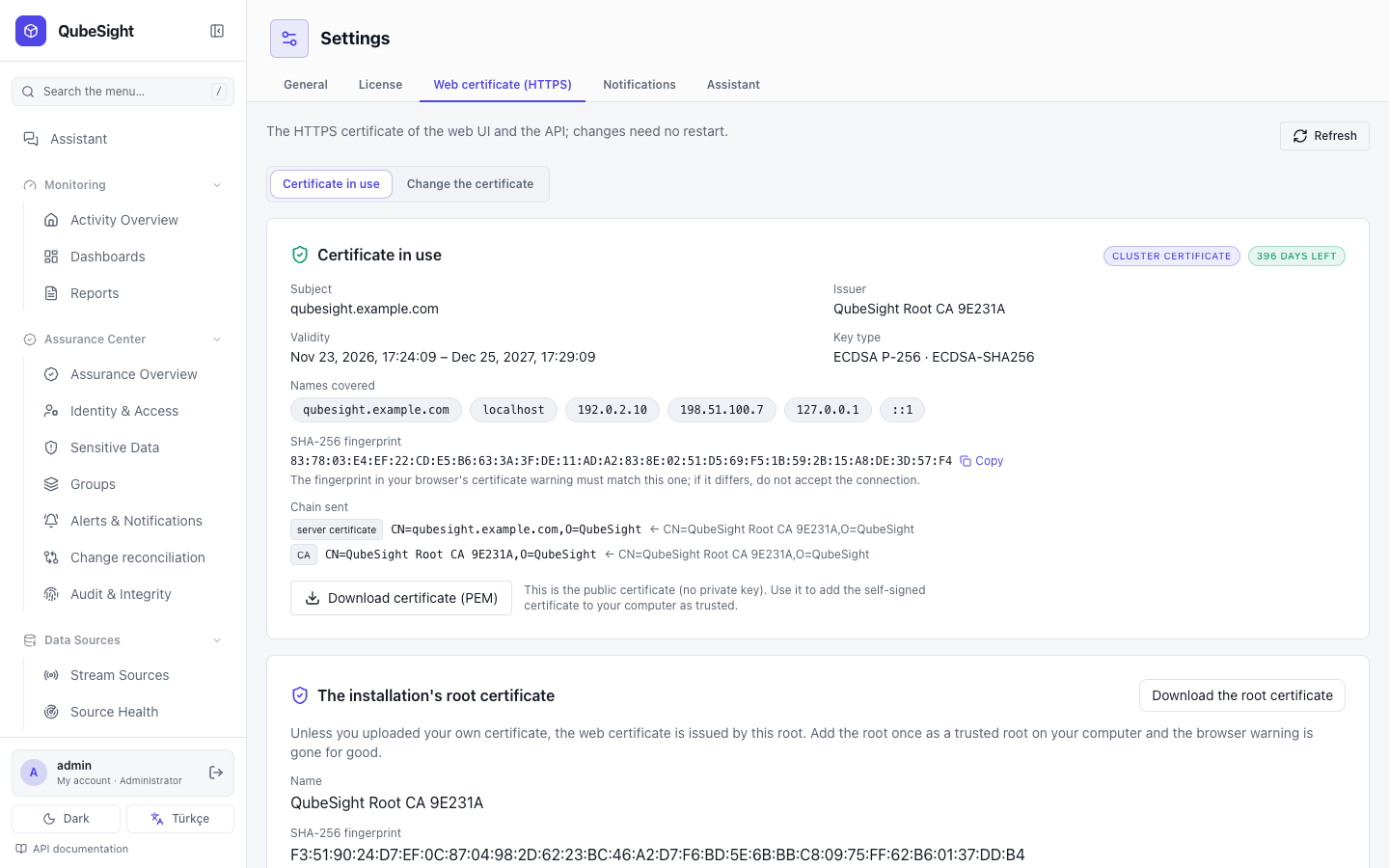
On Platform → Settings → Web certificate (HTTPS) an administrator can:
- view the Certificate in use: subject, issuer, validity with days left, names covered, key type, SHA-256 fingerprint and chain;
- Download certificate (PEM) (public certificate only);
- Renew the self-signed certificate for a list of names and IP addresses (Regenerate…);
- create a Certificate signing request (CSR); the private key is generated on the server and never leaves it;
- Upload your own certificate (PEM chain and unencrypted private key, or the chain only after a CSR), Check it and Activate certificate;
- Return to the previous certificate with one click (one previous version is kept).
Changes take effect without a restart. The page warns when the certificate expires within 30 days ("The certificate expires soon."), when it has expired, and when the address you are using is not covered.
In a cluster the web certificate is shared: it is stored encrypted in the settings database and every node's gateway is synchronised to it, so the virtual IP serves the same certificate on whichever node holds it.
Trust the installation root
Unless you upload your own certificate, the web certificate is issued by a per-installation root certificate. Trusting this root once on each client removes the browser warning permanently, including after automatic renewals.
- On Platform → Settings → Web certificate (HTTPS), under The installation's root certificate, click Download the root certificate. The file is also available without signing in at
https://qubesight.example.com:3000/api/v1/tls/ca.crt. - Compare the SHA-256 fingerprint shown on the page with the downloaded file.
- Add it as a trusted root:
- macOS: open the file; Keychain Access adds it to System; set When using this certificate to Always Trust.
- Windows: Install Certificate → Local Machine → Trusted Root Certification Authorities.
- Linux: copy to
/usr/local/share/ca-certificates/and runupdate-ca-certificates(Ubuntu), or to/etc/pki/ca-trust/source/anchors/and runupdate-ca-trust(RHEL family). - Firefox: Settings → Privacy & Security → View Certificates → Authorities → Import.
The root is name-constrained: it can only issue certificates for private network addresses, this server's addresses and the domains known at installation.
Break-glass
If a certificate change locks you out of the web UI, reset the gateway's certificate store from the server:
docker compose stop gateway
docker compose run --rm --no-deps gateway -tls-reset
docker compose up -d gateway
A new certificate is generated at the next start. If the browser still refuses the connection because it remembered the HSTS policy for the host name, use a private window, connect by IP address, or delete the browser's HSTS entry. See Web certificate (HTTPS).
Cluster-internal TLS
Enterprise
A new cluster is created with TLS on every internal path. The cluster CA is stored in the cluster definition (its private key encrypted with the server secret key). Each node receives a server and client certificate for its address, 127.0.0.1, its node name and localhost.
| Traffic | Port | Protection |
|---|---|---|
| etcd client (Patroni, control plane) | 12383 | HTTPS and password |
| etcd peers | 12384 | Mutual TLS |
| ClickHouse Keeper client | 9281 | Mutual TLS and digest identity |
| ClickHouse Keeper raft | 9234 | TLS (mutual TLS on newer Keeper images) |
| ClickHouse replication | 9010 | HTTPS and inter-server credentials |
| PostgreSQL (applications, replication) | 5432 | TLS, clients verify the server with the cluster CA, SCRAM password |
| Patroni REST | 8008 | Mutual TLS for every request; changes also need a password |
| Redpanda broker RPC | 33145 | Mutual TLS |
| Redpanda internal Kafka | 29093 | TLS and SASL/SCRAM |
The live state of each path (mutual TLS, TLS or unencrypted) is shown on Platform → System and Cluster → Map. Clusters created on early releases may still have unencrypted paths; the map shows them.
Ingest TLS
Enterprise
On a cluster, log senders can use TLS: syslog over TLS on port 6514 and Filebeat over Kafka TLS on port 9093 (through the virtual IP). The certificates are issued from the installation root; senders trust the root certificate. Plain ports 5140 and 9092 stay open until every sender is switched. SNMP traps (UDP 162) have no TLS. Configuration steps: Syslog and Kafka TLS.
Expiry behaviour to know: a TLS client checks the certificate at every new handshake. Open sessions keep working after expiry, but a sender that reconnects is refused, so an outage starts at an unpredictable moment. The product has no certificate-specific alert for ingest certificates; the Source silence rule reports a source that stops sending, typically hours later. Redpanda reloads changed certificate files within about a second; Vector reloads only when its configuration points to new files and then drops open syslog sessions, which senders re-establish.
Rotate the server secret key
Stored passwords and tokens are encrypted with a key derived from GUARDIUM_SECRET_KEY. Production mode refuses to start with the publicly known development key, so every installation has its own key. To rotate it:
- Take a backup (Back up now).
- Stop
control-planeandworker, or make sure both will be started with the new key. -
Run a dry run, then the rotation:
QS_NEW_SECRET_KEY=<new-key> GUARDIUM_SECRET_KEY=<current-key> \
  docker compose run --rm --no-deps -T -e QS_NEW_SECRET_KEY -e GUARDIUM_SECRET_KEY control-plane \
  ./control-plane -rotate-secret-key --dry-run
# repeat without --dry-run
The tool first checks that every value opens with the old or the new key; if a single value does not, nothing is written. PostgreSQL is updated in one transaction. The tool can be re-run safely. 4. Set the new
GUARDIUM_SECRET_KEYfor bothcontrol-planeandworker, and start them. 5. Take a new backup immediately. The backup escrow now carries the new key.
Older backups remain encrypted with the old key. To open them later, supply the old key through BACKUP_LEGACY_SECRETS (comma-separated). While the rotation runs, the audit trail cannot be signed and a notification channel saved in that window may lose its secrets; perform the rotation in a quiet period.
Kafka passwords
The internal Kafka (Redpanda) users (qs-admin, qs-ingest, qs-worker, qs-filebeat) have random passwords generated at installation and stored in .env (mode 0600). Every run of ./install.sh re-applies the users and ACLs and synchronises each user's password with .env. See Filebeat and Kafka ingest for the Filebeat credentials shown in the product.
Limitations
- There is no expiry alert for uploaded web certificates, the installation root, the cluster CA, node certificates or ingest certificates. Track uploaded certificates in your own certificate inventory; the web certificate page shows the remaining days.
- Cluster node certificates (5 years) and the cluster CA (10 years) have no in-product renewal.
- Ingest TLS is available on clusters only in this release.
- The HSTS header on web interface pages (one year, including subdomains) cannot be changed from the interface. A browser that received it keeps using HTTPS for that host name, also if HTTPS is later switched off.