Support bundle
This how-to guide explains how to collect the diagnostic information QubeSight support needs: the built-in support bundle with the recent logs of every service, and the additional details to collect by hand when the web interface is not available.
Community Enterprise
What the support bundle contains
The support bundle is a zip file named qubesight-support-<node>-<date>-<time>.zip:
| Entry | Content |
|---|---|
logs/<service>.log |
The last 500 lines of each product service on this node (control-plane, worker, UI, gateway, SNMP trap receiver, Vector, Redpanda, ClickHouse, PostgreSQL, MinIO, restore MySQL, update service, as installed). |
manifest.json |
Product version, node name, settings-database schema version, generation time and user, lines per service, the time of the oldest line, each service's status (ok, not_running, not_deployed, busy, error, truncated) and notes. |
Every line is masked twice before it is written: passwords, tokens, Authorization and Bearer values, private key blocks, cloud access keys, licence keys, passphrases and database connection-string credentials are replaced with ***. The bundle is limited to 64 MiB of log text. The download is written to the self-audit trail (support_bundle_download).
The bundle does not contain database content, activity events, settings, certificates or keys.
Download the bundle
Prerequisites: the admin role (the button is not shown to other roles, and the API refuses them), and the update service installed on the node (it reads the container logs).
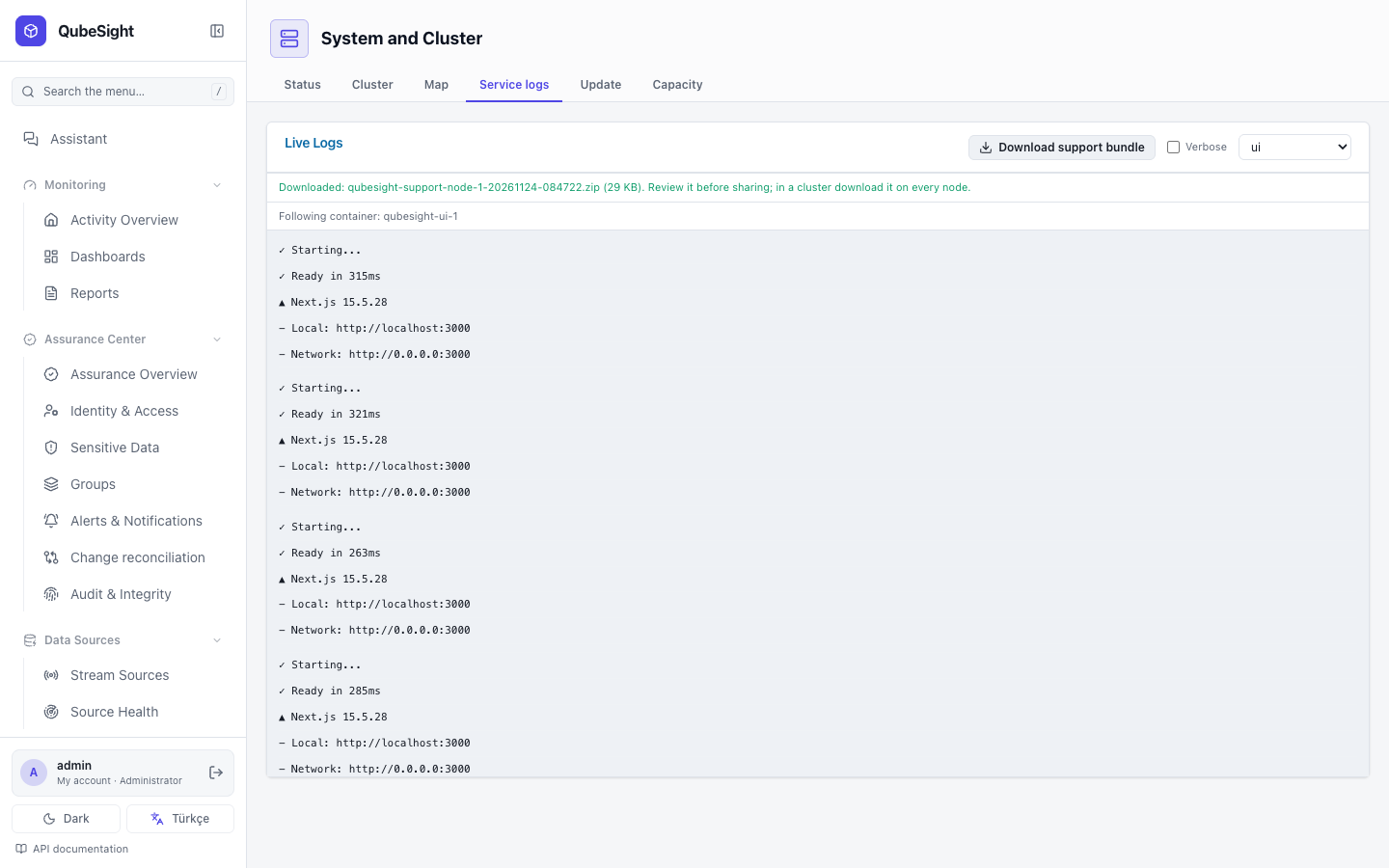
- Go to Platform → System and Cluster → Service logs.
- On the Live Logs card, click Download support bundle. The button shows Preparing… while logs are collected (up to about 15 seconds per service).
- The browser saves the zip file. The message "Downloaded: {name} ({size} KB). Review it before sharing; in a cluster download it on every node." confirms it. If the bundle cannot be built, the card shows "The support bundle could not be prepared: …" with the reason.
- Open the zip and review it before sharing. Masking is automatic but cannot recognise every possible secret, for example a password typed into a free-text field.
- On a cluster, open the UI of each node (by its own address) and download a bundle on every node. On a node without the update service, the request is relayed to the source node and the bundle contains the source node's logs;
manifest.jsonnames the node and states"relayed": true.
The same bundle is available through the API for administrators: GET /api/v1/system/logs/bundle.
Add context
With the bundle, send:
- what you expected and what happened, with the time (and time zone) of the problem;
- screenshots of the relevant screen and of Platform → System and Cluster → Status;
- the open alerts from Assurance Center → Alerts & Notifications (title and evidence);
- for update problems, the run's event log from Update → History;
- for restore problems, the restore banner text and the backup run details.
Manual collection (UI not available)
If the web interface cannot be reached, or the update service is not running, collect the equivalent information on the server. Run the commands as a user allowed to use the container engine, in the installation directory, and replace docker with podman where applicable.
OUT=qubesight-support-$(hostname)-$(date +%Y%m%d-%H%M%S)
mkdir -p "$OUT/logs"

# Versions and container state
docker version            > "$OUT/engine-version.txt" 2>&1
docker compose version   >> "$OUT/engine-version.txt" 2>&1
docker compose ps -a      > "$OUT/compose-ps.txt" 2>&1
grep -E '^(QUBESIGHT_VERSION|QUBESIGHT_RELEASE|COMPOSE_PROJECT_NAME)=' .env > "$OUT/version.txt"

# Last 500 lines of every service
for s in $(docker compose ps -a --services); do
  docker compose logs --no-color --tail 500 "$s" > "$OUT/logs/$s.log" 2>&1
done

# Host facts
uname -a                  > "$OUT/host.txt"
cat /etc/os-release      >> "$OUT/host.txt"
df -h                    >> "$OUT/host.txt"
free -m                  >> "$OUT/host.txt"

# Product diagnostics (if the control plane runs)
docker compose exec -T control-plane ./control-plane -dns-check -json > "$OUT/dns-check.json" 2>&1
docker compose exec -T updater qubesight-updater status              > "$OUT/updater-status.txt" 2>&1

tar czf "$OUT.tar.gz" "$OUT"
Never include secrets
Do not add the .env file, the secrets/ directory, backup files, licence files, private keys or database dumps to anything you send. The manual commands above copy only the version lines from .env. Unlike the built-in bundle, manually collected logs are not masked: search them for passwords, tokens and keys before sending.
Limitations
- The bundle covers one node. On a cluster, collect it on every node.
- Only the last 500 lines per service are included; a problem that happened hours ago may already have rotated out of the window. Collect the bundle as soon as possible, and add older lines manually with
docker compose logs --since <time>. - The bundle cannot be created on a node where the update service is unavailable, unless the request can be relayed to the source node.