Audit & Integrity
Audit & Integrity (/assurance/audit) provides two kinds of proof: a tamper-evident record of every action performed in QubeSight itself (self-audit), and proof that the collected activity logs have not been changed (immutable archive). This page describes the Events tab with its Chain verification sub-tab, the Immutable archive tab, and the Evidence Pack Verification page.
Community Enterprise
| Feature | Edition |
|---|---|
| Viewing self-audit events, chain verification | Community and Enterprise |
| Exporting self-audit events (CSV, JSON), signed evidence pack | Enterprise |
| Hot/cold tier and locked store on the same server | Community and Enterprise |
| Locked store on a separate server or S3 Object Lock storage | Enterprise |
Who can open it:
| Tab | Who |
|---|---|
| Events | Administrator, auditor, access manager. The access manager sees account and identity events only, without the summary, chain verification or export. |
| Immutable archive | Administrator and auditor. Verify now is administrator only. |
Events tab
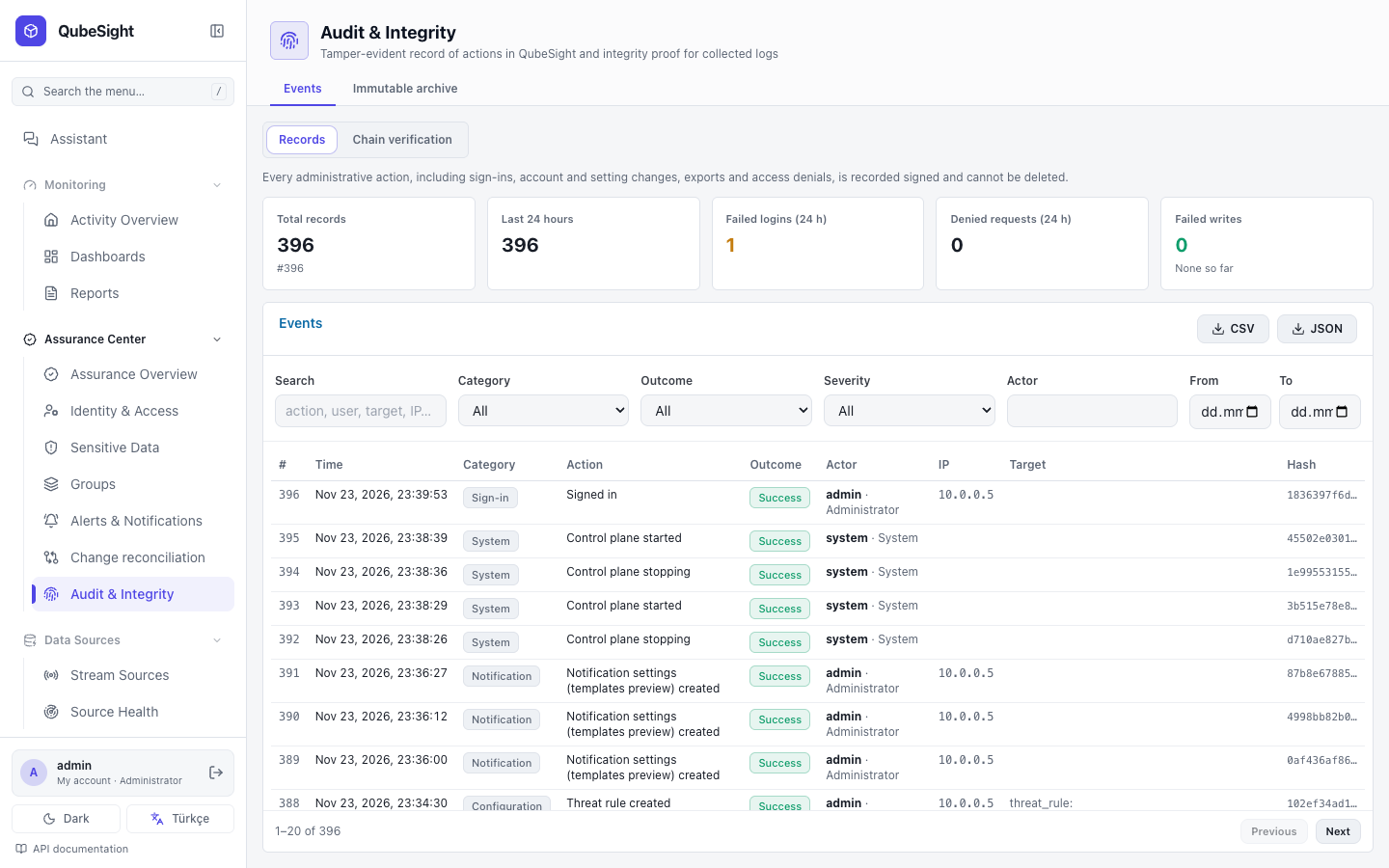
Every administrative action, including sign-ins, account and setting changes, exports and access denials, is recorded signed and cannot be deleted. Records are written to an append-only table protected by a database trigger and permissions, chained with SHA-256 and signed with Ed25519.
Records
Summary cards (administrator and auditor):
| Card | Meaning |
|---|---|
| Total records | With the sequence number of the newest record. |
| Last 24 hours | Records in the last day. |
| Failed logins (24 h) | Highlighted when not zero. |
| Denied requests (24 h) | Requests refused by the permission check. |
| Failed writes | Self-audit records that could not be written (should be zero). |
Filters: Search ("action, user, target, IP…"), Category, Outcome (success, failure, denied), Severity (info, notice, warning, critical), Actor, From, To. Every filter defaults to All or empty; changing one returns to the first page.
| Category | Covers |
|---|---|
| Sign-in | Sign-ins, sign-outs, failures, MFA. |
| Account | Accounts, roles, sessions. |
| Configuration | Product and integration settings. |
| Data | Data actions. |
| Export | Report and evidence exports, downloads. |
| Alert, Notification | Alert decisions, channels. |
| Backup & DR | Backups, restores, drills. |
| Integrity | Chain and archive verification. |
| Access | Viewing evidence and the self-audit records, reads of sensitive data, assistant sessions and MCP calls. |
| System, License, Sensitive data | Other areas. |
A request refused by the permission check is recorded in the category of the area it targeted, with the outcome denied.
The category list shows the number of records per category when the summary is available.
| Column | Meaning |
|---|---|
| # | Sequence number of the record. |
| Time | When. |
| Category | See above. |
| Action | Readable action name, for example "Question asked to the assistant". |
| Outcome | Success, failure or denied. |
| Actor | Who, followed by the role; System for automatic actions. |
| IP | Client address. |
| Target | What was changed (user, session, endpoint, LDAP settings, password policy…). |
| Hash | Chain hash of the record (shortened). |
The list shows 20 records per page; with no match it shows "No records".
Click a row for the full record: Time, Action (readable name and internal action code), Outcome, Severity, Actor (with role and authentication method), IP, Target, Request (method, path and HTTP status), Request ID, Client (user agent), Details (JSON) and Chain proof: the record's prev_hash, row_hash, signature and key_id. With these values and the public key from Chain verification, a third party can check the record's place in the chain.
CSV and JSON buttons export the records matching the current filters (administrator and auditor, Enterprise).
Chain verification
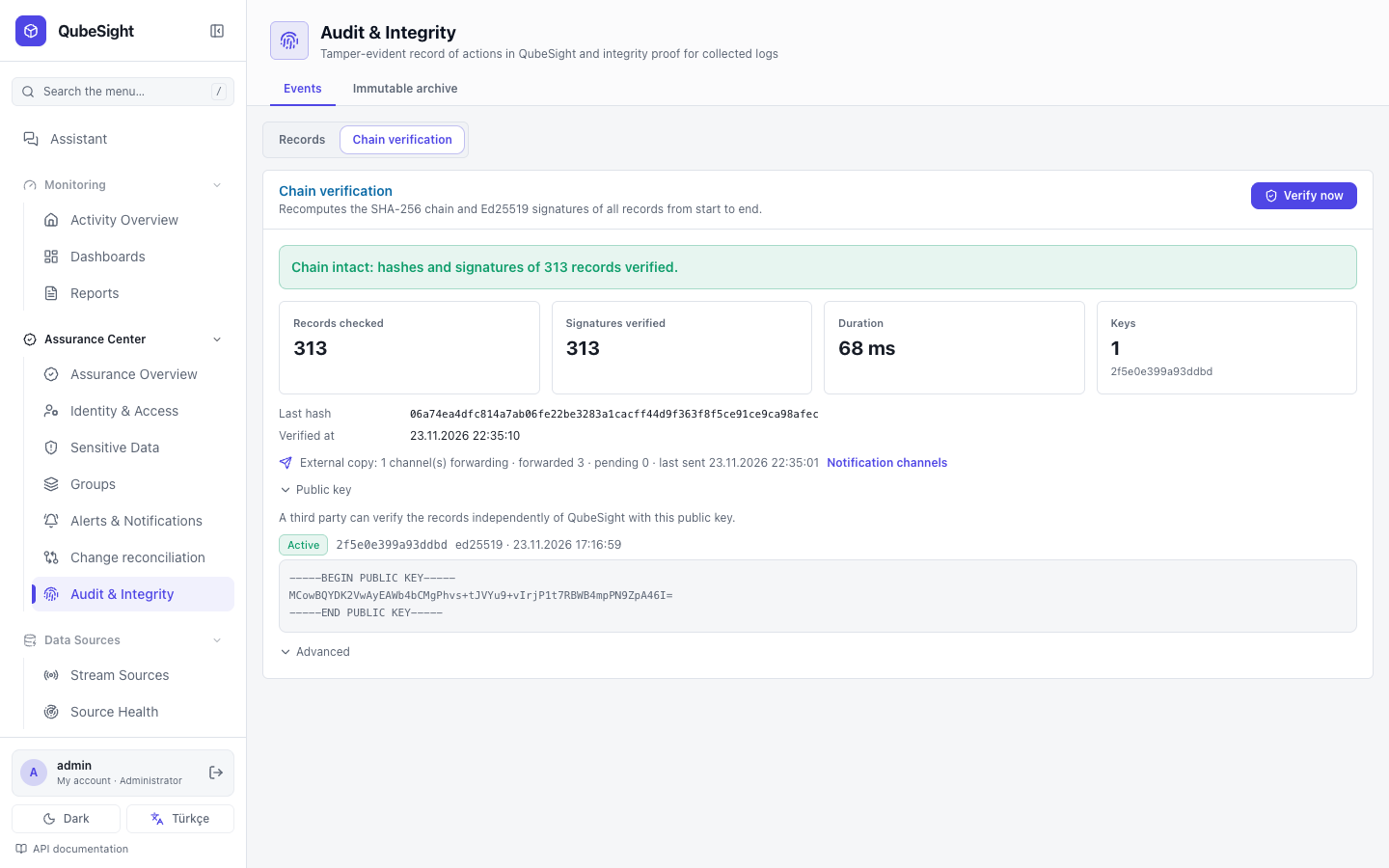
The Chain verification sub-tab (administrator and auditor) proves that no record was changed or removed.
| Element | Meaning |
|---|---|
| Verify now | "Recomputes the SHA-256 chain and Ed25519 signatures of all records from start to end." Result: "Chain intact: hashes and signatures of N records verified." or "Chain broken: problem at record #N — reason". |
| Records checked, Signatures verified, Duration, Keys, Last hash, Verified at | Details of the last verification. |
| Public key | "A third party can verify the records independently of QubeSight with this public key." |
| External copy | "External copy: N channel(s) forwarding · forwarded X · pending Y · last sent T" (plus "forwarding error on N channel(s)" when a channel fails), or "No channel forwards the self-audit stream. Turn on "Forward the self-audit stream to this channel" in a notification channel." with a Notification channels link. |
Forwarding the self-audit stream to a syslog/SIEM channel keeps a copy outside QubeSight. Configure it in Settings → Notifications; see SIEM forwarding and Mail (SMTP) and notification channels.
Immutable archive tab
Collected activity logs are copied to a locked store; until the lock expires, nobody can delete or change that copy. This tab shows whether the copy is complete and whether the data in ClickHouse still matches it. For the concepts, see Hot and cold storage tiers and Data lifecycle and retention.
How it works (shown on the tab)
- Logs are written to ClickHouse on arrival and stay there for the configured number of days, or until the disk reaches the configured fill level (fast queries).
- Within about 12 minutes, data is written to the locked store as part of a 10-minute block file and locked at once for 30 days.
- When the event day is final (about 1.5 to 2 days after it ends), that day's files are merged into one daily file, the content is compared, and the daily file is locked for the configured number of years.
- After 30 days the 10-minute files are deleted; only the locked daily file remains. No small file is deleted before the daily file is verified and long-locked.
- Older data is read only from the locked store. Verification compares ClickHouse with the locked copy and shows deleted, modified or added rows next to their original value.
- Files hidden or overwritten in the store are found every 10 minutes and their original version is restored.
- Guardium live (SNMP) rows are temporary: they are locked once the next-day archive arrives and replaces them. Until then they count as "awaiting finalisation".
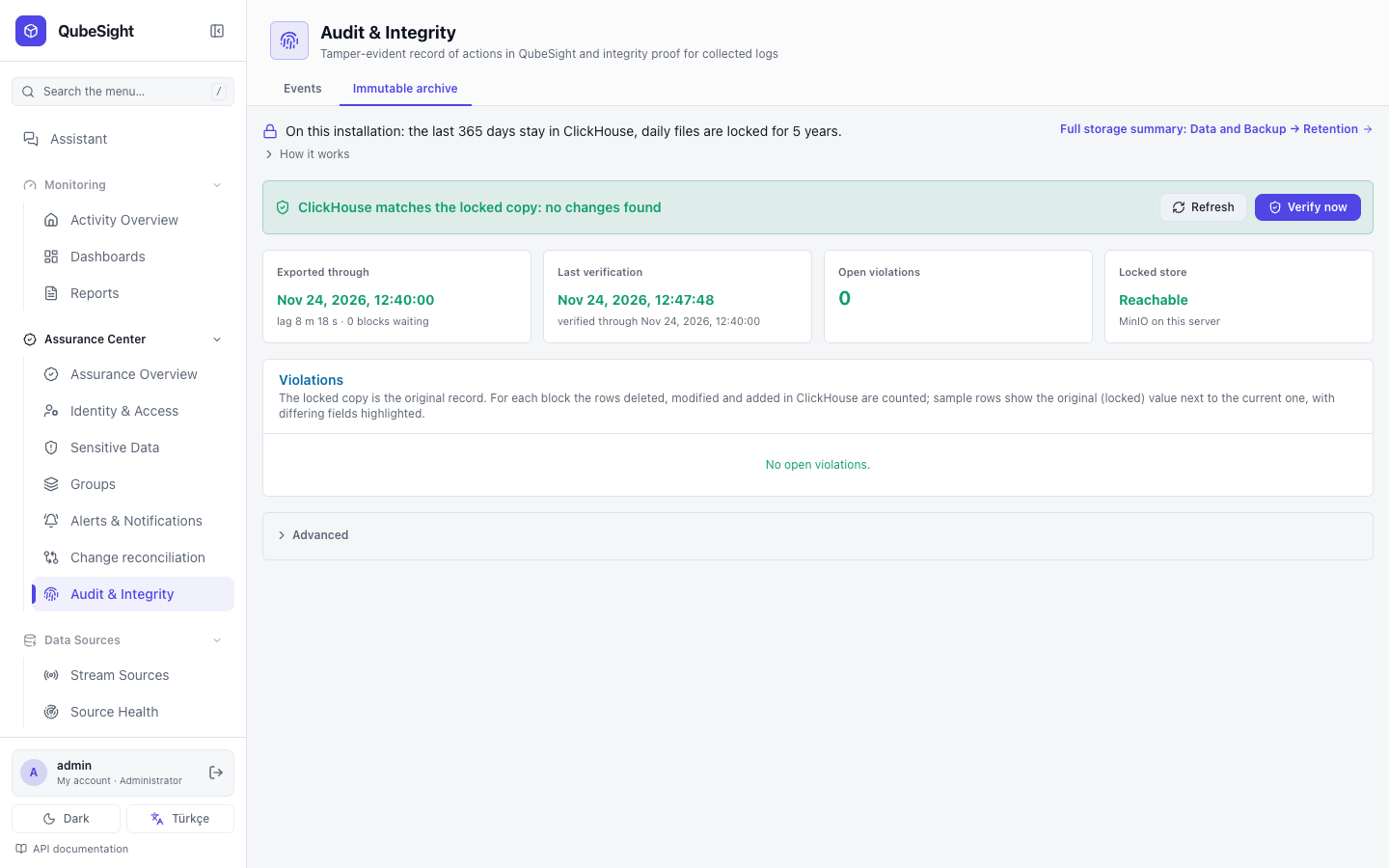
The tab states the settings of this installation: "On this installation: the last N days stay in ClickHouse, daily files are locked for N years." (or, with disk-based retention, "data stays in ClickHouse until the disk is N% full").
If the archive is off, the tab shows Immutable archive is off with Open Retention settings (Data and Backup → Retention → Hot / cold storage; administrator).
Status banner
| Banner | Meaning |
|---|---|
| "ClickHouse matches the locked copy: no changes found" | Everything verified is intact. |
| "Violation: data in ClickHouse differs from the locked copy (N blocks/days)" | See Violations. |
| "Attention: export or store access needs a look" | Export is lagging or the store is unreachable. |
| "Not verified yet" | No verification has run. |
The status line adds "lag
Panels
| Panel | Fields |
|---|---|
| Locked store | Endpoint, Bucket, Lock (mode and "10-minute files N days"), Objects, Reachable / Unreachable, Last probe; mode MinIO on this server or Separate server (Enterprise). A warning appears when interventions (hidden or overwritten files) were found and repaired in the last 7 days. |
| Export | Exported through, Blocks waiting, Exported blocks, Last export, Run by (this server, background worker, control plane as fallback), Last error. |
| Background job runners (per node) | Node, Process, Version, State (Running, Ready, Not responding, Last round failed, older version), Last heartbeat, Last round, Last export. |
| Verification | Last verification, Blocks checked, Intact, Open violations. Verify now (administrator) runs a verification: "Verification complete: N blocks, no changes" or "Verification finished: violation in N blocks". |
| Hot tier (ClickHouse) | Older than this only in the locked store, Oldest month in ClickHouse, Next month to drop, Drop waiting because. |
| Daily files | Daily files, Merged through, Blocks awaiting merge, Awaiting long lock, Earliest lock expiry, Days checked, Days with violations, Days awaiting check. |
| Rows awaiting finalisation | Guardium live rows not yet replaced by archive rows. |
| Detailed figures | Block and row counts. |
Tampering with the locked store
Events of the last 30 days: File hidden (delete marker), File overwritten, Block file changed, with Restored or Not repaired. The original locked version always stays in the store. Close as investigated requires a note ("What was found, who did it?"); the record is kept and written to the audit trail.
Violations
"The locked copy is the original record. For each block the rows deleted, modified and added in ClickHouse are counted; sample rows show the original (locked) value next to the current one."
Each violation shows N deleted, N modified, N added, Detected and Sample rows (at most 20 per block). Show difference compares Field, Original (locked copy) and Current (ClickHouse), with "Not in ClickHouse (deleted)" or "Not in the locked copy (added later)".
Blocks
"Every 10-minute export is one block; the digest is computed from the content of the locked file." Filters: Status (All, Violation, Pending, Intact, Locked store only; default All) and a From / To time range (both empty by default, which shows the newest blocks).
| Column | Meaning |
|---|---|
| Block start | Start of the 10-minute block. |
| Type | Block or Finalisation (live). |
| Status | Intact, Violation, Pending or Locked store only. |
| Rows, Days | Size and the event days the block covers. |
| File | In 10-minute file, In daily file, In daily file (10-minute file deleted). |
| Exported, Verified | Times. |
| Digest | Content digest (shortened). |
| Detail | Explanation text for the block, for example the reason for a violation. |
The panel loads 100 blocks at a time and shows "N blocks shown"; Show more loads the next 100. With no match: "No blocks match this filter."
Evidence Pack Verification
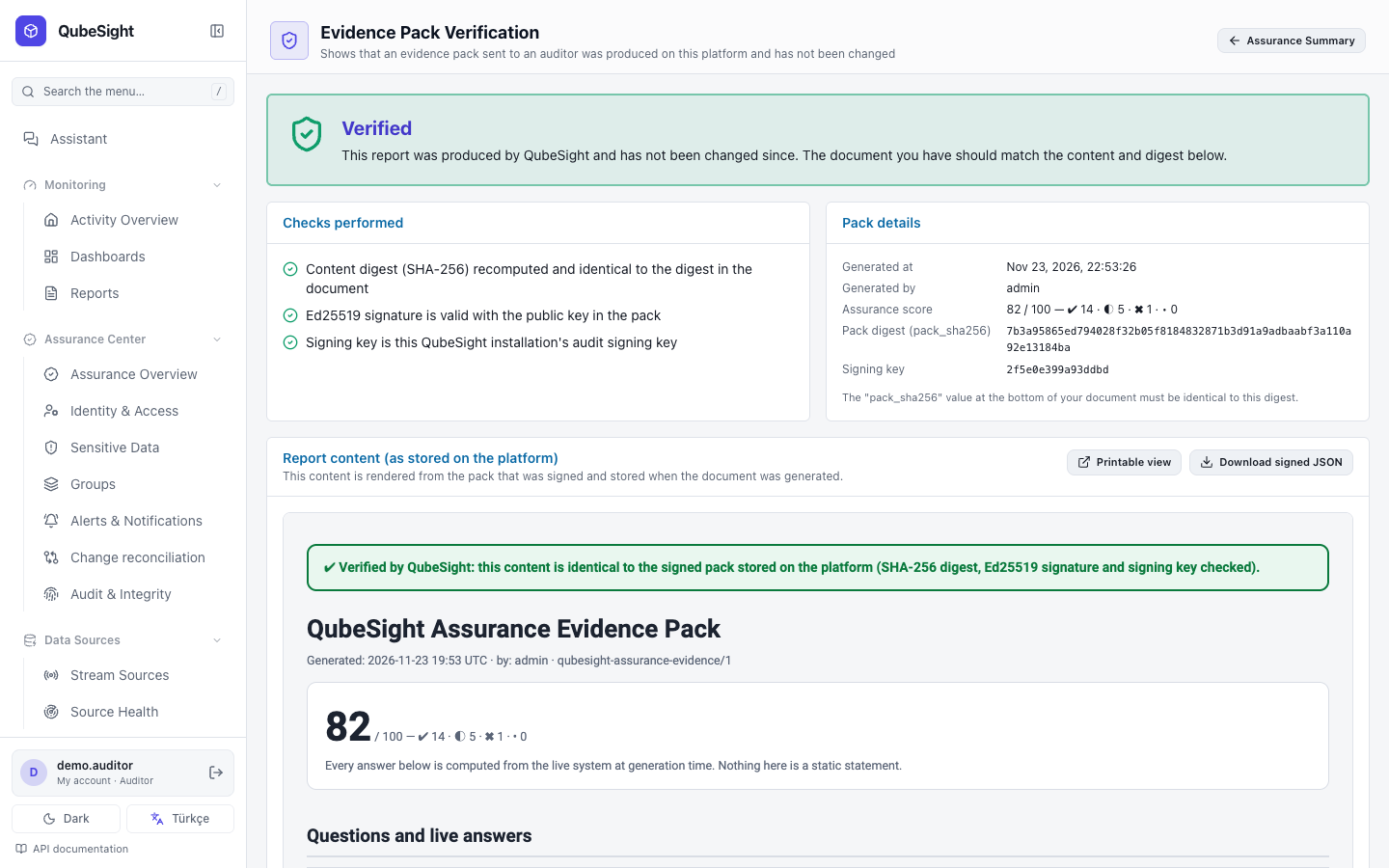
Each evidence pack from Assurance Overview contains a verification link of the form https://qubesight.example.com/assurance/evidence/verify/<pack_sha256>. Opening it (sign-in required; after sign-in you return to the link) shows Evidence Pack Verification: "Shows that an evidence pack sent to an auditor was produced on this platform and has not been changed."
| Result | Meaning |
|---|---|
| Verified | "This report was produced by QubeSight and has not been changed since." |
| Could not be verified | The stored pack failed verification; do not rely on the document. |
| No such evidence pack on this platform | The link belongs to another installation, or the document was not produced here. |
| Invalid verification link | The id must be a 64-character SHA-256 digest; copy the link in full. |
Checks performed:
- Content digest (SHA-256) recomputed and identical to the digest in the document.
- Ed25519 signature is valid with the public key in the pack.
- Signing key is this QubeSight installation's audit signing key.
Pack details: Generated at, Generated by, Pack digest (pack_sha256), Signing key, Assurance score. "The "pack_sha256" value at the bottom of your document must be identical to this digest."
Report content (as stored on the platform) shows the signed content; Printable view and Download signed JSON give copies. Assurance Summary returns to the overview. The older address form /assurance/evidence/verify?id=<digest> redirects to this page.
Limitations
- The access manager sees only account and identity events.
- Exporting self-audit records and the evidence pack needs the Enterprise edition.
- A locked store on the same server protects against changes through QubeSight and ClickHouse, but not against loss of the server itself; use a separate server or S3 Object Lock storage (Enterprise) for that.
- Guardium live rows are not locked until the next-day archive replaces them.
- Verification compares ClickHouse with the locked copy; it cannot detect changes made before the data reached QubeSight.