Ingest access allowlist
This page explains the source IP allowlist of QubeSight's push-based log intake endpoints and how to turn it on safely. The syslog and SNMP trap endpoints accept data without authentication, so without the allowlist any machine that can reach them could write forged audit events. With the allowlist enforced, only the listed addresses and networks are accepted; everything else is dropped and counted. The first part is a how-to, the second a reference.
Community Enterprise
What the allowlist covers
| Endpoint | Protocol and port | Covered |
|---|---|---|
| Syslog (plain) | TCP 5140 | yes |
| Syslog over TLS | TCP 6514 | yes |
| SNMP traps (Guardium live path) | UDP 162 | yes |
| Filebeat / Kafka | Kafka listener | no: protected by Kafka SASL/SCRAM credentials when Kafka authentication is on |
| Azure Event Hub, AWS Kinesis, AWS CloudWatch Logs | outbound pull from QubeSight | not applicable |
| Guardium archive import | outbound SSH/SFTP/SMB from QubeSight | not applicable |
QubeSight's own internal forwarding (for example the SNMP receiver passing parsed traps to the log collector, or reprocessing from the log queue) is recognised by an internal token, not by address, so it keeps working when the list is enforced. A test trap that the receiver sends to itself over the loopback address is always accepted.
Where to find it and who can use it
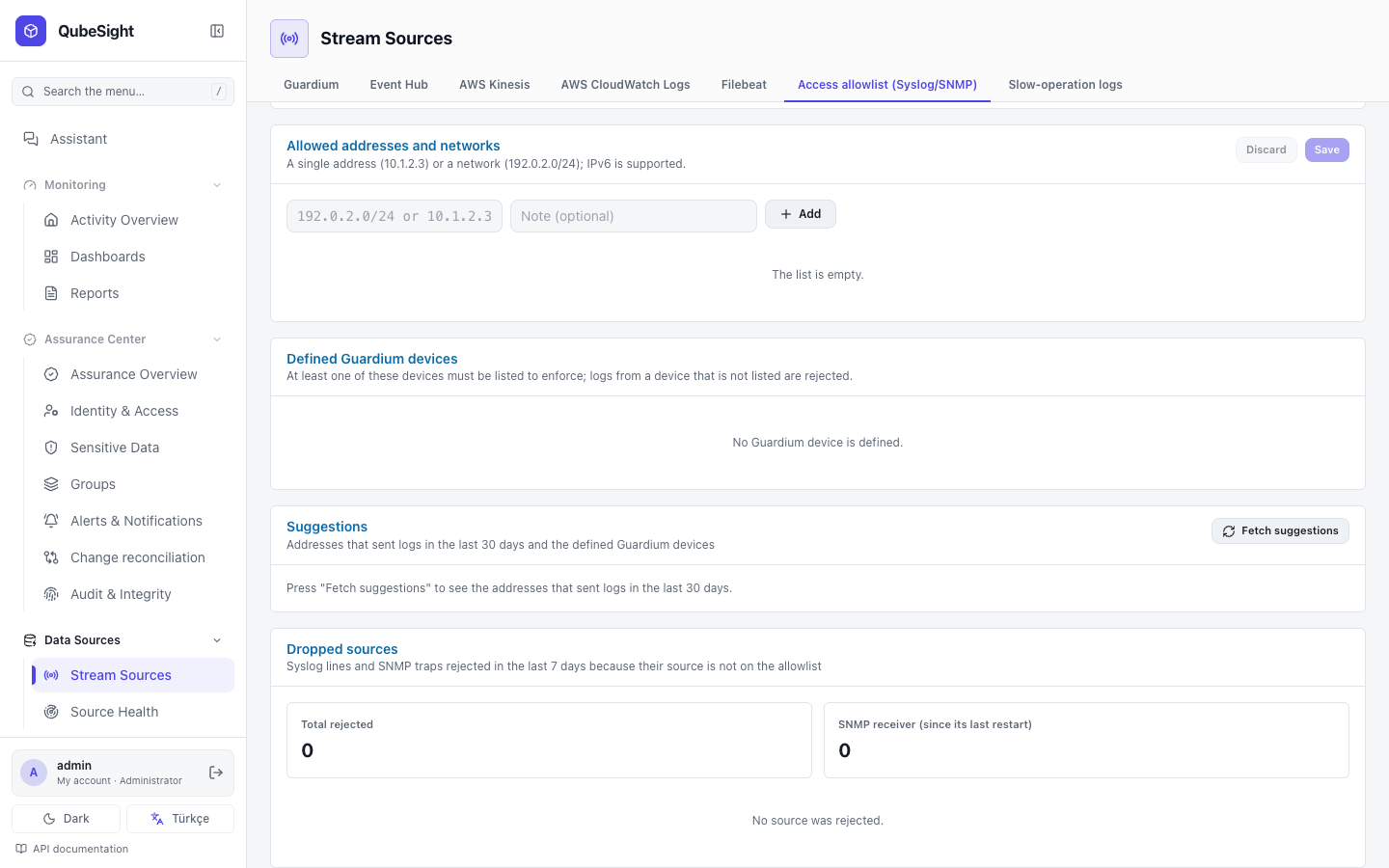
Data Sources → Stream Sources → Access allowlist (Syslog/SNMP) (/stream-sources?tab=access). Only the admin role sees the tab, and the server refuses both reading and changing the list for any other role. Every change is written to the audit log with the entries added, removed or re-noted; a refused attempt to enforce is audited as well.
Default state
- New installations made with
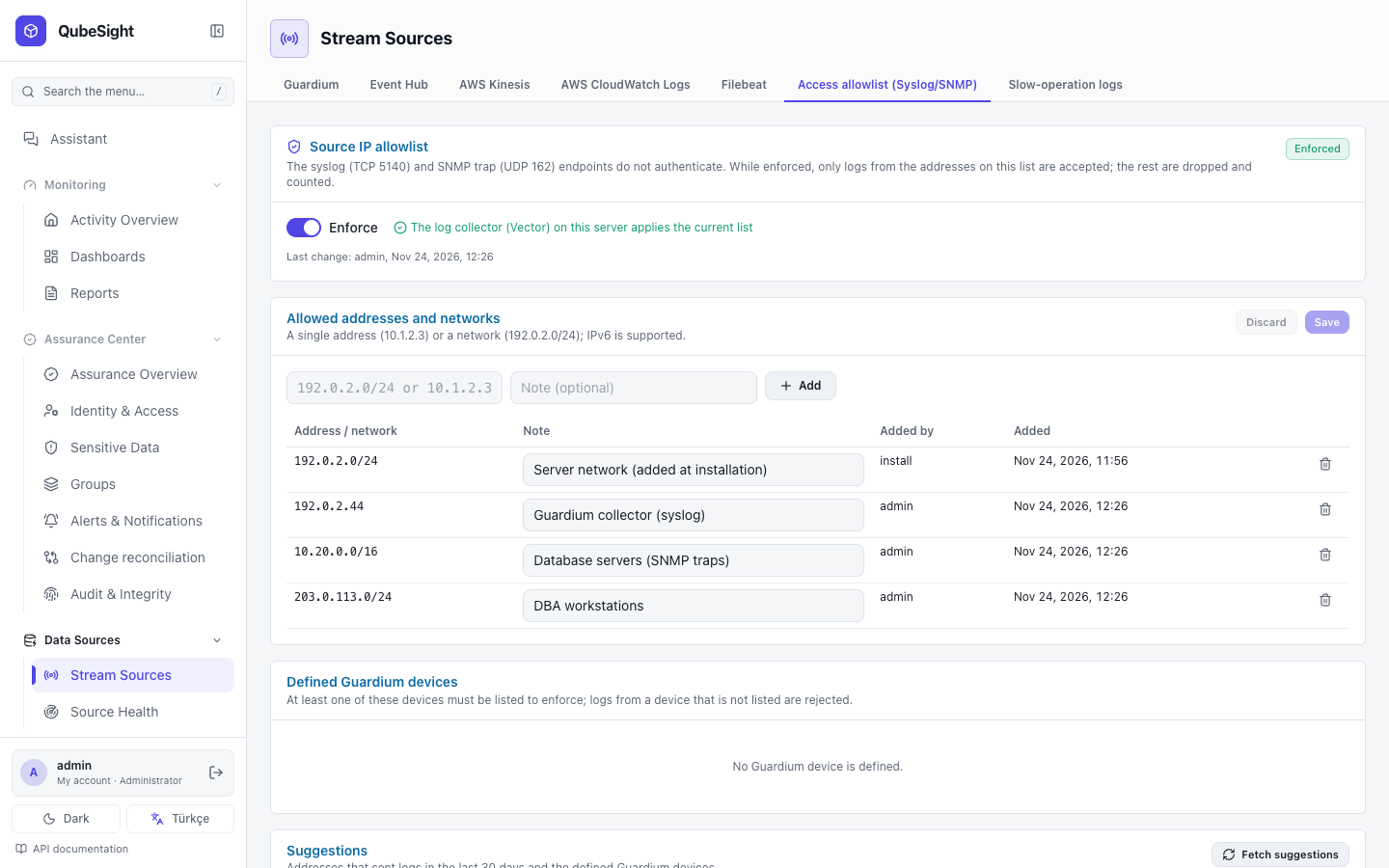
install.sh: the installer writes the server's own network (for example192.0.2.0/24) into the setting and the list starts Enforced with that one entry, noted as written by the installation. You can pass other networks oroffwith--ingest-allow CIDR[,CIDR]|off(IPv4); see install.sh options. If the installer cannot determine the server's network, the list starts Off. - The installer value is read only at the first start, when no allowlist setting exists yet. After that the list is managed only on this screen.
- Existing installations that never saved a list stay Off (unchanged behaviour after an upgrade).
While the list is off, the tab shows The log intake endpoints are open to every source, the same warning appears on Source Health, and the corresponding Assurance item fails (Source IP allowlist is off).
Turn on the allowlist
Prerequisites: admin role; you know which machines send syslog or SNMP traps (Guardium Central Manager and collectors, database servers, relays).
- Open Data Sources → Stream Sources → Access allowlist (Syslog/SNMP).
- In Suggestions, click Fetch suggestions. The table lists the addresses that sent logs in the last 30 days and the defined Guardium devices, with the Source (Syslog, SNMP, Event record, Guardium CM, Guardium unit), Events, Rejected and Last seen.
- Add what you trust: Add per row, or Add every address that is not listed (shown when more than one suggested address is not listed yet). You can also type an address or network in the add row (for example
192.0.2.0/24or198.51.100.7) with an optional note, then Add. An invalid entry shows "Enter a valid IP address or CIDR". - Check Defined Guardium devices: every Central Manager and managed unit should show covered by …. Use Add next to any device marked Not listed; the device name becomes the note.
- Set Enforce on. Until you save, a hint reminds you that unlisted sources are rejected after saving.
- Click Save.
- Verify:
- The header pill shows Enforced.
- The collector line reads The log collector (Vector) on this server applies the current list. Right after saving it may read …not updated yet; it converges within 30 seconds.
- Dropped sources stays empty for your real senders. In Guardium → Live data (SNMP), traps keep arriving.
Lock-out protection
The server refuses to save Enforce when the list is empty (all logs would be rejected) or when none of the defined Guardium devices is covered. When only some Guardium devices are missing, the save succeeds and Warnings lists each missing device: its logs will be rejected.
Add a new sender later
- Open the tab and type the address or network in the add row, with a note such as the device name.
- Click Add, then Save. Unsaved changes are marked There are unsaved changes; Discard reverts them.
- Within 30 seconds the log collector applies the new list; the SNMP receiver re-reads it within 15 seconds.
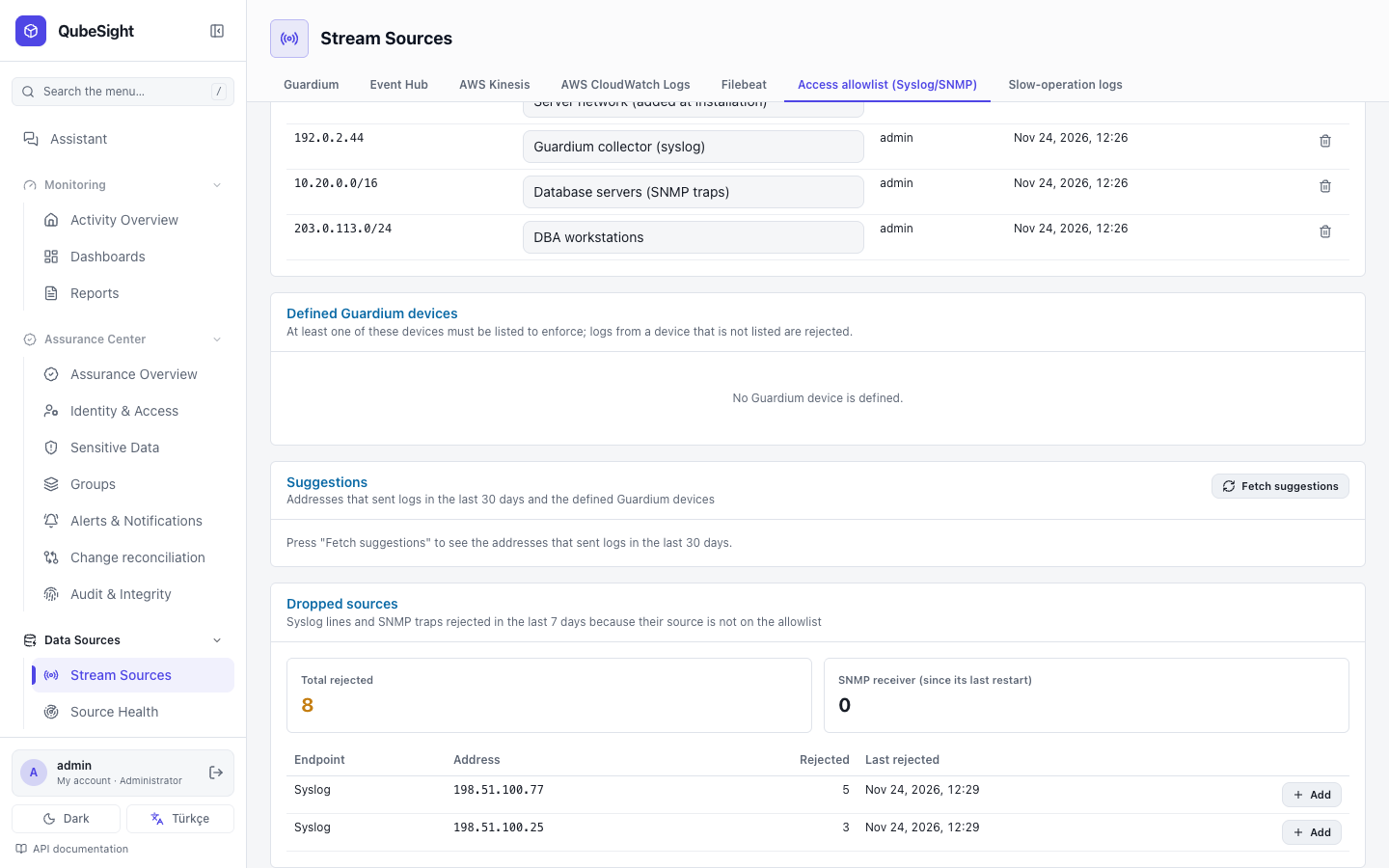
If a sender was already rejected, it appears under Dropped sources with an Add button (not shown for the aggregated row or for addresses already covered by the list).
Investigate dropped sources
Dropped sources lists syslog lines and SNMP traps rejected in the last 7 days because their source is not on the list:
| Column | Content |
|---|---|
| Endpoint | Syslog or SNMP |
| Address | the source address; other addresses (aggregated) when the per-interval limit of distinct addresses was exceeded (for example a flood with spoofed UDP sources) |
| Rejected | count |
| Last rejected | time |
Above the table: Total rejected and SNMP receiver (since its last restart) with Last rejected: {ip}. Rejected events are not written to the event store; only their counts are kept.
Reference
Screen elements
| Element | Description |
|---|---|
| Source IP allowlist header | the subtitle and the pill Enforced or Off |
| Enforce | switch for the mode (off or enforce) |
| Collector status line | in sync, converging within 30 seconds, no collector configuration found, or could not be written: {e} |
| Last change: {who}, {when} | last saved by |
| Warnings | Guardium devices that are not covered |
| Allowed addresses and networks | table Address / network, Note (editable inline), Added by, Added, Remove |
| Defined Guardium devices | Address, Name, Central Manager / Managed unit, covered by {c} or Not listed with Add |
| Suggestions | Fetch suggestions, Add every address that is not listed, table Address, Name, Source, Events, Rejected, Last seen, Listed ({c}) or Add |
| Dropped sources | see above |
| Save, Discard | apply or revert pending changes; both are disabled while there is nothing to save. After saving, Saved is shown; a refused save shows the server's reason in red above the add row. |
Empty and error states
| Situation | What the tab shows |
|---|---|
| The allowlist cannot be read | Could not read the allowlist: with the error and a retry button |
| No entries | "The list is empty." |
| No Guardium device defined | "No Guardium device is defined." |
| Suggestions not fetched yet | Press Fetch suggestions to see the addresses that sent logs in the last 30 days. |
| No suggestions | "No suggestions." |
| Some suggestion sources could not be read | "Some sources could not be read: …" above the table |
| Nothing rejected | "No source was rejected." |
Entry rules
| Rule | Value |
|---|---|
| Entry formats | a single address (198.51.100.7) or a network (192.0.2.0/24); IPv6 is supported |
| Network address | a CIDR must name the network address: 192.0.2.5/24 is rejected (write 192.0.2.5 or 192.0.2.0/24) |
| Catch-all | 0.0.0.0/0 and ::/0 are rejected |
| Duplicates | rejected (This address is already on the list) |
| Maximum entries | 512 |
| Note length | at most 200 characters |
| IPv4-mapped IPv6 sources | treated as IPv4 |
Timing
| Component | Applies a saved change |
|---|---|
| Log collector (Vector) for syslog 5140 / 6514 | within 30 seconds; each cluster node converges on its own |
| SNMP trap receiver (UDP 162) | within 15 seconds |
Where the setting lives
The list is stored in the configuration database and is therefore part of configuration backups and restores. In a cluster, every node applies the same list.
Limitations
- The allowlist checks the network source address. It does not authenticate the sender; a host on an allowed network can still send events. For stronger protection use Syslog and Kafka TLS and restrict the networks as narrowly as possible.
- SNMP uses UDP, whose source address can be spoofed on networks that allow it; keep the trap port reachable only from the Guardium network.
- Filebeat/Kafka ingest is not covered; protect it with Kafka authentication.
- The installer seeds the list only for IPv4 and only at the first start.
- Suggestions cover the last 30 days; a sender that was silent longer must be added by hand.