AWS CloudWatch Logs
This guide shows how to read Amazon RDS and Aurora audit logs directly from CloudWatch Logs log groups, without a Kinesis stream or subscription filter, and how the reader avoids losing or duplicating events.
Step-by-step walkthrough
For a complete AWS console walkthrough with pictures (install from AWS Marketplace, turn on pgaudit for RDS for PostgreSQL and Aurora PostgreSQL, export to CloudWatch Logs, connect and verify), see Monitor Amazon RDS for PostgreSQL and Aurora PostgreSQL.
Enterprise
When to use it
| CloudWatch Logs direct | CloudWatch Logs through Kinesis | |
|---|---|---|
| AWS setup | Log export and read permission only | Kinesis stream, subscription filter and role per log group |
| Extra AWS resources | None | A Kinesis stream |
| Latency | 30 seconds settle time plus up to 15 seconds polling; longer with many groups in one region | Seconds |
| Volume | Audit logs of tens of databases at moderate rates | High volume, many busy databases |
| Late events | Read if within the overlap window | Delivered once by CloudWatch |
Prefer the direct read for a quick start and for small and medium estates. Prefer Kinesis for hundreds of events per second per region and more, or when you need the lowest latency.
Prerequisites
- The audit log is enabled and exported to CloudWatch Logs:
- RDS for MySQL / MariaDB:
MARIADB_AUDIT_PLUGINoption (SERVER_AUDIT_EVENTS = CONNECT,QUERY), log exportaudit. Log group/aws/rds/instance/<db>/audit. - RDS for PostgreSQL:
pgauditloaded,pgaudit.logset, default RDSlog_line_prefix,CREATE EXTENSION pgaudit;, log exportpostgresql. Log group/aws/rds/instance/<db>/postgresql. Turn onlog_connectionsandlog_disconnectionsto receive logins and logouts (failed logins are logged either way). Walkthrough: RDS and Aurora PostgreSQL. - Aurora: cluster log groups such as
/aws/rds/cluster/<cluster>/audit(MySQL) or/aws/rds/cluster/<cluster>/postgresql(PostgreSQL, samepgauditsettings in the DB cluster parameter group).
- RDS for MySQL / MariaDB:
- QubeSight can reach the CloudWatch Logs API over HTTPS.
- An Enterprise licence (or the marketplace trial).
Step 1: grant read permission
The identity QubeSight uses needs logs:FilterLogEvents on the log groups, and logs:DescribeLogGroups on * (names only, for the group picker and prefix discovery). QubeSight does not call logs:DescribeLogStreams; the hint in the form and the CloudFormation template grant it as well, which is harmless but not required.
With the QubeSight CloudFormation template, set CloudWatchLogGroupArns to the log group ARNs, comma-separated. A trailing * matches several groups, for example arn:aws:logs:<region>:<account-id>:log-group:/aws/rds/instance/*.
Otherwise attach a policy such as:
{"Version": "2012-10-17", "Statement": [
  {"Effect": "Allow", "Action": ["logs:FilterLogEvents"],
   "Resource": ["arn:aws:logs:<region>:<account-id>:log-group:/aws/rds/instance/<db>/audit",
                "arn:aws:logs:<region>:<account-id>:log-group:/aws/rds/instance/<db>/audit:*"]},
  {"Effect": "Allow", "Action": "logs:DescribeLogGroups", "Resource": "*"}]}
For log groups in another account, create a role there and let QubeSight assume it.
Step 2: add the integration
- Open Data Sources → Stream Sources → AWS CloudWatch Logs and press New integration.
-
Fill in:
Field Value Integration Name Free text; events are tagged with this source name. AWS Region The region of the log groups. Log groups (one name or ARN per line) For example /aws/rds/instance/orders-db/audit. List groups lists the groups under the prefix (or/aws/rds/when the prefix is empty; first 200) with a check box each; ticked groups are added.Prefix (optional) Groups starting with this prefix are discovered every 5 minutes and read (at most 200). First read goes back (min) 0= from the moment it is saved; at most 20160 (14 days).Overlap (s) How far back each read looks to catch late events; default 300. Role ARN to assume (optional), External ID For cross-account access. Access keys Optional. Without keys or a role, the worker's AWS identity (EC2 instance role or IRSA) is used. Delete the stored keys (switch to the instance role) (shown only when editing an integration with stored keys) removes them. -
Press Save, then Test. The test reads the last 5 minutes of each group and reports per group: readable, no permission, not found or throttled.
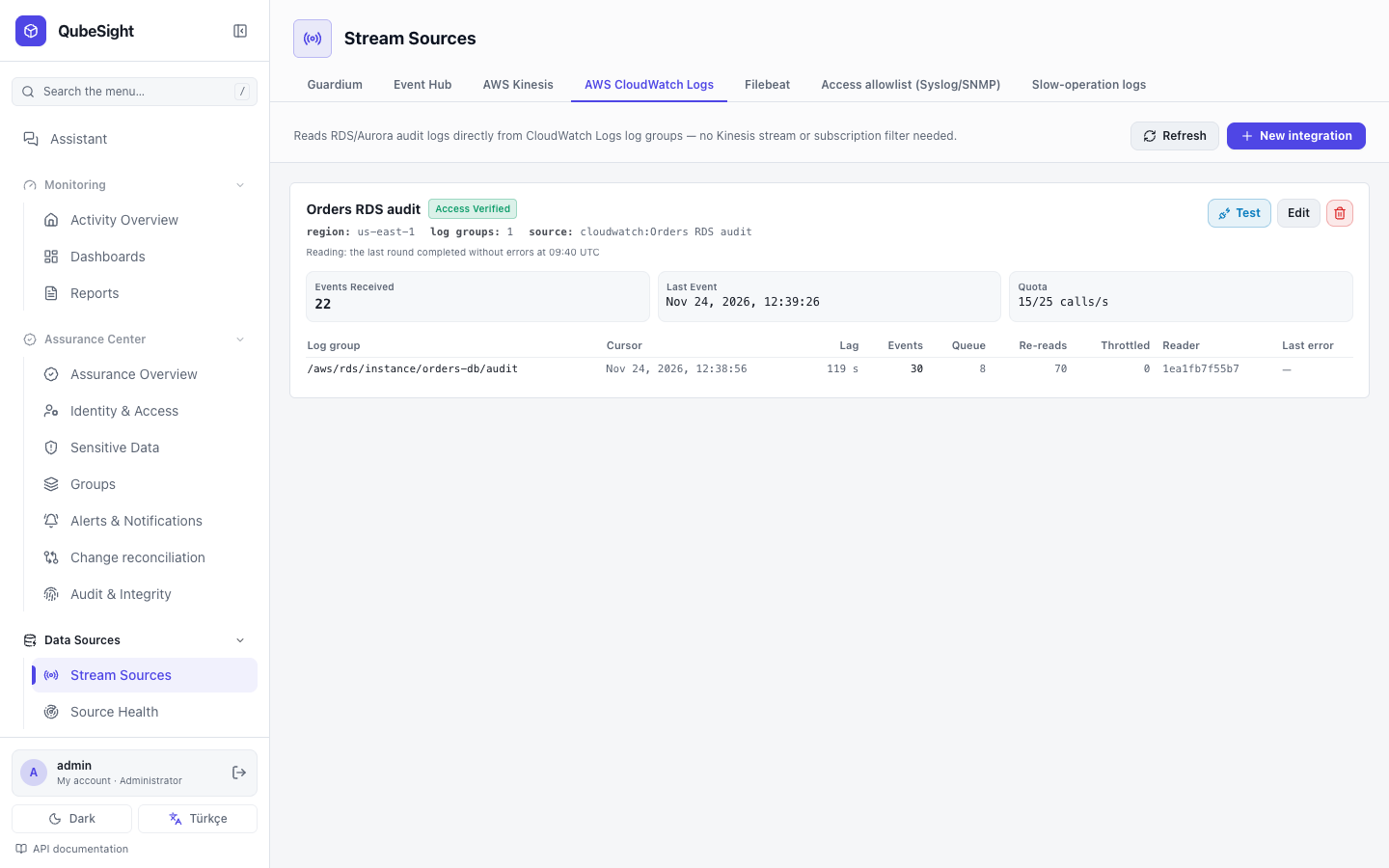
How the reader works
- Every 15 seconds each group is read for the window from the cursor minus the overlap up to 30 seconds ago, page by page until CloudWatch has no more pages.
- The cursor follows the newest ingestion time read. An event written late with an older timestamp is still read if its timestamp is within the overlap.
- Each event gets a deterministic id from the log group, stream and CloudWatch
eventId. Re-reading the overlap, restarting the worker or a cluster node taking over never adds rows: already written events are skipped. - The cursor is stored in QubeSight's PostgreSQL. In a cluster each group is read by one node at a time; if that node fails, another continues from the stored cursor.
- PostgreSQL's own lines in the group become session, failed-login or parameter-change events (so turning auditing off stays visible). Housekeeping lines are counted, not stored. Lines nothing recognises go to the unrecognised-logs queue.
Quota
FilterLogEvents is limited per account and region: 25 calls per second in us-east-1, 5 in eu-central-1 and 10 elsewhere, and AWS does not raise this quota. QubeSight uses 60 % of it, shared by all groups of the region, and backs off when AWS throttles. Other tools in the account use the same quota. The card shows the quota as Quota in calls per second.
Verification
- The card shows Access Verified, Events Received and Last Event.
- The per-group table shows Cursor, Lag (seconds), Events, Queue (unrecognised lines), Re-reads (overlap events skipped), Throttled, Reader (the node) and Last error.
- Platform → Pipeline → Flow shows lines read by AWS CloudWatch Logs.
Licence pause
Like Event Hub and Kinesis, the reader runs only while Enterprise is active. When the licence or trial ends, the Enterprise capability turns off and the reader pauses without loss: the cursors do not advance. The AWS CloudWatch Logs tab is hidden while the licence is missing; the integrations are kept. A banner on every page reads Enterprise license required: {n} ingest sources paused (one entry per log group). When a licence is applied, the tab returns and reading resumes from the cursors within about 15 seconds, within the log groups' retention.
Troubleshooting
| Symptom | Cause and action |
|---|---|
| Access Error or "no permission" for a group | Missing logs:FilterLogEvents on the group ARN (both the group and :*). |
| Could not list log groups | Missing logs:DescribeLogGroups on *. |
| Throttled increases, lag grows | Region quota shared with other tools or too many groups. Move busy groups to the Kinesis path. |
| PostgreSQL lines in the queue | Non-default log_line_prefix. Keep the RDS default. |
| Events missing that arrived very late | The event's timestamp was older than the overlap when it arrived. Raise Overlap (s). |
Limitations
- The rate limiter is per QubeSight process; several cluster nodes together may use more than 60 % of the quota.
- Noise summarising does not apply on this path.
- Whether
FilterLogEventscalls appear on the AWS bill has not been confirmed; CloudWatch Logs ingestion and storage are charged either way. - Each round re-reads the overlap window, which costs API calls proportional to the overlap.