Microsoft Azure
This page explains how to run QubeSight on Microsoft Azure from the QubeSight virtual machine image: the deployment options, every deployment field, what the first boot does, the first sign-in, the Enterprise trial and plans, and day-2 operations on Azure.
Community Enterprise
What you get
The deployment creates, in one resource group:
- a Linux virtual machine from the QubeSight image (Ubuntu, amd64) with a separate data disk (LUN 0) that holds all data: databases, events, the local immutable archive and backups;
- a virtual network and a network security group that opens the web interface (3000/tcp) and SSH to your administrator range, and syslog (5140/tcp), Kafka (9092/tcp) and SNMP traps (162/udp) to your log-source range. Nothing else is opened;
- a Standard public IP with a DNS name (
<label>.<region>.cloudapp.azure.com); - a Key Vault that receives the initial credentials, written by the VM with its managed identity. The account that deployed the template gets read access (Key Vault Secrets User).
The VM installs QubeSight on its first boot with install.sh, from images that are already in the image; nothing is built or pulled.
Ways to deploy
| Way | Notes |
|---|---|
| Azure Marketplace offer QubeSight | Choose Create in the portal and follow the steps below. Plans are described in Plans and licence. |
| Deploy to Azure link from QubeSight | Opens the same deployment form in the portal with the current image version pre-selected (for evaluations and when the offer is not yet visible to you). |
Availability
Marketplace offer and plan availability are decided per release and per Microsoft certification. If the offer is not visible in your tenant, ask QubeSight for the Deploy to Azure link of the current version.
Install from the Azure portal, step by step
The steps below were recorded with version 2.0.107 in the Spain Central region; they are the same for 2.0.110, whose gallery image version is 2.0.110. The deployment itself takes about one minute and the first boot about 6 to 10 minutes. Subscription IDs, addresses and names in the pictures are examples.
Option A: from the Marketplace offer
- In the Azure portal, open Marketplace, search for QubeSight and choose Create on the offer.
-
Basics: choose the Subscription, a new or empty Resource group and the Region. Keep VM name
qubesightand Linux administrator user name (SSH)qsadmin, or change them. For SSH public key source choose Use existing public key and paste your public key, or let Azure generate a key pair (it offers the private key for download once). Choose Next.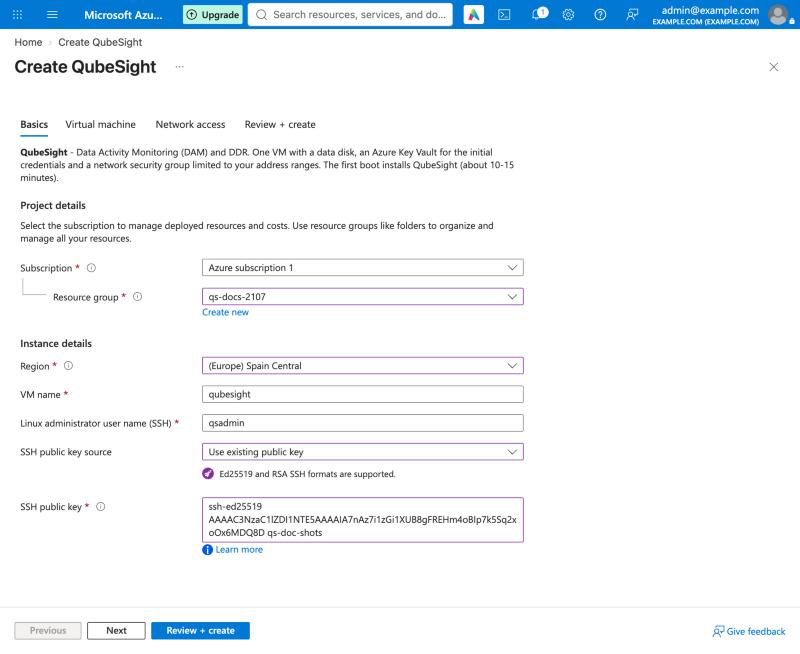
-
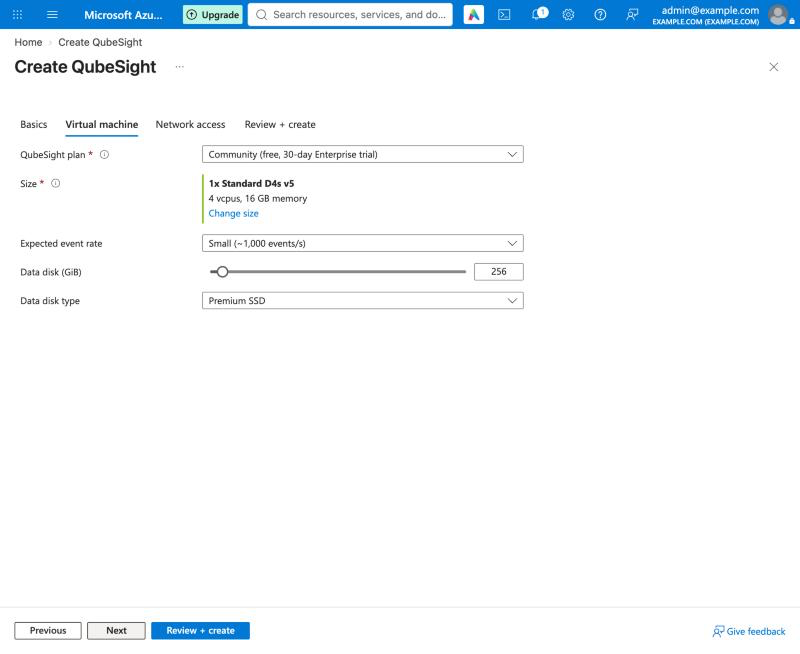
Virtual machine: choose the QubeSight plan (Community or an Enterprise plan, see Plans and licence), the Size (at least 4 vCPU and 16 GiB; Change size opens the size picker with the recommended sizes), the Expected event rate, the Data disk (GiB) and the Data disk type. Choose Next.
-
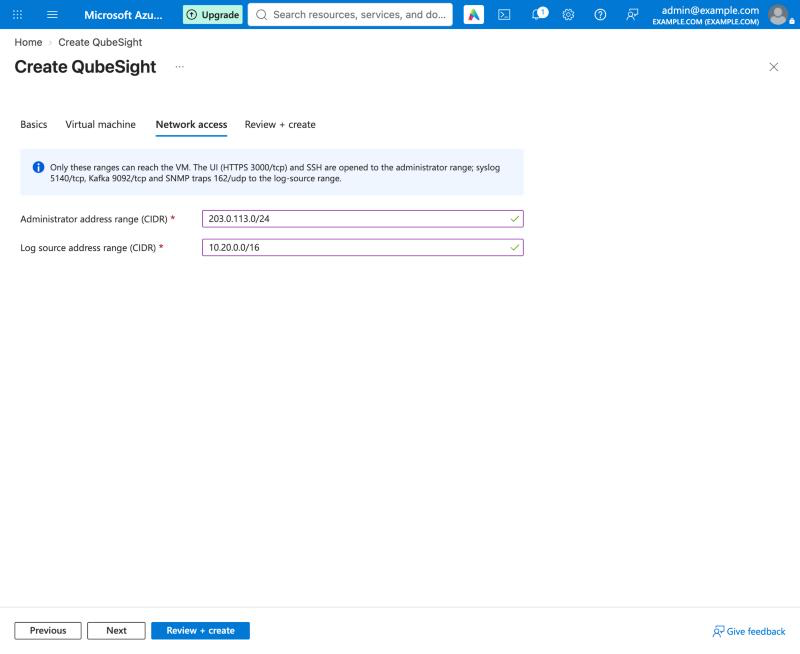
Network access: enter the Administrator address range (CIDR) and the Log source address range (CIDR). Only these ranges can reach the VM. Choose Review + create.
-
Review + create: the portal validates the form and shows the terms of the offer and a summary. Choosing Create accepts those terms for your subscription and starts the deployment; this is a decision for the person who owns the subscription. Continue with Watch the deployment.
The fields are described in Deployment fields.
Option B: from the Deploy to Azure link
The Deploy to Azure link opens the portal's Custom deployment page with the QubeSight template loaded. It asks for the template parameters directly (see Template parameters).
- Project details: choose the Subscription, then Create new under Resource group and enter a name, for example
qubesight-rg. Choose the Region. -
Instance details: keep Location
[resourceGroup().location], Vm Name, Vm Size (Standard_D4s_v4or larger) and Admin Username, or change them.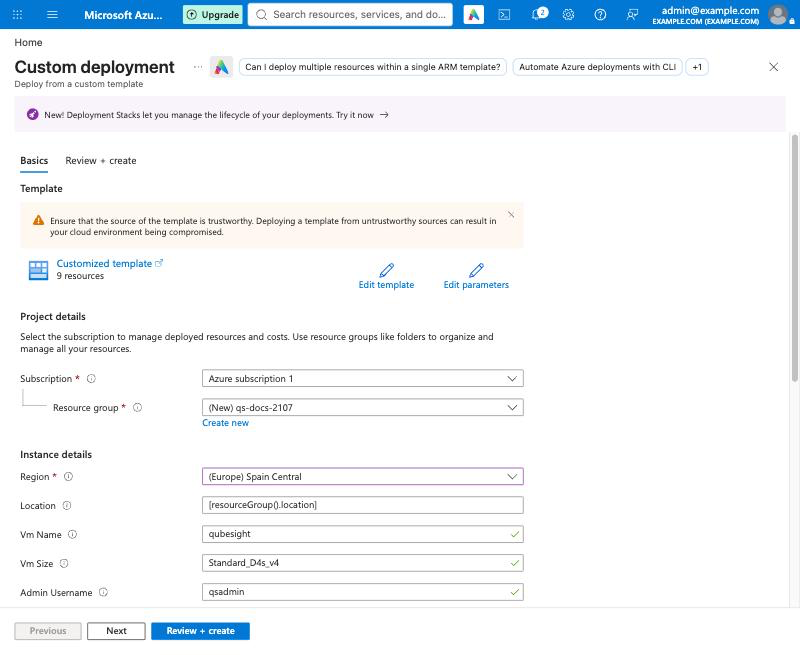
-
For SSH public key source choose Use existing public key and paste your key. Enter Admin Cidr and Ingest Cidr. Keep Sizing, Data Disk Size GB, Data Disk Type, Dns Label Prefix, Image Version Id, Time Zone and Plan unless you were told otherwise; the link fills Image Version Id with the image of the current version.
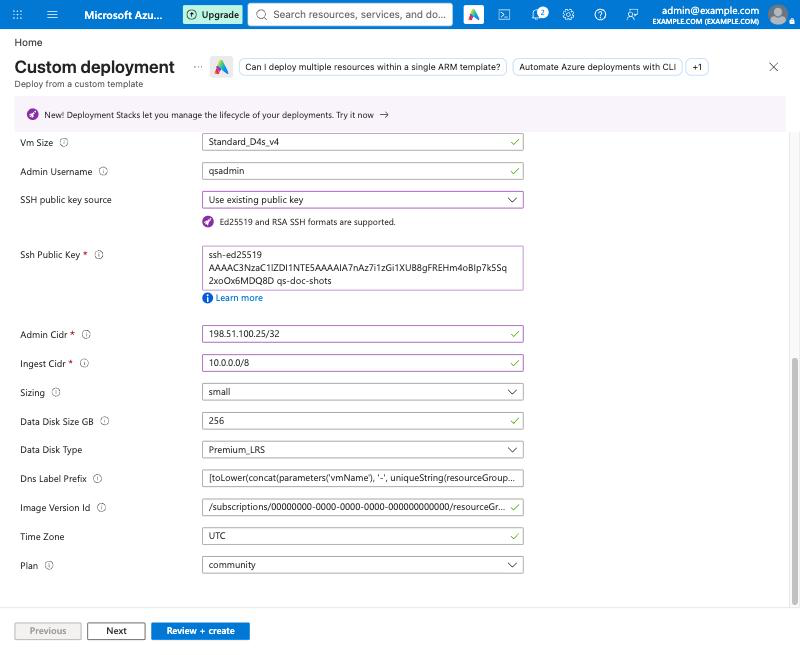
-
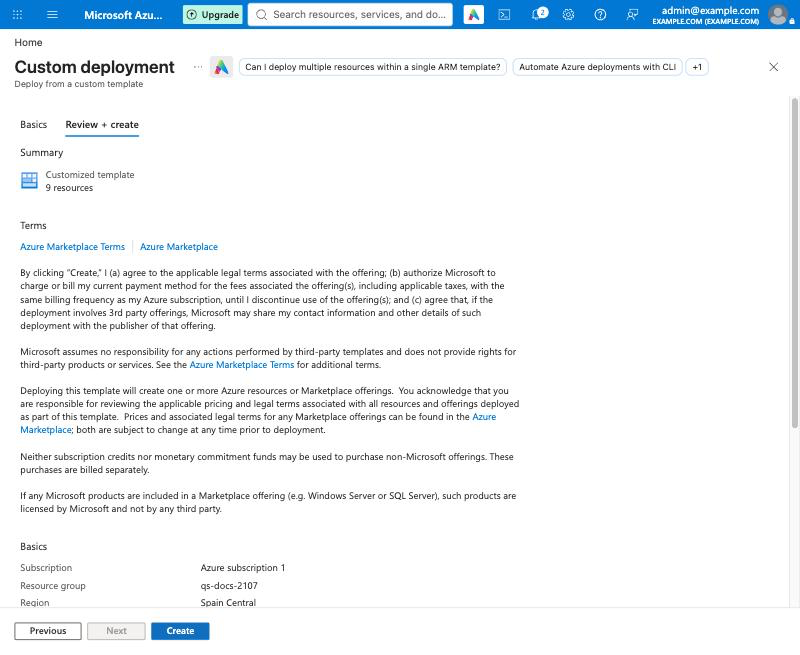
Choose Review + create. After Validation passed, the page shows the terms and the summary. Choosing Create accepts the terms shown there for your subscription and starts the deployment.
Watch the deployment
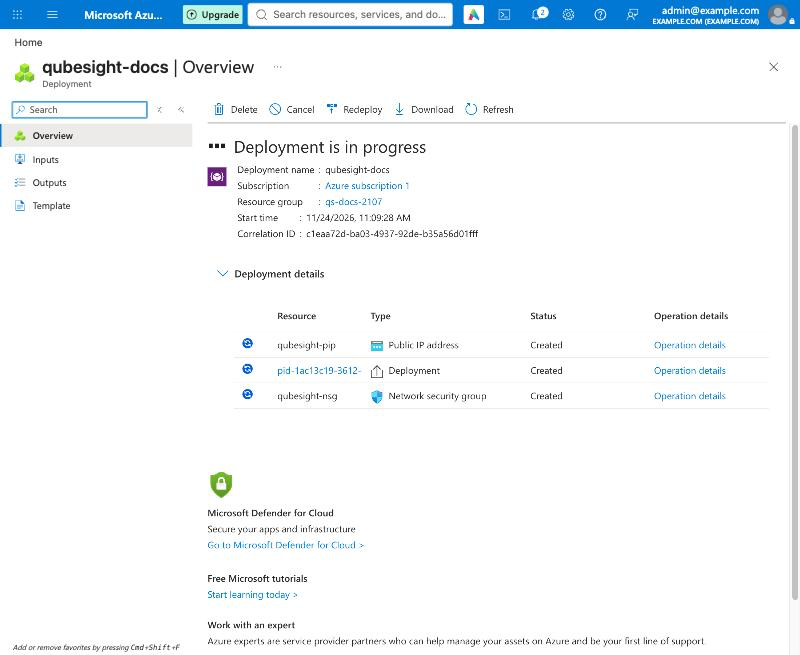
The portal opens the deployment page. Deployment details lists each resource as it is created (public IP, network security group, virtual network, Key Vault, network interface, virtual machine, role assignments). After about a minute the page says Your deployment is complete.
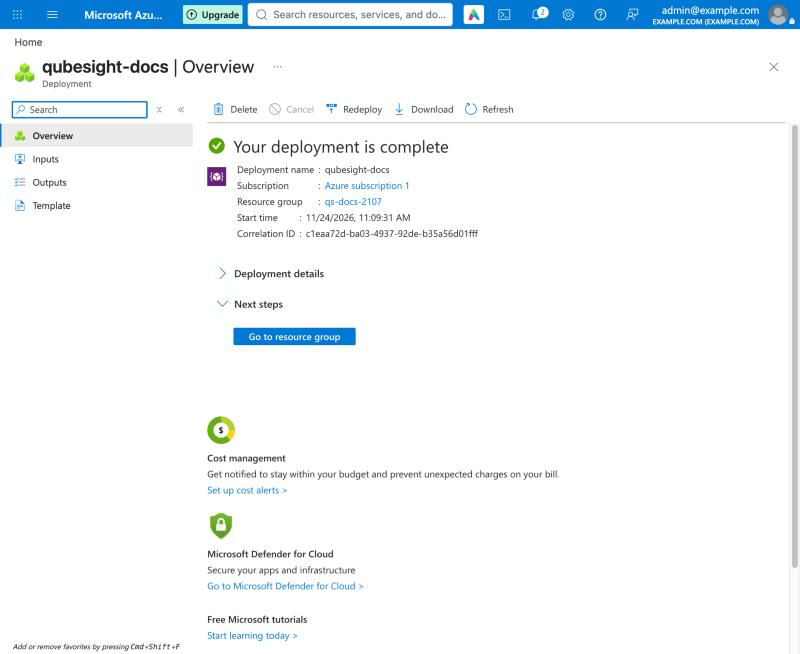
The deployment being complete means the Azure resources exist; the VM is still installing QubeSight. The web interface answers after the first boot, typically 6 to 10 minutes later.
Read the outputs and the initial password
-
On the deployment page, open Outputs.
uiUrlis the web address;keyVaultNameandcredentialsSecretPortallead to the initial credentials;sshCommandis the SSH command for the Linux administrator.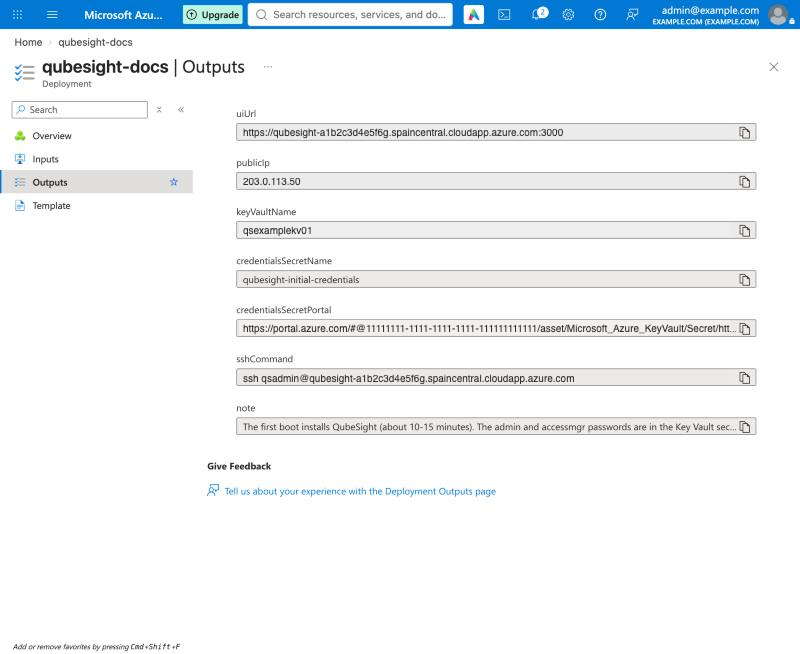
-
Open the Key Vault, then Secrets →
qubesight-initial-credentials→ the current version → Show Secret Value. Copypassword(the initial administrator password) and storebackup_passphrasein your password vault.
First sign-in
- Browse to
uiUrland accept the self-signed certificate once. -
The sign-in page says that the first passwords are in Azure Key Vault and how to find them. Sign in as
admin.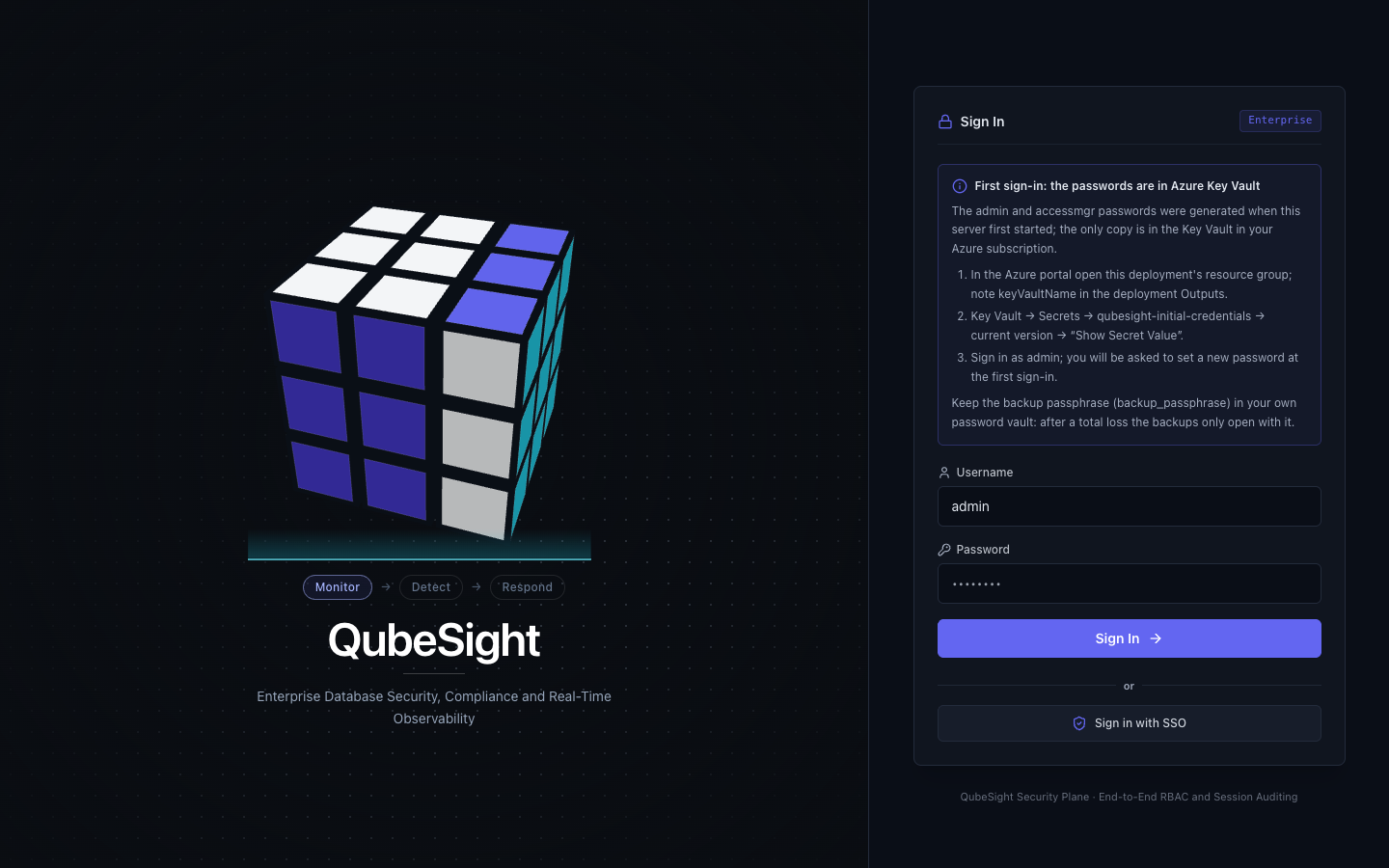
-
The Change password page opens before anything else. Enter the initial password and a new password twice, then choose Change password.
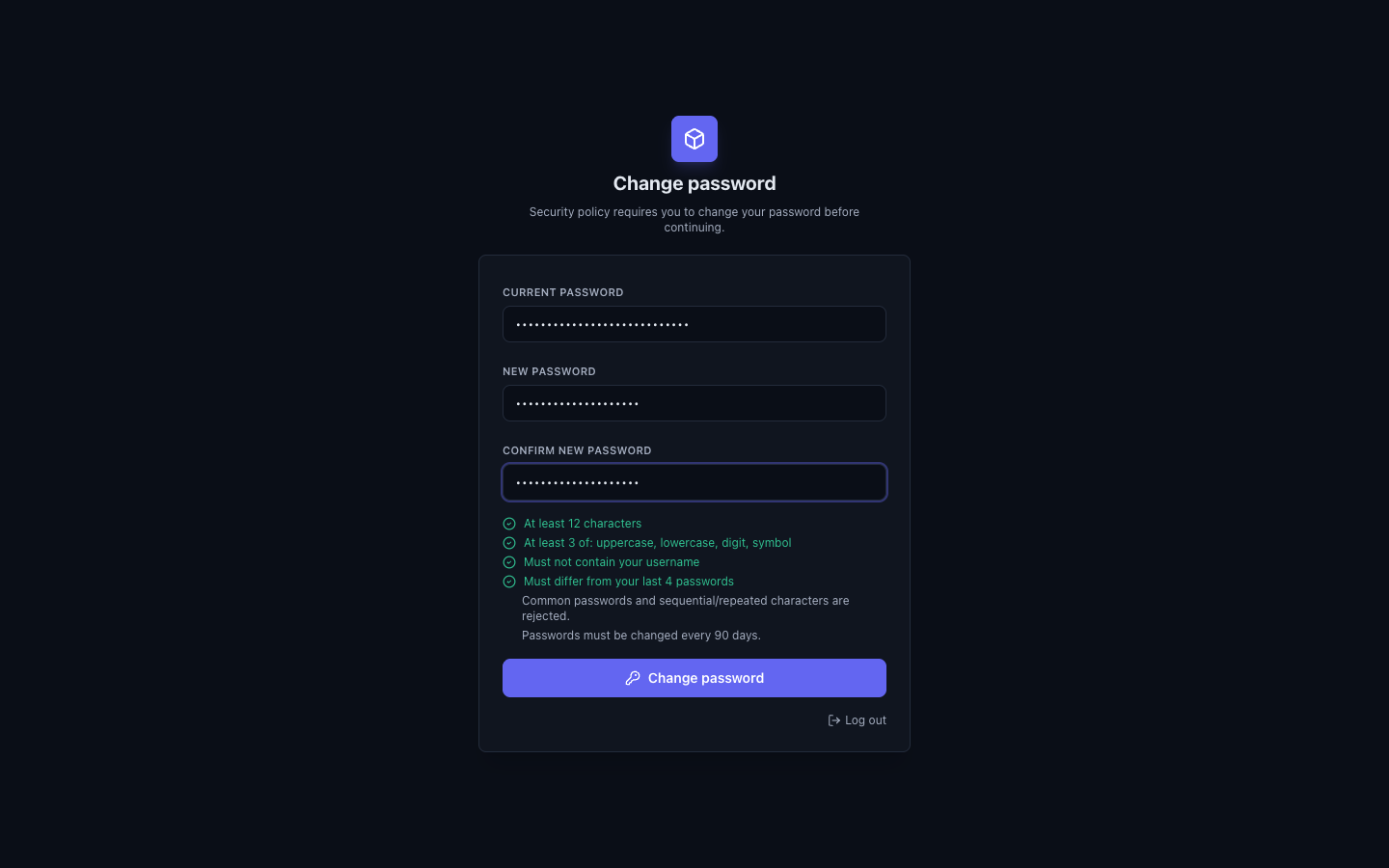
-
Open Platform → Settings → License. A Community deployment runs the 30-day Enterprise trial: Edition
Enterprise, licence provider Azure Marketplace with the Trial badge and the days remaining. On a deployment that was not made from an Enterprise plan, the Azure Marketplace plan card below says Not an Enterprise plan; that is expected and does not affect the trial.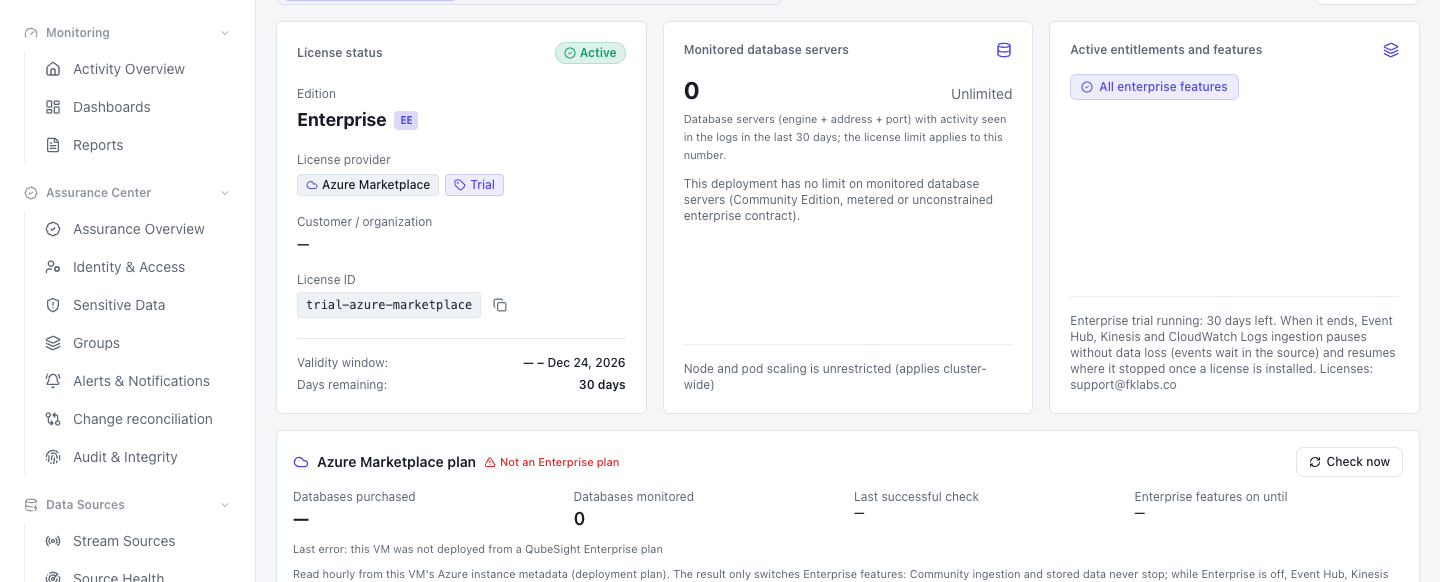
Continue with After installation.
Deployment fields
Basics
| Field | Default | What to enter |
|---|---|---|
| Subscription, Resource group, Region | A new resource group is recommended | |
| VM name | qubesight |
3 to 50 characters: lower-case letters, digits and hyphens, starting with a letter and not ending with a hyphen. Also used for related resource names (<name>-vnet, <name>-nsg, <name>-pip, <name>-nic). |
| Linux administrator user name (SSH) | qsadmin |
Operating-system user for SSH; not a QubeSight user |
| SSH public key | Your SSH public key. Password authentication is not offered. |
Virtual machine
| Field | Default | Meaning |
|---|---|---|
| QubeSight plan | Community (free, 30-day Enterprise trial) | Or an Enterprise plan, see below |
| Size | At least 4 vCPU and 16 GiB. The picker recommends Standard_D4s_v5, Standard_D4s_v4, Standard_D8s_v5 and Standard_E4s_v5. |
|
| Expected event rate | Small (~1,000 events/s) | Small, medium (~3,000/s) or large (~8,000/s); resource limits are tuned to the VM |
| Data disk (GiB) | 256 | 64 to 4,096 in steps of 64. Events, databases, local archive and backups |
| Data disk type | Premium SSD | Premium SSD or Standard SSD |
Network access
| Field | Meaning |
|---|---|
| Administrator address range (CIDR) | Allowed to reach the web interface (HTTPS 3000) and SSH, for example 203.0.113.0/24 |
| Log source address range (CIDR) | Allowed to send syslog, Kafka and SNMP traps. Also becomes QubeSight's ingest allowlist. |
Then Review + create. The deployment itself takes a few minutes; the first boot then installs QubeSight (about 10 to 15 minutes).
Template parameters
When you deploy the template directly (for example from the Deploy to Azure link or the command line), the parameters are:
| Parameter | Default | Meaning |
|---|---|---|
location |
resource group's region | Region |
vmName |
qubesight |
VM name |
vmSize |
Standard_D4s_v4 |
VM size, at least 4 vCPU / 16 GiB |
adminUsername |
qsadmin |
Linux administrator for SSH |
sshPublicKey |
SSH public key | |
adminCidr |
Administrator range | |
ingestCidr |
Log-source range | |
sizing |
small |
small, medium or large |
dataDiskSizeGB |
256 | Data disk size, 64 to 32,767 GiB |
dataDiskType |
Premium_LRS |
Premium_LRS or StandardSSD_LRS |
dnsLabelPrefix |
<vmName>-<unique string> |
DNS label of the public IP (not shown in the portal form) |
timeZone |
UTC |
Time zone of the services (not shown in the portal form) |
plan |
community |
community, enterprise-25, enterprise-100, enterprise-250 |
imageVersionId |
empty | For testing only: a specific image version (not shown in the portal form). Empty uses the Marketplace image. |
What the first boot does
The qubesight-firstboot service runs on every boot and is safe to re-run:
- Formats the data disk only if it has no file system, mounts it, and starts Docker with its data on that disk.
- Loads the images from the image's bundle (checksums verified).
- On the first boot only: generates the initial administrator password and backup passphrase on the VM, stores them in the Key Vault secret, then runs
install.sh --yes --no-buildwith:- server address = the private IP; no virtual IP;
- expected load from Expected event rate, syslog ingest path;
- hot data in disk mode (until the ClickHouse disk is 85 % full; since 2.0.109, earlier images kept 365 days), cold storage in a locked MinIO store on the data disk with a 5-year lock, backups to the same locked store;
- ingest allowlist = the log-source range; time zone from
timeZone; - administrator
admin, forced to change the password at the first sign-in; - the product's cluster SSH key for the Linux administrator account (root SSH is disabled in the image);
- the web certificate covering the DNS name, the VM name and the private IP;
- embedded language model on when the VM has at least 11 GiB of memory and 4 vCPUs.
- Starts the 30-day Enterprise trial as soon as the web interface answers.
First boot without a Key Vault
The template always creates a Key Vault and passes its name to the VM in /etc/qubesight/azure.env. If the image is started without that name (for example, a VM created from the image with your own parameter file), the first boot writes the initial credentials (administrator user and password, backup passphrase, web address and, when created, the access manager account) to /root/qubesight-initial-credentials.json on the VM, readable only by root (mode 0600). The administrator must still change the password at the first sign-in, but the sign-in page does not point to a Key Vault. Read the file with sudo cat /root/qubesight-initial-credentials.json, store the values in your password vault, then delete the file.
The log is /var/log/qubesight-firstboot.log (no passwords are written to it). After fixing a problem, re-run with sudo systemctl restart qubesight-firstboot.
First sign-in
- Open the deployment Outputs.
uiUrlishttps://<name>.<region>.cloudapp.azure.com:3000. - Open the Key Vault named in
keyVaultName(or thecredentialsSecretPortallink) → Secrets →qubesight-initial-credentials→ current version → Show Secret Value. Grant the Key Vault Secrets User role to other operators if they need it. - Browse to
uiUrl. The certificate is generated on the VM and self-signed; accept it once, or install your own in Platform → Settings → Web certificate (HTTPS). - Sign in as
adminwith the password from the secret and set a new password. The access manager accountaccessmgris in the same secret and must also change its password at its first sign-in. - Keep
backup_passphrasein your password vault; after a total loss the backups open only with it.
| Output | Content |
|---|---|
uiUrl |
Web interface |
publicIp |
Public IP address |
keyVaultName |
Key Vault with the initial credentials |
credentialsSecretName |
Name of the credentials secret |
credentialsSecretPortal |
Portal link to the secret |
sshCommand |
SSH command for the Linux administrator |
note |
Reminder of the first-boot duration and the forced password change |
Continue with After installation.
Plans and licence
| Plan | Licence |
|---|---|
community |
Free. Community edition with a 30-day Enterprise trial from the first boot. Upload an Enterprise licence in Platform → Settings → License at any time. |
enterprise-25, enterprise-100, enterprise-250 |
Enterprise for up to 25, 100 or 250 monitored databases, billed hourly by Microsoft at the plan price |
With an Enterprise plan, QubeSight reads the plan from the Azure instance metadata service at start and then hourly. Monitoring more databases than the plan covers does not stop log ingestion; the licence status shows a warning. If the metadata service cannot be reached, Enterprise features stay on for 14 days after the last successful check.
The trial is written once and is not extended by a re-run; a real licence always takes precedence. Warnings appear 7, 3 and 1 days before the end. When it ends the product continues as Community; log ingestion and stored data are never affected. Azure Event Hub ingestion is an Enterprise capability. See Licensing and Azure Event Hub.
Operations on Azure
- All data is on the data disk. To move to a larger VM size: stop the VM, resize, start.
- Updates: signed patches in Platform → System and Cluster → Update; with Enterprise, the automatic update channel (needs outbound HTTPS to
updates.qubesight.io). - Re-run a failed first boot:
sudo systemctl restart qubesight-firstboot.
Limitations
- The local immutable archive and backups are on the same data disk as the data; use an SFTP backup location (Platform → Data and Backup → Backup settings) for an off-VM copy.
- Ingest TLS is not enabled on the single-node image; restrict the log-source range and use private connectivity.
- A high-availability (multi-VM) deployment is not offered as an Azure template in this release.