Change reconciliation
Change reconciliation (/assurance/changes) matches database change statements (for example DDL and privilege changes) against approved change tickets from ServiceNow, Jira or a generic source. Changes without an approved ticket are listed for review. This page describes the four views of the page: Changes, Change tickets, Sources and Settings.
Enterprise
Who can open it: every role except the access manager.
| Action | Who |
|---|---|
| See Changes and Change tickets | All roles that can open the page |
| Decide on a change (match, reject, accept with reason, undo) | Administrator, analyst, DBA |
| Sources and Settings views | Administrator |
Old links to /reports?tab=changes, including links in alert e-mails, are redirected here with their filters.
How matching works
flowchart LR
  T[Ticket sources<br/>ServiceNow, Jira, REST, CSV] --> K[Change tickets]
  E[Change statements<br/>in activity logs] --> M{Match}
  K --> M
  M -->|ticket number in SQL<br/>or score ≥ auto| OK[Matched]
  M -->|score ≥ review| CA[Needs review]
M -->|below| UN[Unapproved]- Tickets are synchronised from the sources at their interval (a CSV source takes an uploaded file).
- Every change statement of the classes that need a ticket (default DDL and DCL) is compared with approved tickets every two minutes.
- If the statement, its additional information or the program name contains a ticket number, it is Matched "by ticket number".
- Otherwise a similarity score is computed: inside the ticket's planned window (with tolerance) 0.5, object named in the ticket 0.25, database 0.1, server 0.1, user and operation 0.05 each. At or above the automatic threshold (default 0.75) the change is Matched "by time window and text"; at or above the review threshold (default 0.5) it Needs review with candidate tickets; below that it is Unapproved.
- Unapproved changes raise the built-in alert "Unapproved database change".
Changes view
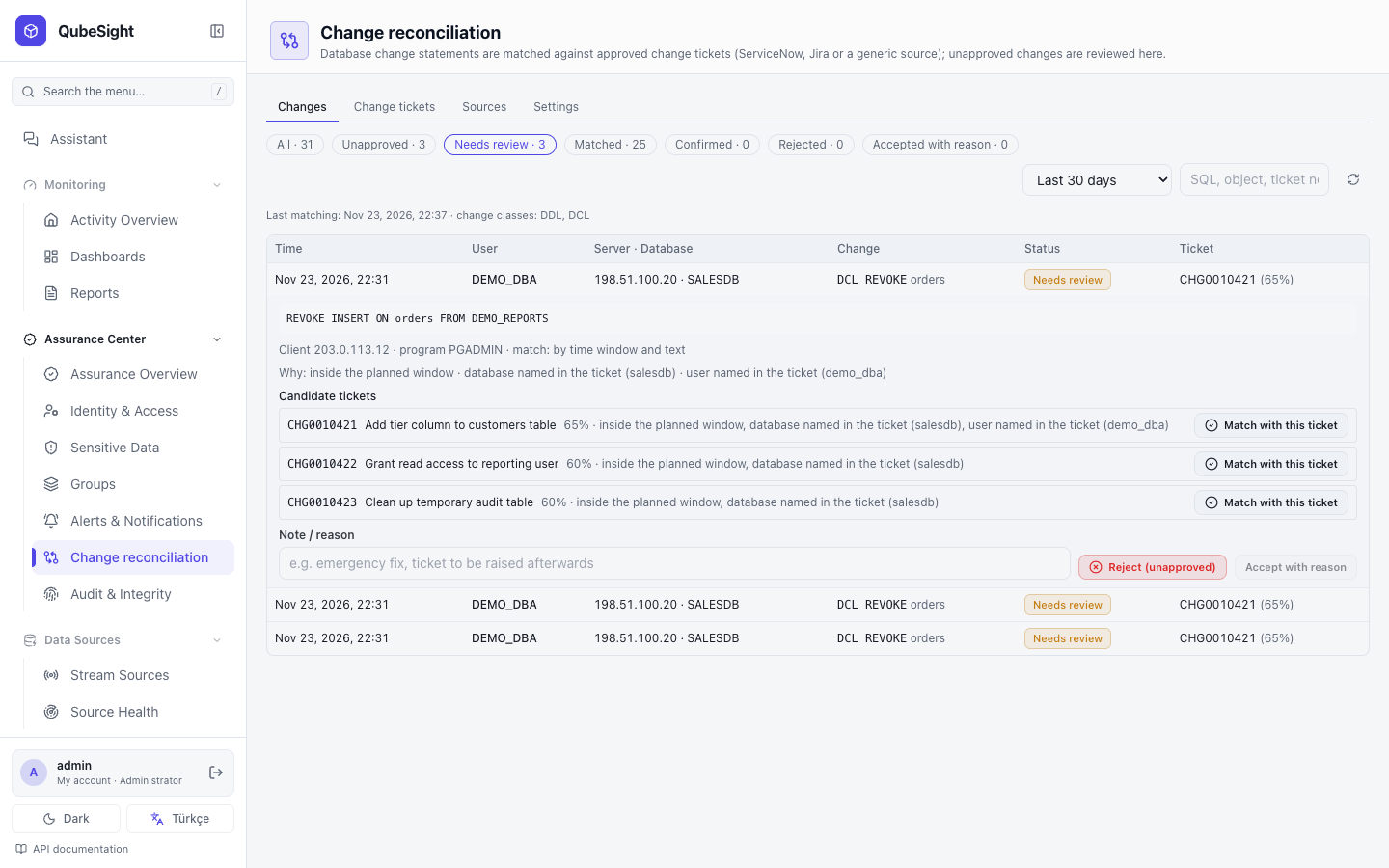
| Element | Meaning |
|---|---|
| Status filter | All, Matched, Needs review, Unapproved, Confirmed, Rejected, Accepted with reason. |
| Range | Last 1 days, Last 7 days, Last 30 days (default), Last 90 days or Last 365 days. |
| Search | "SQL, object, ticket no, server…". |
| User chip | When the page is opened with a user in the link (?user=<name>, for example from an alert e-mail), the list is limited to that database user and a chip " |
| "Last matching: | When matching last ran and which classes need a ticket. |
| Column | Meaning |
|---|---|
| Time | When the change ran. |
| User | Database user. |
| Server · Database | Where. |
| Change | The statement. |
| Status | Match status; "N candidates" for review items. |
| Ticket | Linked ticket. |
Click a row to open the detail: client, program and match method (by ticket number, by time window and text, person decision, no match), Why: with the reasons (for example "inside the planned window", "object named in the ticket (X)", "the ticket is not approved", "no approved ticket at this time", "similarity below the threshold"), the decision history and the Candidate tickets.
Decisions (administrator, analyst, DBA):
| Button | Result |
|---|---|
| Match with this ticket | Confirmed with the chosen ticket. |
| Reject (unapproved) | Rejected. |
| Accept with reason | Accepted with reason; write the reason in Note / reason (for example "emergency fix, ticket to be raised afterwards"). |
| Undo decision | Returns the change to automatic matching. |
When more changes match than the list shows, "Showing N of M changes; narrow the range or search." appears. "No change ticket source yet: matching is not running." with Add source is shown when no source exists.
Change tickets view
Lists synchronised tickets: Ticket, Title, Status (Approved / Not approved), Planned window, System / CI, Events (matched changes) and Source. Search: "Ticket no, title, system…".
Sources view
Change ticket sources (administrator): "Systems approved change tickets are read from. Tickets are synced regularly; a CSV source takes an uploaded file. Passwords and tokens are stored encrypted and never come back to this screen."
Each source shows its kind, "N tickets · M approved", the last sync time or "Sync failed: …", and the actions Sync now, Upload CSV (CSV sources), Edit and Delete ("The source and its tickets are deleted; changes matched to them keep their status but lose the ticket link.").
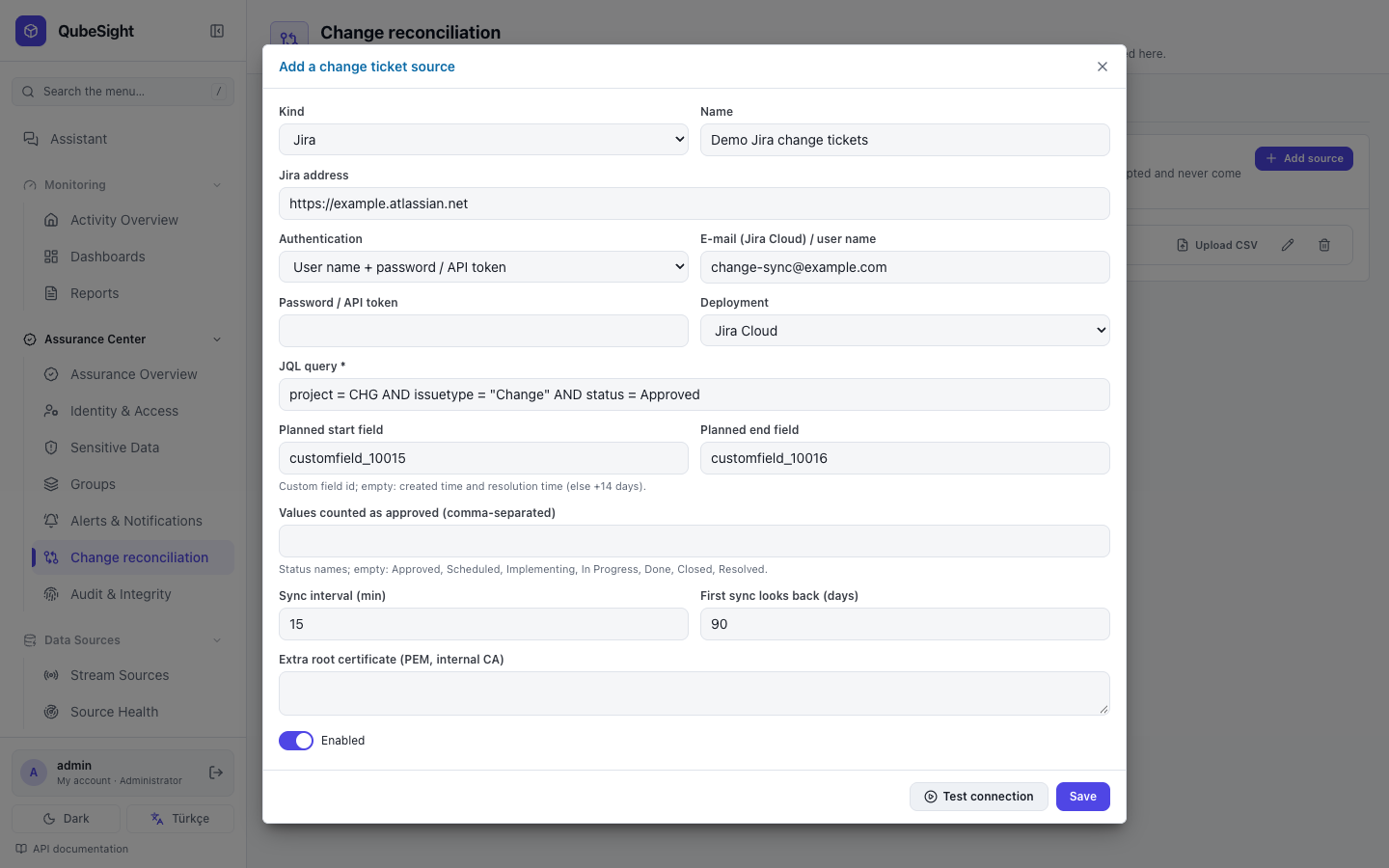
Add source opens Add a change ticket source:
| Field | Meaning |
|---|---|
| Kind | ServiceNow, Jira, REST (JSON), CSV file. |
| Name | Display name. |
| Address | ServiceNow address (https://company.service-now.com), Jira address, REST address (GET). |
| Authentication | User name + password / API token, Bearer token (PAT, OAuth), Custom header (Header name), None. Secrets must be entered again if the address changes. |
| ServiceNow | Table, Extra filter (encoded query). |
| Jira | JQL query (required), Deployment (Cloud or Data Center), Planned start field, Planned end field (custom field ids; empty uses creation and resolution times). |
| REST | Path of the ticket list in the response, Field map (JSON path, e.g. approval.state). |
| CSV | Column map (CSV headers). |
| Field map | Ticket no, Title, Description, Status, Approval, Start, End, System / CI, Link. |
| Values counted as approved (comma-separated) | Which status or approval values count as approved; defaults depend on the kind. Cancelled ServiceNow tickets never count as approved. |
| Sync interval (min), First sync looks back (days) | Scheduling. |
| Extra root certificate (PEM, internal CA) | For servers with an internal CA. |
| Enabled | On or off. |
| Test connection | "Works: N tickets in the last 7 days (M approved) · T ms". |
Full connection guide: Ticketing and change systems.
Settings view
Matching settings (administrator). Saving re-evaluates open changes.
| Setting | Default | Meaning |
|---|---|---|
| Matching on | On | Master switch. |
| Changes that need a ticket: | DDL, DCL | Command classes that are matched. |
| Tolerance before the window (min) | 60 | Accepted early start, up to 7 days. |
| Tolerance after the window (min) | 60 | Accepted late finish, up to 7 days. |
| Look-back (days) | 30 | 1–365. |
| Automatic match threshold | 0.75 | Score for automatic matching. |
| Review threshold | 0.5 | Below this counts as unapproved. Must not exceed the automatic threshold. |
| Excluded users (comma-separated) | none | For example automated maintenance accounts. |
Limitations
- Matching depends on the ticket data: tickets without a planned window or without the system/object names reach lower scores and land in Needs review.
- Only the command classes selected in Settings are matched; other changes are not checked.
- Jira field ids for the planned window differ between installations and must be entered by hand.
- The ServiceNow, Jira, REST and CSV readers are verified with automated tests; validate each new source with Test connection before relying on it.